Work & organize

Firefly III
Self-hosted personal finance tracking with accounts, budgets, rules and reports.
Release notes / v6.7.9
Released 2026-10-11. Snapshot from the included release data, not a live check.
Welcome to release v6.7.9 of Firefly III. It contains the latest fixes, translations and features. Docker users can find this release under the `latest` tag. ## Changelog <!-- summary: This release fixes an issue for self-hosted users and fixes some minor other issues. --> ### Fixed - Self-hosted users should no longer run into `Target class [hash] does not exist` errors. - Explain in the release notes how to clear your cache, as suggested by @Kage1 - [Issue 12972](https://github.com/firefly-iii/firefly-iii/issues/12972) (Updating transaction from account reconciliation results in JSON/HTML output) reported by @Tommy78649 - [Issue 13022](https://github.com/firefly-iii/firefly-iii/issues/13022) (Category list does not render actions-menu) reported by @JC5 - [Issue 13034](https://github.com/firefly-iii/firefly-iii/issues/13034) (Account list shows "January 1st" when there is no last activity) reported by @JC5 - [Issue 13037](https://github.com/firefly-iii/firefly-iii/issues/13037) (Account lists are missing sums) reported by @JC5 - [Issue 13039](https://github.com/firefly-iii/firefly-iii/issues/13039) (Budget column empty values on transaction view) reported by @no-coders ## Installation and upgrade instructions - Please read the installation instructions for [Docker](https://docs.firefly-iii.org/how-to/firefly-iii/installation/docker/), [Portainer](https://docs.firefly-iii
Read the full release notes on GitHub ↗Available on these platforms
Requires Firefly III host.
Server systems, compatibility details and official sources
The app, database, backups and scheduled tasks; the separate Data Importer adds its own setup and updates.
- Linux (server) - Docker Compose with a database and persistent uploads
- Web (client) - Browser interface served by the host
Official availability checked 2026-11-15. Availability is not feature parity. The recorded release and license refer to the linked source project; separate clients can differ. No install or compatibility test was run.
Before you install
Personal money tracking, not a business accounting suite.
- What does it need?
- Docker Compose with a database and persistent uploads
- Where is my data?
- Your own database and uploaded-file storage. Bank imports are optional and may involve external providers you configure.
- What will I maintain?
- The app, database, backups and scheduled tasks; the separate Data Importer adds its own setup and updates.
Advice and funding routes source-checked November 15, 2026. Researched, not an install or restore test. Installation source ↗ · Report a correction
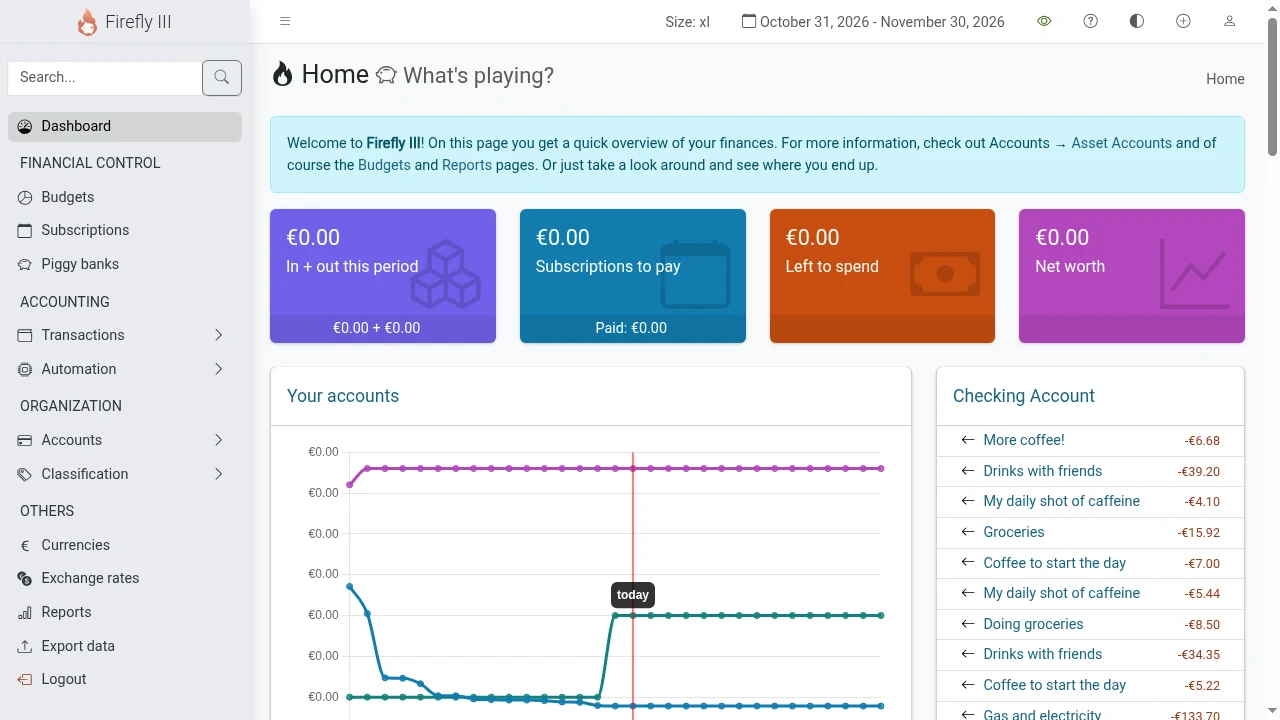
Firefly III helps a person or household track income, spending, accounts, budgets and savings goals. Rules can categorize imported transactions, and reports make spending patterns easier to see. It uses double-entry bookkeeping internally, but its stated purpose is personal finance.
It is not a replacement for a business general-ledger package with payroll, stock and tax workflows. In a QuickBooks comparison, it belongs in the personal-budgeting branch of the decision, not the small-business ledger branch. You can self-host it; the project also links paid third-party hosting options, which are separate from the software license.
Quick start
Researched from the project’s Docker guide on November 15, 2026.
Docker Compose
Follow the official Docker guide.
It links three files: docker-compose.yml, the app environment file
(saved as .env), and database variables (saved as .db.env). Save all
three in one directory and read them before starting.
- Replace the example database password in both environment files with the same strong local password before the first start. Configure the app key, URL, timezone and scheduled-task token as the files direct.
- Review port exposure. The supplied Compose file publishes host port 80; keep access local/trusted until authentication, HTTPS and backups are ready.
- Start the stack:
docker compose -f docker-compose.yml up -d --pull=always
docker compose -f docker-compose.yml logs -f
Once the logs report the installation is complete, open http://localhost (or the port you configured) and create your own account. This stack does not automatically include the separate Data Importer. Never reuse the public demo login on your installation.
Docker Compose · Self-hosted personal finance tracking with accounts, budgets, rules and reports. Paste into your AI assistant. It may only be able to guide you. Review changes before running anything.
Researched from the project's documentation. Checked 2026-11-15. No AI account or connection is needed here.
Read or copy the prompt manually
First steps
Create asset accounts and opening balances, then enter a few manual transactions. Reconcile them with a statement before importing a history. If you add the Data Importer, start with a small sample and check for duplicates. Back up both the database and uploaded files, and keep the application secrets needed for a restore safely with the backup plan.
Why it’s listed
A FOSS option for people who want their financial overview on a server they control. No automatic bank connection is required; manual entry and file imports let you choose how much integration to add.
Documentation
Tags: Finance, Self-hosted
Want help setting this up? Ask FOSSadmin ↗