Work & organize
Actual Budget
Envelope budgeting with local-first data and an optional self-hosted sync server.
Release notes / v26.11.0
Released 2026-11-02. Snapshot from the included release data, not a live check.
:link: [View release notes](https://actualbudget.org/blog/release-26.11.0) ## Desktop releases Please note: Microsoft store updates can sometimes lag behind the main release by a couple of days while they verify the new version. <p> <a href="https://apps.microsoft.com/detail/9p2hmlhsdbrm?cid=Github+Releases&mode=direct"><img src="https://get.microsoft.com/images/en-us%20dark.svg" width="200" /></a> <img src="data:image/gif;base64,R0lGODlhAQABAAAAACw=" width="12" height="1" alt="" /> <a href="https://flathub.org/apps/com.actualbudget.actual"><img width="165" style="margin-left:12px;" alt="Get it on Flathub" src="https://flathub.org/api/badge?locale=en" /></a> </p>
Read the full release notes on GitHub ↗Available on these platforms
Desktop apps are available for Linux, Windows and macOS. Mobile access uses the web app/PWA, not a native iOS or Android app. A personal server provides sync; local-only browser use has separate data-loss and backup limits.
Compatibility details and official sources
- Linux - Native desktop app
- Windows - Native desktop app
- macOS - Native desktop app
- Web - Browser app / mobile PWA
Official availability checked 2026-11-12. Availability is not feature parity. The recorded release and license refer to the linked source project; separate clients can differ. No install or compatibility test was run.
Before you install
Start with a budget, not a server.
- Server needed?
- Not for local budgeting in the desktop app. Device sync, bank sync and the API need a server. Mobile use is through a browser or installed web app, not a native phone app.
- Where is my data?
- Actual is local-first. A sync server keeps a copy for your devices. Bank connections are optional external services; manual entries and file imports are an alternative.
- What will I maintain?
- A self-hosted server needs updates, HTTPS for other devices and backups. A hosted option can reduce server work, but you still need a way to export and restore your budget.
Advice and funding routes source-checked November 12, 2026. Researched, not an install or restore test. Installation source ↗ · Report a correction
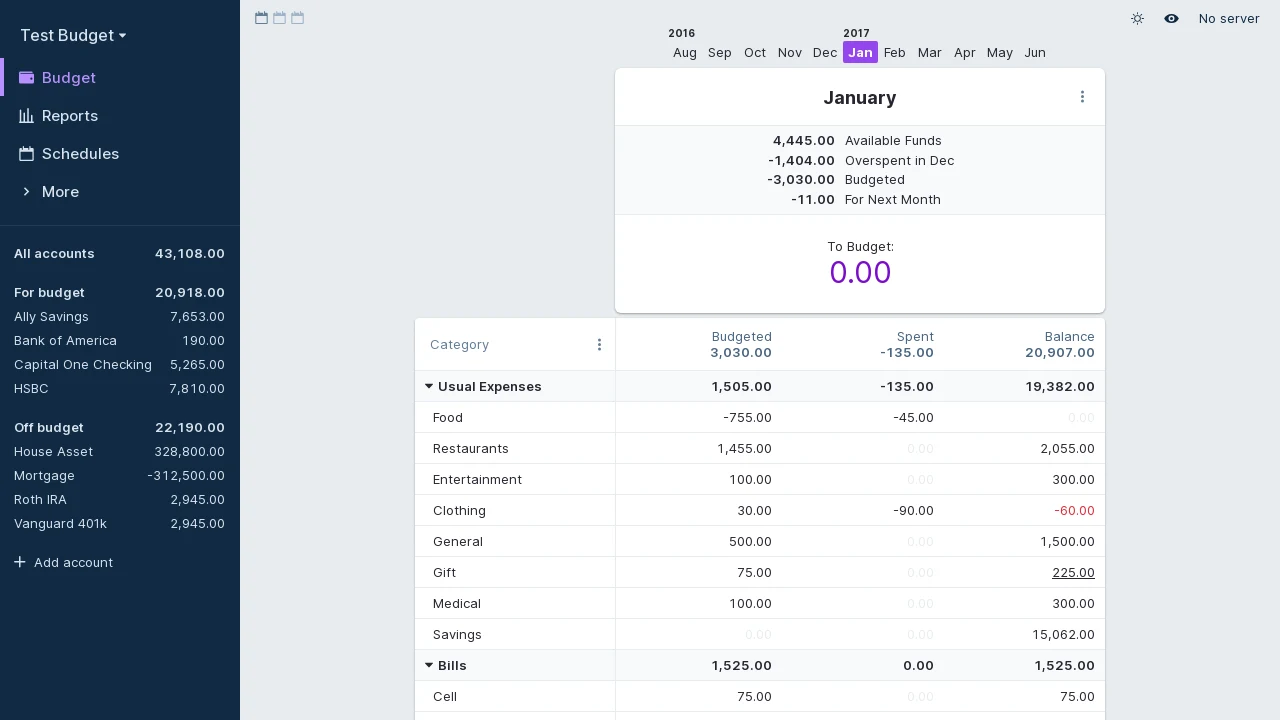

Actual uses envelope budgeting: give money a job, track transactions and see what is still available in each category. Budget data lives locally, with an optional server for syncing between devices. Optional end-to-end encryption is available; it is not a claim that every server feature is encrypted.
Bank connections are optional and depend on external providers, coverage and provider terms. You can start with manual entries or file imports instead. A budget deserves both exports and backups, not just a running container.
Try it and keep a way out
Start with the official demo and sample data, not your financial history. The desktop app is a server-optional way to learn the workflow and includes automatic local backups.
The standalone browser-only route is different: clearing browser data can erase your budget. Upstream warns against that route for long-term use. Export after every session if you use it; do not confuse it with a backed-up sync server.
Before moving real data:
- Check the migration guide for your old app. Whole-budget migration and transaction-file import are different; do not assume every account, rule or attachment will transfer.
- In Actual, use Settings → Export data to keep an Actual budget ZIP. Keep a separate copy away from the server or browser. This is an Actual restore format, not a promise that another finance app can read it.
- Follow the restore guide to import that ZIP as an Actual file. Verify the imported copy before removing the original. Keep server data backups as well as budget exports.
Sources checked November 12, 2026: installation, export/backup, restore and migration above. No migration, export or restore was performed for this listing.
Quick start
Checked against the official installation docs on November 9, 2026. We have not run these setups ourselves.
Docker is an upstream-supported route. The NixOS module is maintained in nixpkgs and may package a different version.
Docker Compose
This adapts the official Docker command into Compose, with a persistent data
volume and a localhost-only port. Requires Docker and the Compose plugin.
Save as compose.yaml in a new directory:
services:
  actual:
    image: actualbudget/actual-server:latest
    ports:
      - "127.0.0.1:5006:5006"
    volumes:
      - actual-data:/data
    restart: unless-stopped

volumes:
  actual-data:
Run docker compose up -d, then open http://localhost:5006 on the host.
Complete the initial server setup and create or import a budget. Back up the
actual-data volume and keep budget exports separately. latest follows the
current stable release, so review release notes before pulling updates.
For another computer or phone, use HTTPS through a reverse proxy and a real hostname, following the official installation docs. Do not simply expose this local port to the internet. Browser security requirements can affect access outside localhost.
Desktop app
The official installation guide also offers desktop apps. A local budget does not require a self-hosted sync server. Start there if you want to learn the budgeting workflow before maintaining a service.
NixOS
services.actual = {
  enable = true;
  settings = {
    hostname = "127.0.0.1";
    port = 3000;
  };
};
Run sudo nixos-rebuild switch, then open http://localhost:3000 on the host
and complete the initial server setup. The module’s default port is 3000,
not the 5006 used by the Docker image. Data lives under /var/lib/actual
(services.actual.settings.dataDir); back it up along with separate budget
exports. For other devices, use HTTPS through a reverse proxy as in the
Docker notes rather than opening the port directly.
Why it’s listed
A concrete way to bring a private, everyday task onto software you control. Its budgeting model is different from a generic expense spreadsheet, so try it with sample data before moving your whole financial history.
Documentation
Docker Compose · Envelope budgeting with local-first data and an optional self-hosted sync server. Paste into your AI assistant. It may only be able to guide you. Review changes before running anything.
Researched, not run by the Index. Checked 2026-11-12. No AI account or connection is needed here.
Read or copy the prompt manually
NixOS · Envelope budgeting with local-first data and an optional self-hosted sync server. Paste into your AI assistant. It may only be able to guide you. Review changes before running anything.
Researched, not run by the Index. Checked 2026-11-12. No AI account or connection is needed here.
Read or copy the prompt manually
Tags: Finance