Work & organize

Easy!Appointments
Open-source appointment scheduling with a customer booking page on your own server.
Release notes / 1.6.1
Released 2026-10-19. Snapshot from the included release data, not a live check.
- A CalDAV section under Settings / Integrations, where the connection URLs that may point into the local network are listed - The calendar page now explains why a CalDAV synchronization failed and what has to be corrected, instead of only reporting that it did - Changing the password in the account settings page now requires the current password, so that a stolen session alone cannot be used to take over the account - The release build now falls back to running Composer inside the php-fpm container, so a Composer installation on the host machine is no longer required - A failing Google Calendar synchronization no longer removes the local appointments of the sync period, so an expired token, a quota limit or an unreachable API only interrupts the sync
Read the full release notes on GitHub ↗Available on these platforms
Requires a self-hosted Easy!Appointments server.
Server systems, compatibility details and official sources
Customers book from the browser without an account. The author sells managed hosting for the same software.
- Linux (server) - Apache or Nginx with PHP 8.2+ and MySQL; Docker for development
- Web (client) - Booking page and admin backend in the browser
Official availability checked 2026-11-15. Availability is not feature parity. The recorded release and license refer to the linked source project; separate clients can differ. No install or compatibility test was run.
Before you install
A booking page your customers use, on your server.
- What does it run on?
- A classic PHP application: Apache or Nginx, PHP 8.2+ and MySQL. Customers book from a public page; your team manages appointments in a web backend.
- Where is my data?
- Appointments, customers and services stay in your MySQL database. Calendar sync to Google Calendar or CalDAV is optional and configured per provider.
- What will I maintain?
- PHP/MySQL updates and backups, or pay the author's own managed hosting to run it. Email notifications need an SMTP account.
Advice and funding routes source-checked November 15, 2026. Researched, not an install or restore test. Installation source ↗ · Report a correction
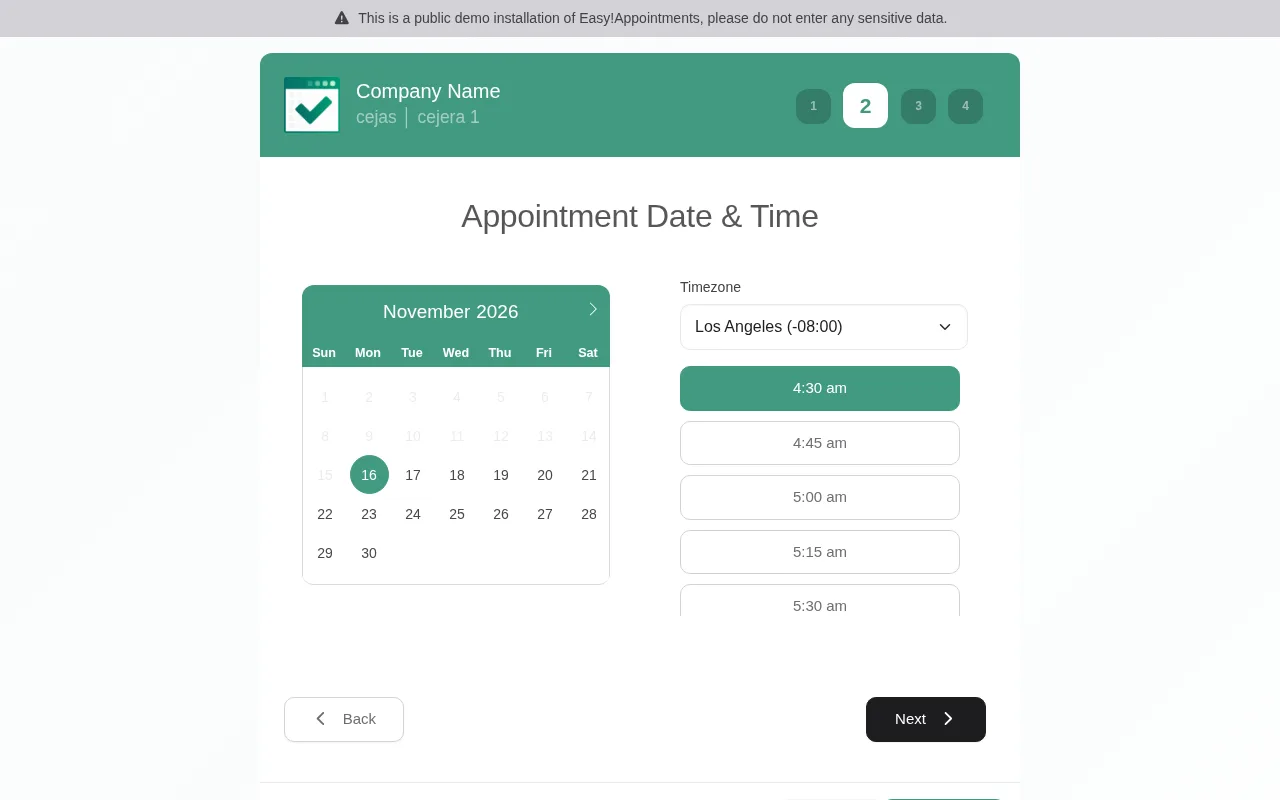
Easy!Appointments gives a small business a booking page its customers can use directly: pick a service, pick a person, pick a time. Appointments, customers, services and working hours are managed in a web backend, and your records live in your own database instead of a scheduling SaaS. Optional calendar and email integrations still send data to those services.
It syncs with Google Calendar and CalDAV, sends email notifications, and offers a REST API and webhooks for integrations. The project has been maintained for over a decade; the author also sells managed hosting and support, which funds the work.
Quick start
Verified against Easy!Appointments’ own documentation and README on November 15, 2026.
The production install is a classic PHP application: Apache or Nginx, PHP 8.2+ and a MySQL database. The repository’s Docker Compose setup is documented for development; the official image on Docker Hub tracks releases.
Jump to: Docker · Ubuntu Server
Docker
For a first look, the project’s own demo needs no install: demo.easyappointments.org.
For a local development environment, follow the repository’s Docker guide and README together:
git clone https://github.com/alextselegidis/easyappointments.git
cd easyappointments
cp config-sample.php config.php
Set BASE_URL to http://localhost, database host to mysql, database
name to easyappointments, user to user and password to password, as
the development guide specifies. These are public development credentials.
The Compose stack exposes several services, including database/admin tools;
use an isolated local environment, not an internet-facing server.
docker compose upIn a second terminal in the same directory, follow the README’s dependency and asset setup:
docker compose exec php-fpm bash
npm install && composer install
npm run build
Then open http://localhost and finish the setup wizard. This repository stack is for development only. The Docker guide links the separate production image project for that route; the classic production install is below.
Docker · Open-source appointment scheduling with a customer booking page on your own server. Paste into your AI assistant. It may only be able to guide you. Review changes before running anything.
Researched from the project's documentation. Checked 2026-11-15. No AI account or connection is needed here.
Read or copy the prompt manually
Ubuntu Server
From the installation guide:
- Create a MySQL database (or reuse an existing one).
- Download the latest release and upload it to your web server.
- Make the
storagedirectory writable by the web server. - Copy
config-sample.phptoconfig.phpand set your base URL and database credentials. - Open the site in your browser and follow the setup wizard.
Ubuntu Server · Open-source appointment scheduling with a customer booking page on your own server. Paste into your AI assistant. It may only be able to guide you. Review changes before running anything.
Researched from the project's documentation. Checked 2026-11-15. No AI account or connection is needed here.
Read or copy the prompt manually
First steps
In the backend, create at least one service and one provider, set working hours, and the booking page is live at your base URL. Email notifications need SMTP settings under Settings; Google Calendar and CalDAV sync are under Integrations. The booking page is translatable, and customers can book without an account.
Why it’s listed
Scheduling links from a commercial service hand every booking to that service. Easy!Appointments covers the same job - a booking page, reminders, calendar sync - while the appointment book stays on your server. A mature, actively maintained project with a paid managed-hosting route from its own author when you want someone else to run it.
Documentation
Tags: Calendar & Contacts, Self-hosted
Want help setting this up? Ask FOSSadmin ↗