Work & organize
Radicale
A small CalDAV and CardDAV server for calendars, tasks and address books you control.
Release notes / v3.9.1
Released 2026-11-12. Snapshot from the included release data, not a live check.
# Fixes (Security) * Fix: storage/hook: escape `$` on all placeholder values received from external * credits to @sdushantha for report * Fix: auth: reject empty login earlier and empty password on all external verification types * credits to @sdushantha for report # Fixes * Fix: [sharing] owner cannot change the user or the mapped collection of a map-based share if not permitted to create it * Fix: doc of rights permissions `Mm` and `Tt` in reference config and SHARING.md * F…
Read the full release notes on GitHub ↗Available on these platforms
Radicale is a CalDAV/CardDAV server. Its browser page is a limited management interface, not a full calendar/contact app. Compatible clients on phones/desktops are separate projects.
Compatibility details and official sources
- Web - Browser interface
Official availability checked 2026-11-12. Availability is not feature parity. The recorded release and license refer to the linked source project; separate clients can differ. No install or compatibility test was run.
Before you install
CalDAV and CardDAV without the groupware.
- What does it run on?
- A small Python server you run. Keep using your compatible calendar and address-book apps on your devices - its web interface only manages collections.
- Where is my data?
- Calendars and contacts live on your server and sync to your clients over CalDAV and CardDAV.
- What will I maintain?
- Very little: updates and a backup of its storage folder. Deliberately focused - not a mail or full groupware suite.
Advice and funding routes source-checked November 12, 2026. Researched, not an install or restore test. Installation source ↗ · Report a correction
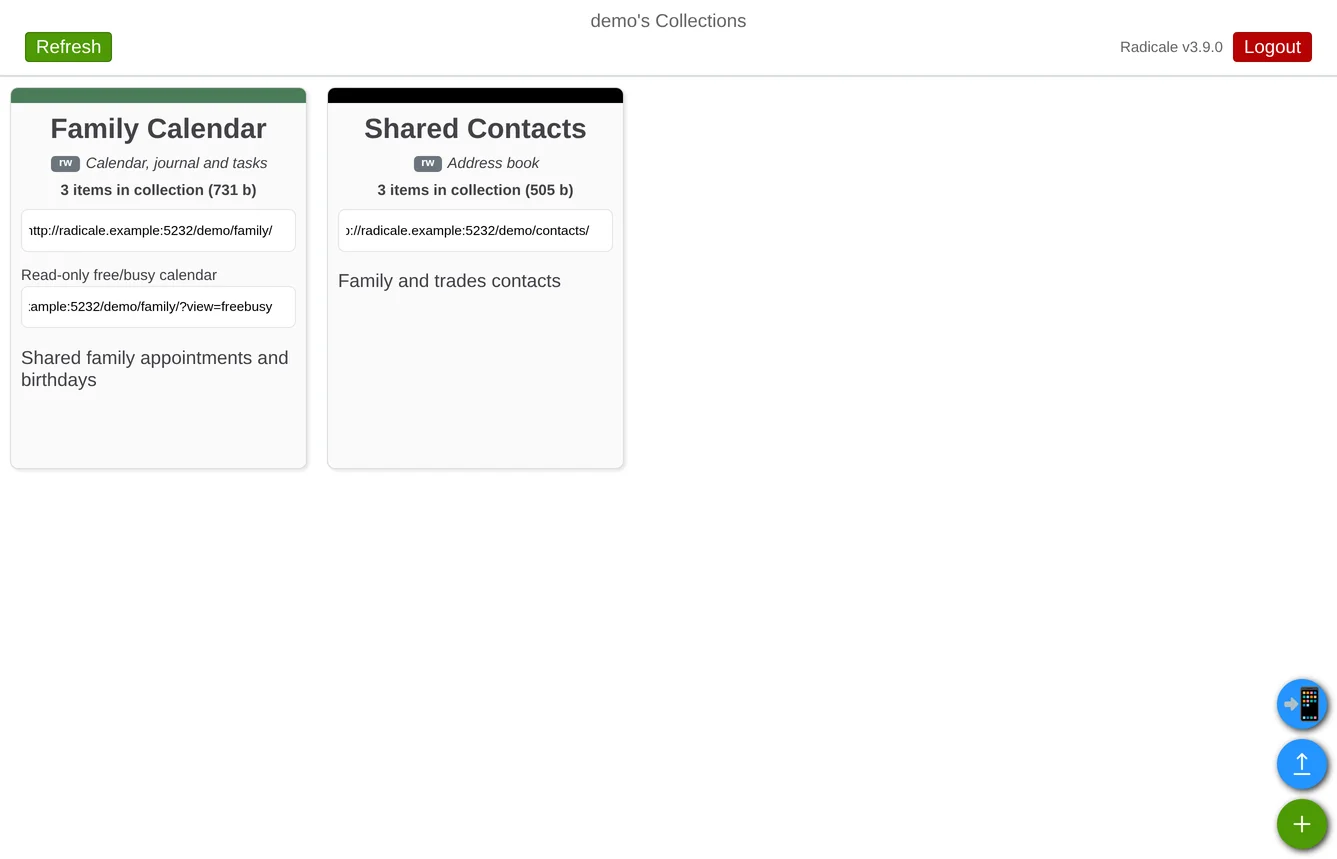
Radicale stores calendars and contacts on your own server and syncs them with CalDAV and CardDAV clients. It is a focused sync service rather than a full groupware suite: keep using a compatible calendar or address-book app on your devices. Its web interface manages collections, not a full calendar view.
That smaller scope suits people who want private calendar and contact sync without running a larger collaboration platform. Server control is not end-to-end encryption: protect the host, backups and account passwords.
Quick start
Verified against Radicale’s own documentation on November 8, 2026; we haven’t run these setups ourselves.
Upstream publishes a Docker image and Python installation instructions. The NixOS module is maintained in nixpkgs. Both examples below explicitly enable password authentication and restrict access to each user’s own collections. They listen only on localhost. Use an SSH tunnel for setup; remote clients need a reachable HTTPS reverse proxy before sending passwords over a network.
Docker Compose
In a new project directory, run mkdir config. Save this as
config/config:
[auth]
type = htpasswd
htpasswd_filename = /etc/radicale/users
htpasswd_encryption = bcrypt

[rights]
type = owner_only

[storage]
filesystem_folder = /var/lib/radicale/collections
Create the admin user’s password file interactively using htpasswd
from the official image. This writes a bcrypt hash, not a plaintext password:
docker run --rm -it \
  --user "$(id -u):$(id -g)" \
  --entrypoint htpasswd \
  -v "$PWD/config:/config" \
  ghcr.io/kozea/radicale:stable \
  -B -c /config/users admin
chmod 644 config/config config/users
The configuration and password hashes must be readable by the container’s
user (UID 1000); keep the project directory private on the host. Use -c
only when creating the file: leave it out when adding another user or it
will overwrite the existing accounts.
Save this as compose.yaml, adapted from the official image and Compose
example with read-only configuration and a localhost-only binding:
services:
  radicale:
    image: ghcr.io/kozea/radicale:stable
    ports:
      - "127.0.0.1:5232:5232"
    volumes:
      - ./config:/etc/radicale:ro
      - radicale-data:/var/lib/radicale
    restart: unless-stopped

volumes:
  radicale-data:
Run docker compose up -d, open http://localhost:5232 on the host and
log in as admin. Create a calendar or address book, then use its URL in
a supported client.
Back up both the data volume and configuration directory.
This needs Docker and the Compose plugin. On Ubuntu Server,
sudo apt install docker.io docker-compose-v2 installs both; on NixOS,
virtualisation.docker.enable = true; enables Docker.
NixOS
Create a password file before starting the service. After adding the
configuration below and rebuilding, use the module-created radicale
group to let the service read it:
services.radicale = {
  enable = true;
  settings = {
    server.hosts = [ "127.0.0.1:5232" ];
    auth = {
      type = "htpasswd";
      htpasswd_filename = "/var/lib/radicale/users";
      htpasswd_encryption = "bcrypt";
    };
    rights.type = "owner_only";
    storage.filesystem_folder = "/var/lib/radicale/collections";
  };
};
Run sudo nixos-rebuild switch. The service will not authenticate users
until the password file exists. Create it interactively, then restart:
nix shell nixpkgs#apacheHttpd -c sh -c 'sudo "$(command -v htpasswd)" -B -c /var/lib/radicale/users admin'
sudo chown root:radicale /var/lib/radicale/users
sudo chmod 640 /var/lib/radicale/users
sudo systemctl restart radicale
Open http://127.0.0.1:5232 on the host and log in as admin. As with
the Docker route, omit -c when adding subsequent users. Keep the file
outside the Nix store and back up /var/lib/radicale.
Why it’s listed
Calendar and contact sync are everyday needs that do not always require a large office suite. Radicale keeps that job small and works with open protocols, so the server and client can be chosen separately.
Documentation
Docker Compose · A small CalDAV and CardDAV server for calendars, tasks and address books you control. Paste into your AI assistant. It may only be able to guide you. Review changes before running anything.
Researched, not run by the Index. Checked 2026-11-12. No AI account or connection is needed here.
Read or copy the prompt manually
NixOS · A small CalDAV and CardDAV server for calendars, tasks and address books you control. Paste into your AI assistant. It may only be able to guide you. Review changes before running anything.
Researched, not run by the Index. Checked 2026-11-12. No AI account or connection is needed here.
Read or copy the prompt manually
Tags: Calendar & Contacts
Want help running it? Ask FOSSadmin about hosting and maintenance ↗