Servers & monitoring

Formlander
Self-hosted form backend that keeps your site's form submissions on your own server.
Release notes / v3.10.1
Released 2026-11-12. Snapshot from the included release data, not a live check.
- Bump Go to 1.26.11 for GO-2026-6859 (#93) - Start the install line after a train release
Read the full release notes on GitHub ↗Available on these platforms
Requires a self-hosted Formlander server.
Server systems, compatibility details and official sources
Visitor forms post straight from the browser to your server; there is no client app. A hosted Formlander Cloud is announced as a waitlist only - self-host is the only route today.
- Linux (server) - Docker image or one-command install script (Ubuntu/Debian)
- Web (client) - Admin dashboard in the browser, included with the server
Official availability checked 2026-11-15. Availability is not feature parity. The recorded release and license refer to the linked source project; separate clients can differ. No install or compatibility test was run.
Before you install
Forms on a static site, without a form SaaS.
- What does it run on?
- One container (or one Go binary) with a SQLite file. Your site's forms post to it; submissions show in a small admin dashboard and can be forwarded to email or webhooks.
- Where is my data?
- Submissions are stored in SQLite on your server. Email, webhooks or optional anti-spam services can send data to the providers you configure.
- What will I maintain?
- The container, updates, database backups and uploaded-file backups. The Chasen installer configures HTTPS and nightly updates; its database backups do not include uploads.
Advice and funding routes source-checked November 15, 2026. Researched, not an install or restore test. Installation source ↗ · Report a correction
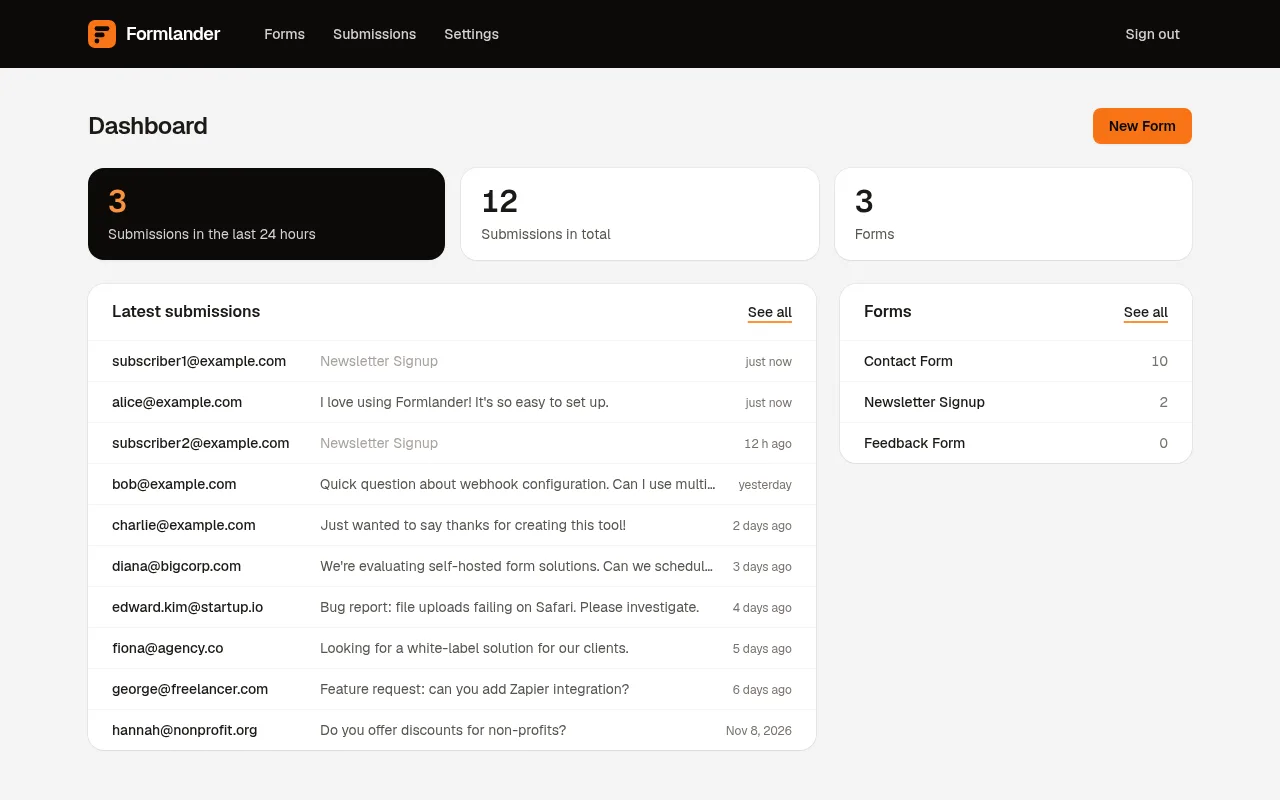
Formlander receives the form posts of a static or serverless site on your own server. Each submission lands in one SQLite file, shows up in an admin dashboard, and can be forwarded to a webhook or by email - no form SaaS in the middle. You control the server and where it sends submissions.
A form points at it with a plain HTML action, so it works with any
static-site generator and needs no JavaScript. Spam handling is built in:
a honeypot field, rate limiting, allowed-site checks and optional
Cloudflare Turnstile. A hosted Formlander Cloud is announced as a waitlist
but does not exist yet; today it is self-host only.
Quick start
Verified against Formlander’s own README and release notes on November 15, 2026.
One Go binary and one SQLite file; the official image is
karloscodes/formlander on Docker Hub. Keep the same session secret
across restarts, or every login session ends.
Jump to: Docker · Ubuntu Server
Docker
docker run -d --name formlander -p 127.0.0.1:8080:8080 \
  -e FORMLANDER_SESSION_SECRET="$(openssl rand -hex 32)" \
  -v "$PWD/storage:/app/storage" \
  karloscodes/formlander:latest
Open http://localhost:8080 and sign in as admin@formlander.local. The
first password is random: read it from
storage/initial-admin-password, or with
docker exec <container> cat /app/storage/initial-admin-password.
The image runs in production mode, which marks the session cookie
Secure: put HTTPS (Caddy, Nginx, Traefik) in front of it for real use.
For backups while it runs, use SQLite’s online backup for the database
and separately copy storage/uploads/, as the deployment guide explains.
A filesystem copy of a live database is not a proven backup.
This needs Docker and OpenSSL. Use the Docker installation route for your operating system. Save the generated session secret locally if you recreate the container; the example generates a new secret on each invocation.
Docker · Self-hosted form backend that keeps your site's form submissions on your own server. Paste into your AI assistant. It may only be able to guide you. Review changes before running anything.
Researched from the project's documentation. Checked 2026-11-15. No AI account or connection is needed here.
Read or copy the prompt manually
Ubuntu Server
The official installer sets up Formlander with HTTPS, live database backups and a nightly update through Chasen, on a fresh Ubuntu or Debian server with an A record for your domain and ports 80 and 443 open:
curl -fsSL https://formlander.com/install | sudo bash -s forms.example.comPut your domain in place of forms.example.com. The installer prints the
first admin password; sign in at https://forms.example.com as
admin@formlander.local and change it in Settings. Running the same
command again updates the server. Details and the deploy-from-your-laptop
variant are in the deployment guide.
Chasen’s backups cover the database, not uploaded files; back up
storage/uploads/ separately and test your restore.
Ubuntu Server · Self-hosted form backend that keeps your site's form submissions on your own server. Paste into your AI assistant. It may only be able to guide you. Review changes before running anything.
Researched from the project's documentation. Checked 2026-11-15. No AI account or connection is needed here.
Read or copy the prompt manually
First steps
Create a form in the dashboard and add your site’s domain under Allowed
sites - until you do, every submission is rejected with “origin not
allowed”. Paste the generated HTML into your site, keep the hidden
__fl_hp honeypot field, and set where submissions go: dashboard only,
email, or a webhook. The optional
https://your-server/assets/formlander.js script adds retries and a
sending state and falls back to a plain post without JavaScript.
Why it’s listed
A contact or intake form is often the one dynamic piece of an otherwise static site, and it is exactly where visitor data leaks to a third party. Formlander keeps that piece on your own server with almost nothing to run. We use it for the intake forms on FOSSadmin’s own site.
Documentation
Tags: Infrastructure, Self-hosted
Want help setting this up? Ask FOSSadmin ↗