Servers & monitoring
AdGuard Home
Self-hosted network-wide DNS filtering for ads, trackers and unwanted domains.
Release notes / v0.107.80
Released 2026-11-03. Snapshot from the included release data, not a live check.
Being vulnerable is fine, but not when it comes to dependencies. That's why we're making this release with updated dependencies to keep AdGuard Home running smoothly and securely 💪 ## Full changelog See also the [v0.107.80 GitHub milestone][ms-v0.107.80]. ### Security - Go version has been updated to mitigate the possibility of exploiting the Go vulnerabilities fixed in [1.27.3][go-1.27.3]. - Support for Multipath TCP has been disabled to mitigate the possibility of exploiting the vulnerability described in [CVE-2026-98432][cve-2026-98432]. ### Removed - The support for ma
Read the full release notes on GitHub ↗Available on these platforms
AdGuard Home is the self-hosted DNS service, not the separate AdGuard Android/iOS content-blocking apps. Browser administration does not make a phone a supported server host.
Compatibility details and official sources
- Linux - DNS service host
- Windows - DNS service host
- macOS - DNS service host
- Web - Administration interface
Official availability checked 2026-11-12. Availability is not feature parity. The recorded release and license refer to the linked source project; separate clients can differ. No install or compatibility test was run.
Before you install
DNS filtering for the whole network, one small service.
- What does it run on?
- A single machine on your network that stays on: a Raspberry Pi, a small server or a Docker host. Devices point at it for DNS.
- Where is my data?
- Filter rules, blocklists and query logs live on your AdGuard Home machine, not with AdGuard's company. The listing is the self-hosted server, separate from AdGuard's paid apps and hosted AdGuard DNS.
- What will I maintain?
- Updates, blocklist choices and the DHCP/DNS settings on your router. DNS filtering blocks domain lookups; it cannot remove every ad inside an allowed website or app.
Advice and funding routes source-checked November 12, 2026. Researched, not an install or restore test. Installation source ↗ · Report a correction
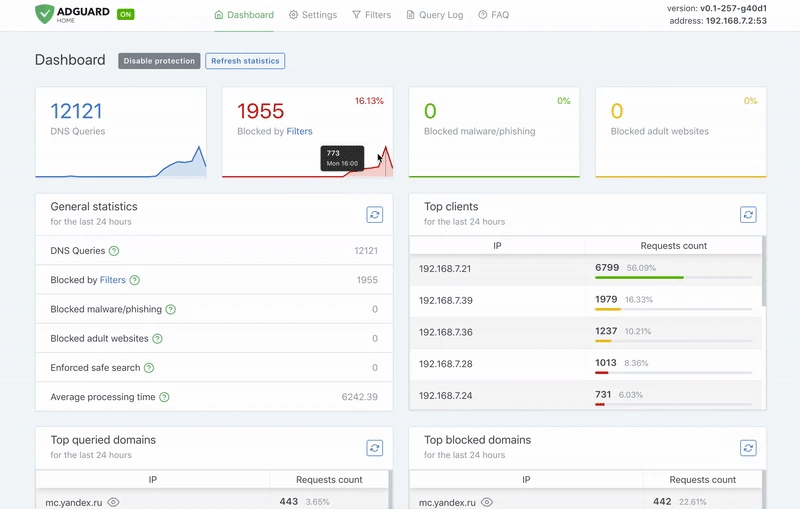
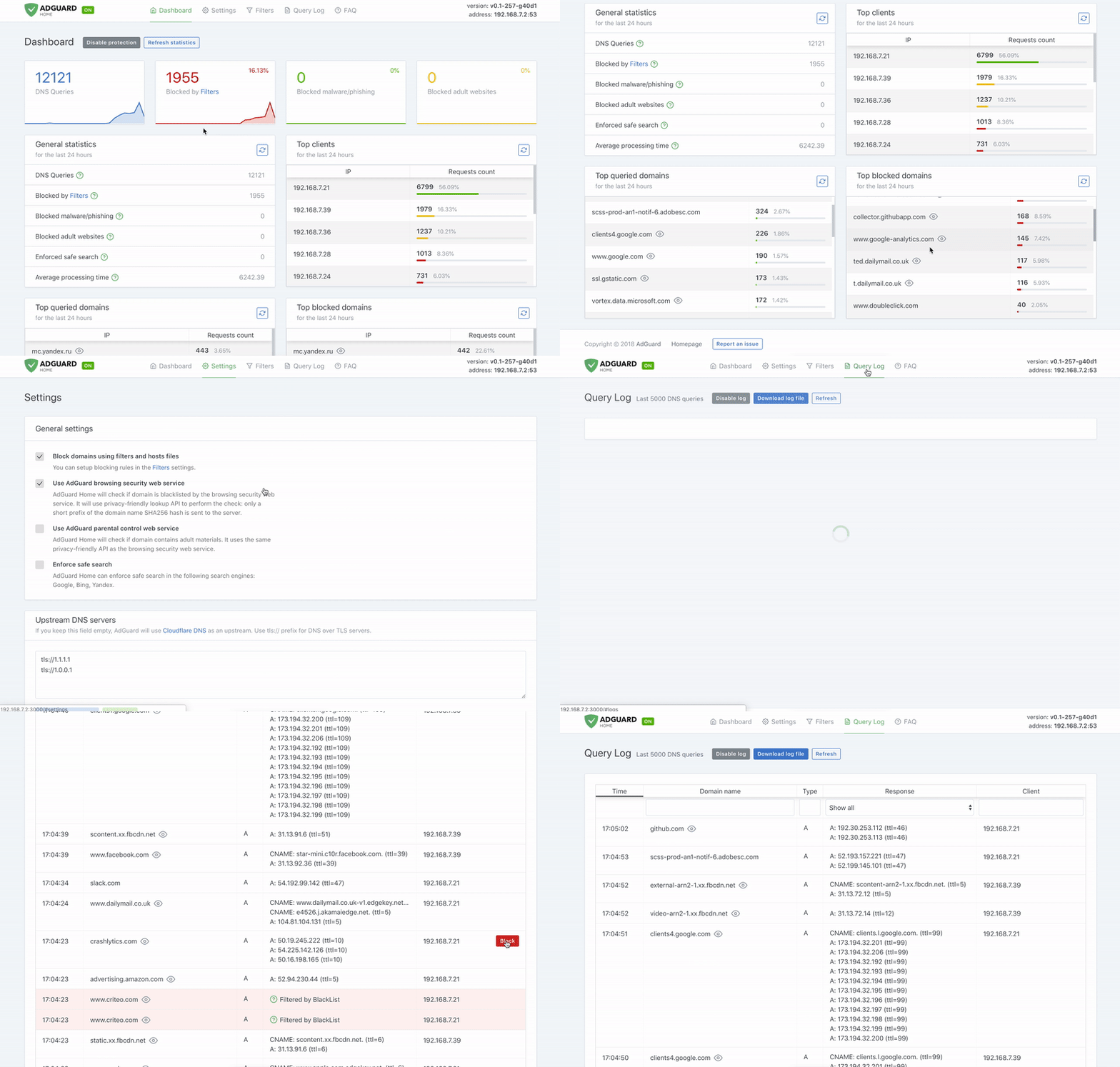
AdGuard Home is a GPLv3 DNS filtering server for your own network. It is separate from AdGuard’s paid browser/desktop apps and hosted AdGuard DNS service. DNS filtering blocks domain lookups, not every advertisement inside an allowed website or application. It is an alternative to Pi-hole, not another name for it.
Quick start
Researched against upstream getting-started instructions and pinned nixpkgs sources on November 11, 2026. No software was installed or network DNS changed.
Linux
Download the release archive for your operating system and CPU from the upstream releases page. Check its checksum and extract it. From that directory:
cd AdGuardHome
sudo ./AdGuardHome -s install
The service starts a setup wizard on port 3000. On the server itself open
http://127.0.0.1:3000. On a headless server, use a trusted LAN connection to
its port 3000 only while completing setup. Never expose the wizard to the
public internet. Confirm that port 53 is free before assigning it to the DNS
listener; another local resolver may already use it.
In the wizard, choose the web-admin listen address and port, create an admin account and choose the DNS listening interfaces. Keep access on a trusted LAN. Initially point only one test device at the server’s LAN IP for DNS. Check the query log and test ordinary websites before changing the router’s DNS settings.
NixOS
services.adguardhome = {
  enable = true;
  openFirewall = false;
};
Apply with sudo nixos-rebuild switch, then complete the setup wizard. Keeping
openFirewall = false does not configure a LAN firewall for you. The module’s
firewall option only handles its web interface, not DNS. For LAN clients, open
TCP and UDP port 53 on your chosen LAN interface only, and permit the admin port
only from trusted devices. Check the module’s mutable/declarative settings
before later managing the same configuration through both Nix and the UI.
First use
Keep the server on a stable LAN address. Check upstream DNS and blocklists in the UI, then verify a test client’s queries appear in the query log. Back up the configuration and note your previous router DNS settings before a network-wide change. Do not enable DHCP unless you deliberately replace the network’s existing DHCP server. DNS filtering is not a VPN or a full security boundary.
Container deployments
Upstream documents multiple port mappings for DNS, DHCP and encrypted DNS. They
are not interchangeable: DHCP needs host networking on supported Linux hosts,
and port 53 may conflict with an existing resolver. Follow the official Docker
guide for your actual interfaces rather than publish every example port. The
persistent paths are /opt/adguardhome/work and /opt/adguardhome/conf.
For a first lab, the Linux setup above has fewer network layers to diagnose.
Documentation
Linux · Self-hosted network-wide DNS filtering for ads, trackers and unwanted domains. Paste into your AI assistant. It may only be able to guide you. Review changes before running anything.
Researched, not run by the Index. Checked 2026-11-12. No AI account or connection is needed here.
Read or copy the prompt manually
NixOS · Self-hosted network-wide DNS filtering for ads, trackers and unwanted domains. Paste into your AI assistant. It may only be able to guide you. Review changes before running anything.
Researched, not run by the Index. Checked 2026-11-12. No AI account or connection is needed here.
Read or copy the prompt manually
Tags: Infrastructure