Servers & monitoring
Percona Server for MySQL
Open-source MySQL-compatible database server with added instrumentation and operational features.
Release notes / 8.4.11-11 (8.4 series)
Version checked by hand on 2026-11-11. Snapshot from the included release data, not a live check.
Recorded 8.4-series release, not a claim that 8.4 is the newest Percona product line. Official 8.4 documentation identifies 8.4.11-11. GitHub latest-release metadata points to an old 5.5 release and is not authoritative for this line.
Read the full release notes ↗Available on these platforms
The official repository installation documentation covers Debian/Ubuntu and RHEL families. This is a server-host statement, not a mobile or desktop GUI client claim.
Compatibility details and official sources
- Linux - MySQL-compatible database server
Official availability checked 2026-11-12. Availability is not feature parity. The recorded release and license refer to the linked source project; separate clients can differ. No install or compatibility test was run.
Before you install
MySQL-compatible, fully open source.
- What does it run on?
- A database server - packages, Docker or a NixOS module. This listing covers the 8.4 series, not the cluster, monitoring or paid-support products.
- Where is my data?
- Your databases live on your server. GPLv2 with included components under their own notices.
- What will I maintain?
- A production database: updates, backups, replication if you need it. Check the documented telemetry settings during setup.
Advice and funding routes source-checked November 12, 2026. Researched, not an install or restore test. Installation source ↗ · Report a correction
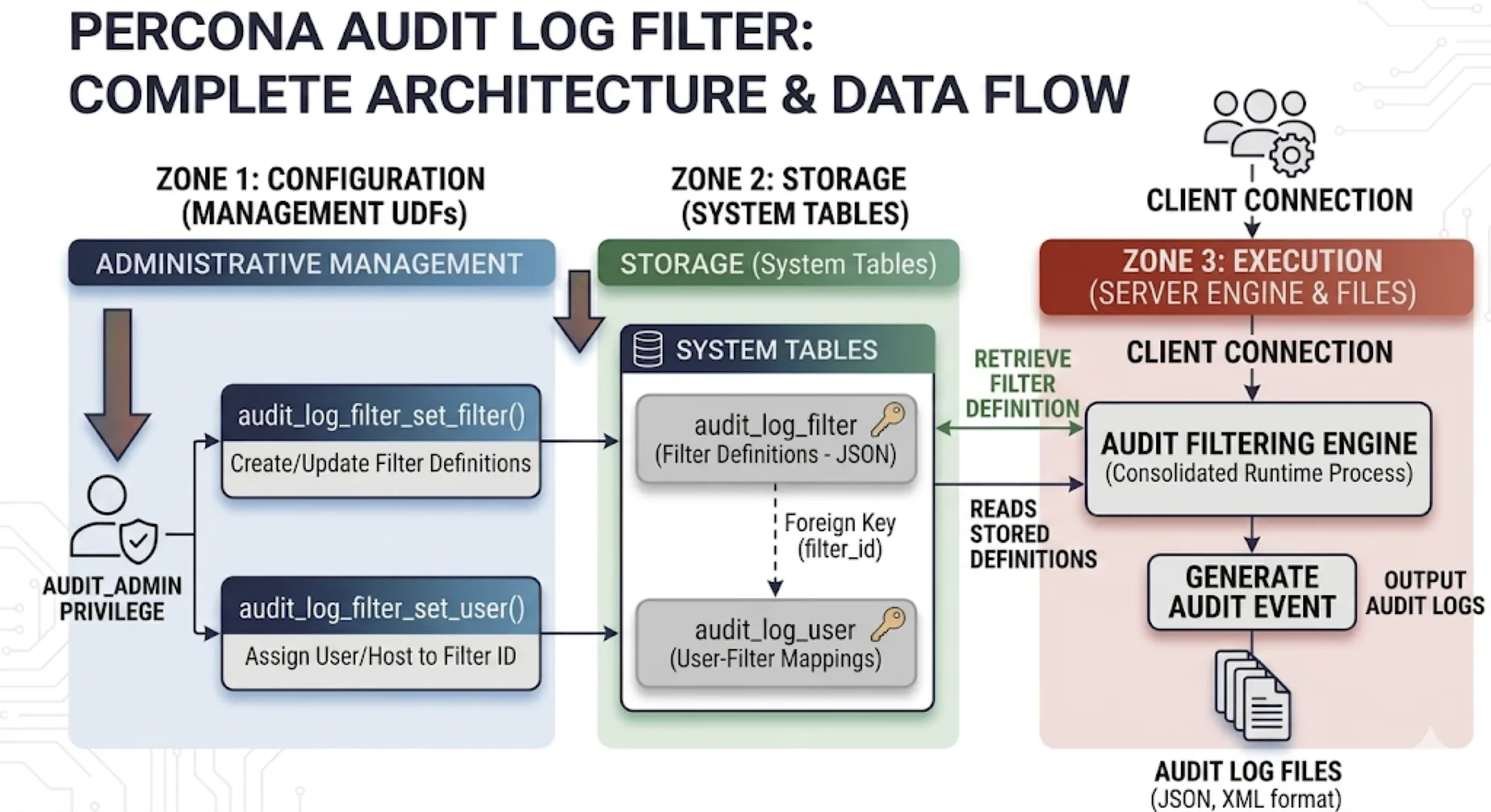

Percona Server for MySQL is an open-source MySQL-compatible database server. This listing covers the 8.4 series, not Percona XtraDB Cluster, Percona Monitoring and Management, paid support or Oracle’s commercial MySQL offerings. The server uses GPLv2; included components retain their own notices.
Percona and its product marks belong to Percona Inc. This independent listing does not imply affiliation or endorsement.
It is a database service with a command-line client, not a built-in graphical dashboard. A screenshot is not yet available for this listing.
Quick start
Researched against Percona’s 8.4 Docker documentation and pinned nixpkgs sources on November 11, 2026. We have not started a server or run these instructions.
Docker Compose
For a new local lab database, create compose.yaml:
services:
  percona:
    image: percona/percona-server:8.4
    environment:
      MYSQL_ROOT_PASSWORD: ${MYSQL_ROOT_PASSWORD:?Set a unique local database password}
    volumes:
      - percona-data:/var/lib/mysql
    restart: unless-stopped
volumes:
  percona-data:
Set MYSQL_ROOT_PASSWORD in a local .env file and keep it out of Git. This
example does not publish database ports to the host or the network. Start it:
docker compose up -d
docker compose logs --tail=40 percona
docker compose exec percona mysql -u root -p
Wait for the log to report that the database is ready. At the password prompt,
enter the password you chose. At mysql>, try:
SELECT VERSION();
CREATE DATABASE index_demo;
SHOW DATABASES;
Use exit to leave the client. Do not put passwords directly on command lines.
The official image uses /var/lib/mysql for data. Initial-password variables
only initialize a new data directory; editing .env does not reset an existing
database password. Stop with docker compose down without -v to retain data.
Percona packages and Docker images collect telemetry. Review the project’s telemetry guide and its current opt-out settings before deploying on a private network.
NixOS
For a new test database only:
services.mysql = {
  enable = true;
  package = pkgs.percona-server_8_4;
  ensureDatabases = [ "index_demo" ];
};
Apply with sudo nixos-rebuild switch. Use sudo mysql for the module’s local
administrative socket connection, then run SELECT VERSION(); and
SHOW DATABASES;. Do not change a running MySQL/MariaDB service’s package to
Percona without checking upgrade compatibility and tested backups first.
First use
Create a database-specific application account instead of using root. Use a separate graphical client if desired. Review telemetry, access control, backup and recovery before storing important data. Compatibility does not make a production migration automatic or reversible.
Other Linux installations
Use Percona’s documented repository installation for your supported Linux distribution. Avoid mixing distribution MySQL/MariaDB packages with Percona packages on a host that already stores data. For a first experiment, the container above avoids replacing the host’s database service.
Documentation
- Percona Server 8.4 documentation
- Docker installation and storage
- NixOS MySQL module
- Percona trademark policy
Docker Compose · Open-source MySQL-compatible database server with added instrumentation and operational features. Paste into your AI assistant. It may only be able to guide you. Review changes before running anything.
Researched, not run by the Index. Checked 2026-11-12. No AI account or connection is needed here.
Read or copy the prompt manually
NixOS · Open-source MySQL-compatible database server with added instrumentation and operational features. Paste into your AI assistant. It may only be able to guide you. Review changes before running anything.
Researched, not run by the Index. Checked 2026-11-12. No AI account or connection is needed here.
Read or copy the prompt manually
Tags: Infrastructure