Home & auto

Zigbee2MQTT
Connect supported Zigbee devices to your own MQTT broker instead of a vendor hub.
Release notes / 2.14.3
Released 2026-11-01. Snapshot from the included release data, not a live check.
32-bit platforms are deprecated, with support ending in April 2027. Includes device support, availability and frontend fixes.
Read the full release notes on GitHub ↗Available on these platforms
Requires Zigbee2MQTT host.
Server systems, compatibility details and official sources
The coordinator, app, MQTT broker, backups and device compatibility.
- Linux (server) - Docker/app with MQTT broker and supported Zigbee coordinator
- Web (client) - Browser interface served by the host
Official availability checked 2026-11-15. Availability is not feature parity. The recorded release and license refer to the linked source project; separate clients can differ. No install or compatibility test was run.
Before you install
A local bridge, not a vendor-specific hub.
- What does it need?
- Docker/app with MQTT broker and supported Zigbee coordinator
- Where is my data?
- Coordinator/network state and device configuration live in the persistent data directory; messages go to your configured MQTT broker.
- What will I maintain?
- The coordinator, app, MQTT broker, backups and device compatibility.
Advice and funding routes source-checked November 15, 2026. Researched, not an install or restore test. Installation source ↗ · Report a correction
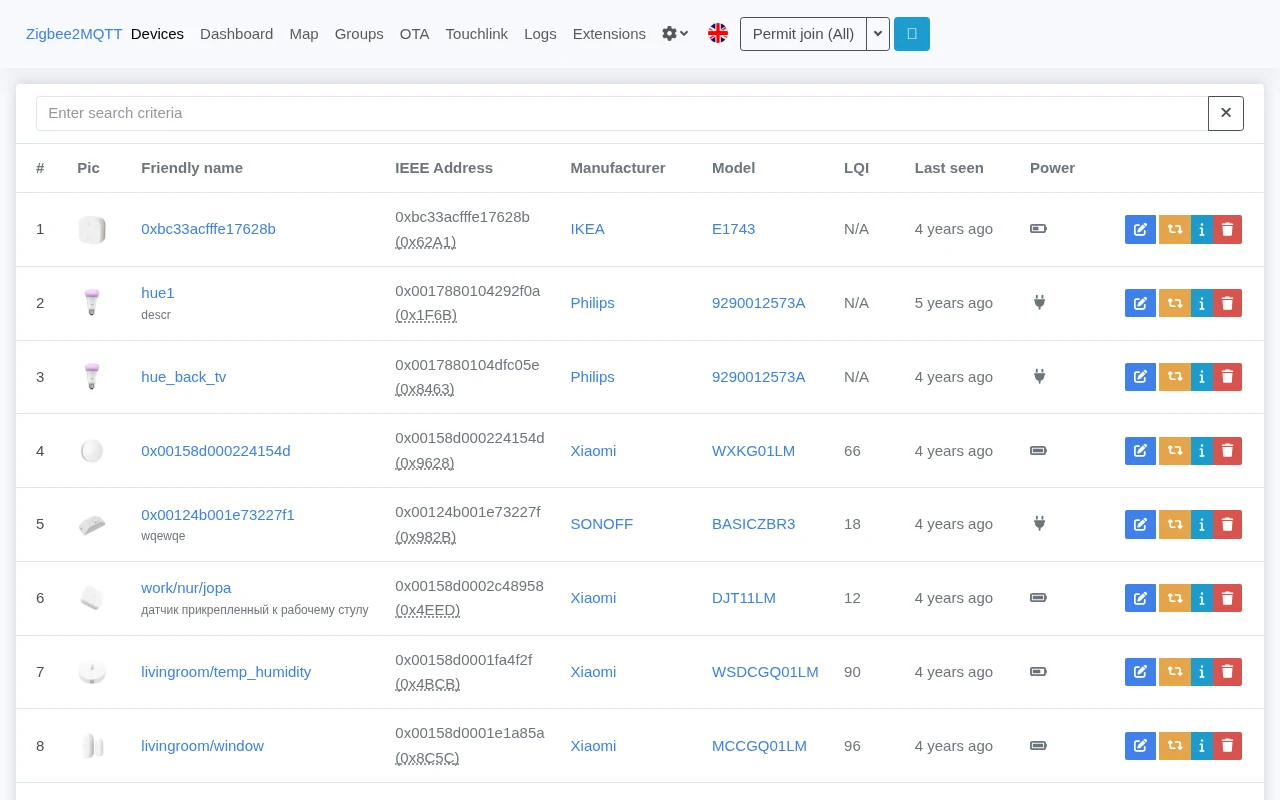
Zigbee2MQTT links a supported Zigbee coordinator to an MQTT broker. Lights, buttons and sensors can then work together across manufacturers, without requiring each manufacturer’s own hub. Home Assistant can discover its devices through the MQTT integration.
It needs more than software: check both the coordinator and every device against the project’s compatibility lists. A Zigbee logo alone does not guarantee that a particular model or firmware revision will work.
Quick start
Researched from the project’s documentation on November 15, 2026.
Jump to: Docker · Home Assistant app
Docker
Before starting, have an MQTT broker and a
supported coordinator ready.
The official Docker guide
uses ghcr.io/koenkk/zigbee2mqtt, maps persistent data to /app/data,
exposes port 8080 for onboarding/the frontend, and passes the adapter into
the container.
- Find your adapter’s stable
/dev/serial/by-id/path on the Linux host. - Use the command in the Docker guide, replacing its example adapter
path and timezone with yours. Keep the
/app/datamount persistent. - Open http://localhost:8080 and complete onboarding with the correct
adapter settings and MQTT broker address. The broker must be reachable
from inside the container;
localhostthere means the container. - Check the logs before allowing devices to join. Restrict frontend access to your trusted network and configure authentication before any wider exposure.
The Docker guide also has rootless Docker/Podman examples. Do not make a container privileged merely to avoid identifying the right device and permissions.
Docker · Bridge Zigbee devices to a local MQTT broker. Paste into your AI assistant. It may only be able to guide you. Review changes before running anything.
Researched from the project's documentation. Checked 2026-11-15. No AI account or connection is needed here.
Read or copy the prompt manually
Home Assistant app
Follow the Home Assistant installation guide. It links the app repository and explains the MQTT and adapter settings. Stop any other integration using the same coordinator first: ZHA and Zigbee2MQTT cannot both own one serial adapter at the same time.
Home Assistant app · Bridge Zigbee devices to a local MQTT broker. Paste into your AI assistant. It may only be able to guide you. Review changes before running anything.
Researched from the project's documentation. Checked 2026-11-15. No AI account or connection is needed here.
Read or copy the prompt manually
First steps
Turn on permit-join only while pairing, follow your device’s documented reset/pairing steps, then close joining again. Give devices useful names and back up the whole data directory, including coordinator/network state. Replacing a coordinator or losing those files can mean re-pairing devices; treat a network migration as a separate plan.
Why it’s listed
It makes a mixed-brand Zigbee network practical with a local broker and an inspectable bridge. It is a useful partner to Home Assistant, rather than a replacement for the automation platform or the MQTT broker.
Documentation
Tags: Home automation, Self-hosted
Want help setting this up? Ask FOSSadmin ↗