Home & auto
Mealie
Self-hosted recipe manager and meal planner - import recipes from a URL, organize them, plan the week and build shopping lists.
Release notes / v3.30.0
Released 2026-10-31. Snapshot from the included release data, not a live check.
Latest GitHub release at check time. The default branch is mealie-next; releases are tagged normally.
Read the full release notes on GitHub ↗Available on these platforms
Official hardware and installation choices ↗
Distributed as a Docker image (compose is the documented route); the web app works in any modern browser including phones. No native desktop or mobile apps.
Compatibility details and official sources
Official availability checked 2026-11-12. Availability is not feature parity. The recorded release and license refer to the linked source project; separate clients can differ. No install or compatibility test was run.
Before you install
Recipes in, meal plans out.
- What does it run on?
- A server you run - Docker is standard - with web access for the household.
- Where is my data?
- Recipes, tags, cookbooks, meal plans and shopping lists live on your server. Importing from a URL parses the page into ingredients, steps and a photo.
- What will I maintain?
- Updates and a database backup. AGPLv3-licensed.
Advice and funding routes source-checked November 12, 2026. Researched, not an install or restore test. Installation source ↗ · Report a correction
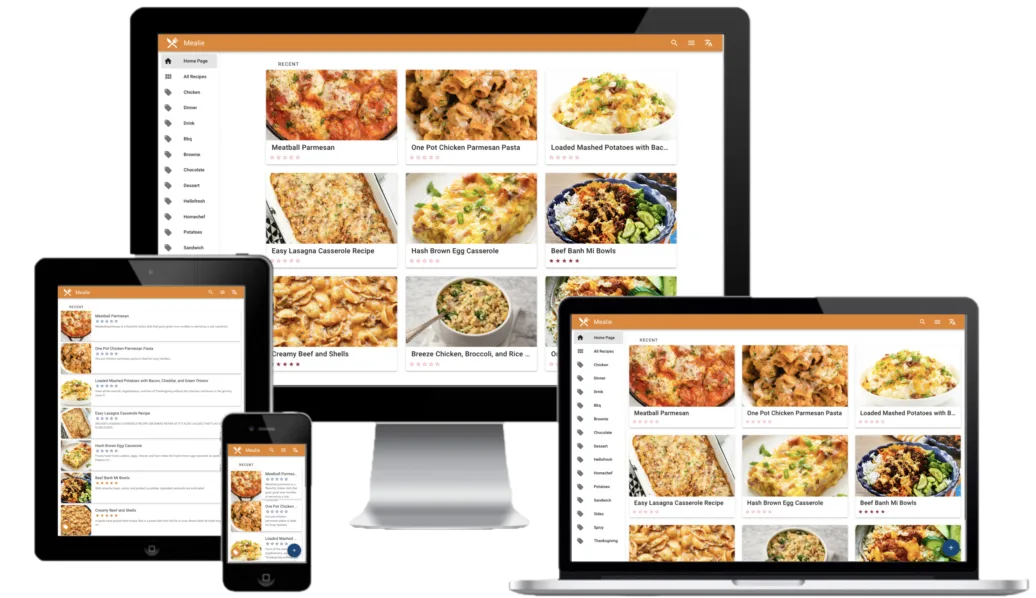

Mealie is an AGPLv3 recipe manager and meal planner for your own server. Its standout trick is importing a recipe straight from a URL - it parses the page into ingredients, steps and a photo - and on top of that it adds tags, cookbooks, meal plans, shopping lists and a household sharing model. It is the recipe equivalent of a media server: one place your family’s collection lives, reachable from any browser.
Mealie is the name and mark of the project. This is an independent listing, not an official Mealie resource or an endorsement.
Quick start
Researched from Mealie’s documentation and GitHub releases on November 12, 2026. We have not installed or run it.
Docker (upstream’s documented route)
Mealie is distributed as a Docker image; the documented route is Docker Compose:
services:
  mealie:
    image: ghcr.io/mealie-recipes/mealie:latest
    container_name: mealie
    ports:
      - "9925:9000"
    volumes:
      - mealie-data:/app/data/
    restart: always
volumes:
  mealie-data:
The docs recommend pinning a version tag instead of latest for production.
Open http://<server-ip>:9925, sign in with the documented default admin
credentials and change them immediately. Put it behind HTTPS if it leaves
your LAN.
NixOS
services.mealie = {
  enable = true;
  port = 9925;
};
Apply with sudo nixos-rebuild switch. The module runs Mealie with its
database on the host; set settings for mail and other options per the
module’s documentation.
First use
Create your household, import a handful of favorite recipes by URL, and check how the parser handled each - tidy ingredients and steps before building plans on top. Set up the automatic backup task in the admin settings; recipe collections are painful to rebuild from memory.
Documentation
Docker (upstream's documented route) · Self-hosted recipe manager and meal planner - import recipes from a URL, organize them, plan the week and build shopping lists. Paste into your AI assistant. It may only be able to guide you. Review changes before running anything.
Researched, not run by the Index. Checked 2026-11-12. No AI account or connection is needed here.
Read or copy the prompt manually
NixOS · Self-hosted recipe manager and meal planner - import recipes from a URL, organize them, plan the week and build shopping lists. Paste into your AI assistant. It may only be able to guide you. Review changes before running anything.
Researched, not run by the Index. Checked 2026-11-12. No AI account or connection is needed here.
Read or copy the prompt manually
Tags: Home