Home & auto
LubeLogger
Vehicle maintenance records and fuel-mileage tracking for your household.
Version checked by hand on 2026-11-10. Snapshot from the included release data, not a live check.
No release-notes excerpt is recorded here.
Open the project's release source ↗Available on these platforms
LubeLogger is web-based. Its Windows standalone executable hosts the service, not a separate native phone app.
Compatibility details and official sources
Official availability checked 2026-11-12. Availability is not feature parity. The recorded release and license refer to the linked source project; separate clients can differ. No install or compatibility test was run.
Before you install
Vehicle records without a spreadsheet.
- What does it run on?
- A small web app you host - Docker is the common route.
- Where is my data?
- Service visits, repairs, fuel fill-ups and odometer history stay on your own machine.
- What will I maintain?
- Very little: updates and a backup of its data. Try the project's demo first if you are unsure the workflow fits.
Advice and funding routes source-checked November 12, 2026. Researched, not an install or restore test. Installation source ↗ · Report a correction
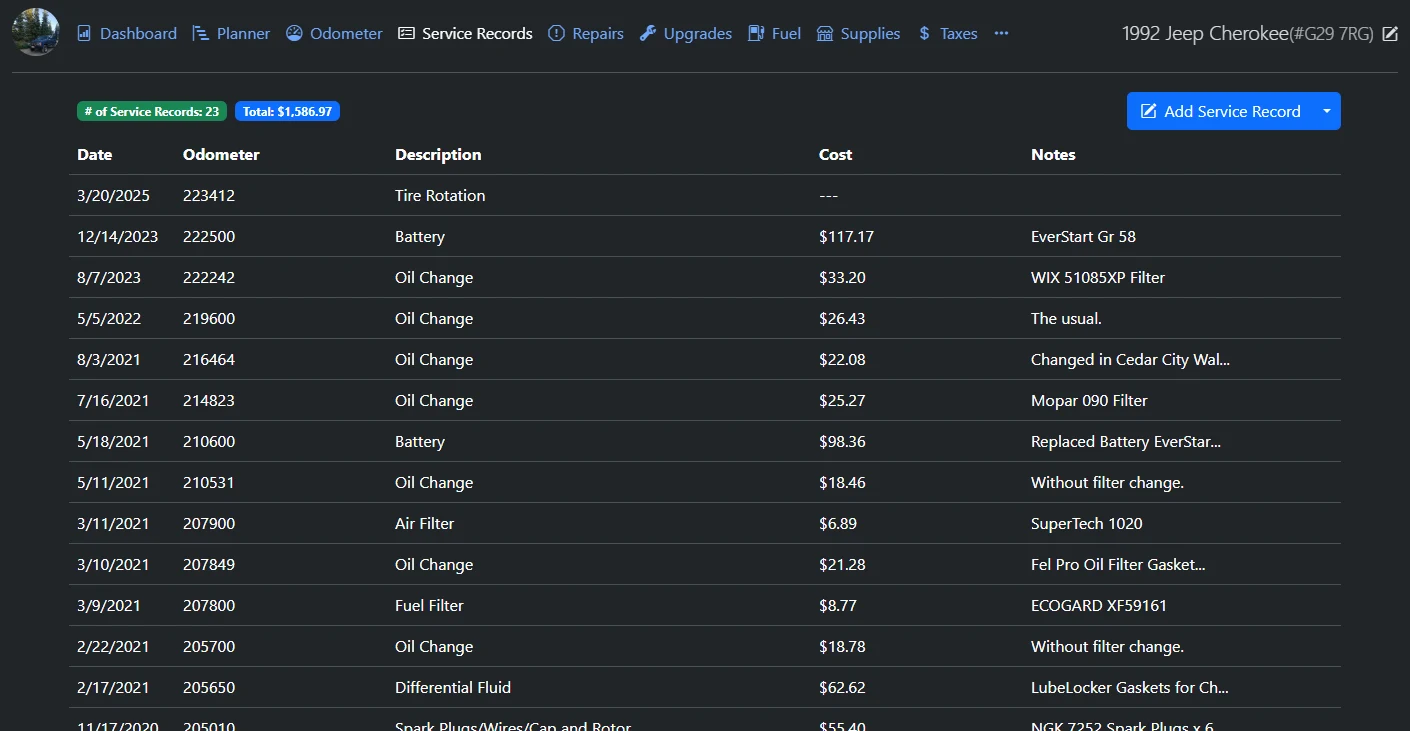
LubeLogger keeps a household’s vehicle records in one place: service visits, repairs, fuel fill-ups with mileage, odometer history and reminders. It is a web app you host yourself, so the records stay on your own machine.
Quick start
Checked against the project’s documentation on November 10, 2026. We have not run this setup ourselves.
Docker Compose
The docs call Docker the most reliable channel. Save the compose file from
the repository (image ghcr.io/hargata/lubelogger:latest, port 8080, volumes
data and keys), then:
docker compose pull
docker compose up -d
Open http://localhost:8080. Keep the port bound to your own machine unless
you add authentication and a reverse proxy. Avoid the :edge image, which
the docs mark experimental.
Linux, without Docker
Download LubeLogger_vNNN_linux_x64.zip from the latest release, extract it
and run ./CarCareTracker (make it executable first, for example
chmod u+x CarCareTracker - the docs’ chmod 777 grants far more than
needed).
Windows
Download the Windows zip from the latest release and run
CarCareTracker.exe.
NixOS
services.lubelogger.enable = true;First steps
- Authentication is off by default. Before you expose LubeLogger beyond your own machine or invite anyone, open Settings, tick “Enable Authentication” and set the root user. New users join by invitation token (Admin Panel, Manage Tokens).
- Add a vehicle, then log a service record or a fill-up and set a reminder by date or odometer.
- Want a look first? The project runs a demo at https://demo.lubelogger.com that resets every 20 minutes.
Docker Compose · Vehicle maintenance records and fuel-mileage tracking for your household. Paste into your AI assistant. It may only be able to guide you. Review changes before running anything.
Researched, not run by the Index. Checked 2026-11-12. No AI account or connection is needed here.
Read or copy the prompt manually
Linux, without Docker · Vehicle maintenance records and fuel-mileage tracking for your household. Paste into your AI assistant. It may only be able to guide you. Review changes before running anything.
Researched, not run by the Index. Checked 2026-11-12. No AI account or connection is needed here.
Read or copy the prompt manually
Windows · Vehicle maintenance records and fuel-mileage tracking for your household. Paste into your AI assistant. It may only be able to guide you. Review changes before running anything.
Researched, not run by the Index. Checked 2026-11-12. No AI account or connection is needed here.
Read or copy the prompt manually
NixOS · Vehicle maintenance records and fuel-mileage tracking for your household. Paste into your AI assistant. It may only be able to guide you. Review changes before running anything.
Researched, not run by the Index. Checked 2026-11-12. No AI account or connection is needed here.
Read or copy the prompt manually
Tags: Home