Home & auto
Home Assistant
Connect devices and automate your home through one locally controlled hub.
Release notes / 2026.11.1
Released 2026-11-09. Snapshot from the included release data, not a live check.
- Bump aiounifi to v98 ([@bhamiltoncx] - [#190145]) ([unifi docs]) (dependency) - Fix HomeKit camera motion events never reaching HomeKit ([@RaHehl] - [#190440]) ([homekit docs]) - Add new entities to restored sleeping Shelly RPC devices on wake ([@thecode] - [#190447]) ([shelly docs]) - Bump broadlink-async to 1.2.1 ([@DAB-LABS] - [#190471]) ([broadlink docs]) (dependency) - Bump opower to 0.23.0 ([@tronikos] - [#190486]) ([opower docs]) (dependency) - Make nexia set_hvac_run_mode fields optional ([@frenck] - [#190498]) ([nexia docs]) - Bump googlewifiapi to 0.1.3 ([@gittastic] - [#190515]) ([google_wifi docs]) (dependency) - Mark SimpliSafe sensors unavailable when reported offline ([@frenck] - [#190501]) ([simplisafe docs]) - Bump aioamazondevice to 17.2.7 ([@jamesonuk] - [#1905…
Read the full release notes on GitHub ↗Available on these platforms
These companion apps connect to Home Assistant. They do not replace the server or imply identical sensors, permissions or background behavior across phones.
Compatibility details and official sources
Official availability checked 2026-11-12. Availability is not feature parity. The recorded release and license refer to the linked source project; separate clients can differ. No install or compatibility test was run.
Before you install
Local-first home automation.
- What does it run on?
- A dedicated device (a Raspberry Pi or similar), a container, or a VM. It connects compatible devices and services into dashboards and automations.
- Where is my data?
- Configuration, history and automations live on your device. It favors local control, but some integrations still depend on vendor clouds - check each device rather than assuming offline operation.
- What will I maintain?
- Updates, occasional breaking-change notes, and the devices themselves. Start with a few integrations and grow deliberately.
Advice and funding routes source-checked November 12, 2026. Researched, not an install or restore test. Installation source ↗ · Report a correction
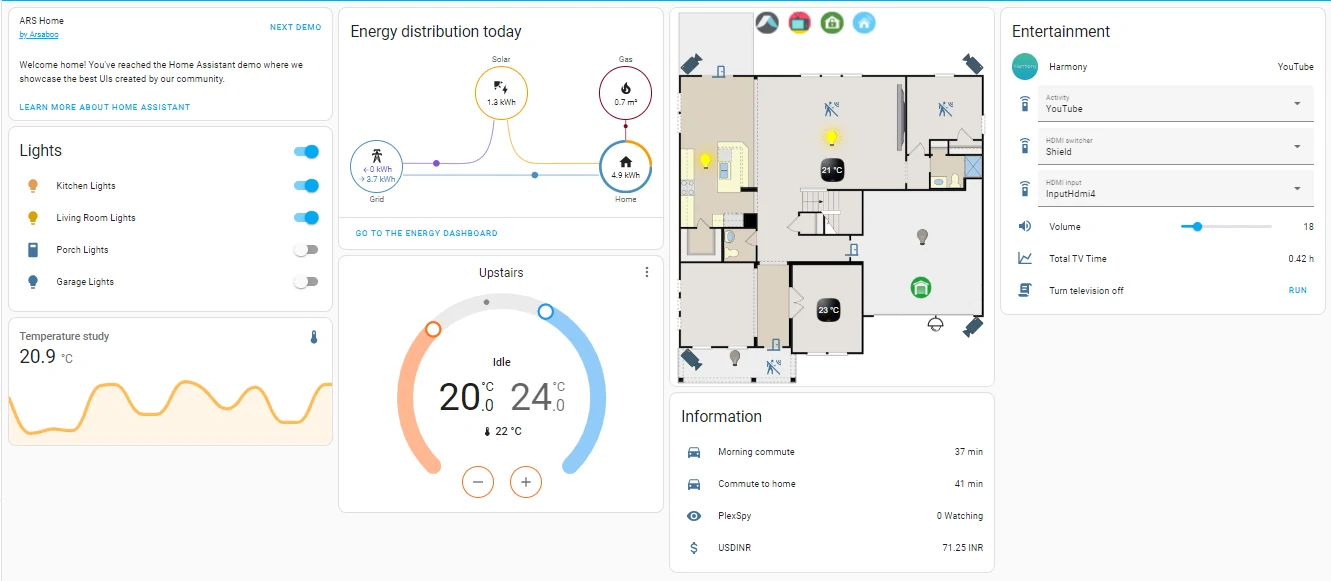

Home Assistant connects compatible devices and services, then lets you build dashboards and automations around them. It favors local control where devices and integrations support it. Some integrations still depend on vendor clouds; check each device rather than assuming every connection works offline.
It can become part of the household’s daily routine, so backups, update planning and recovery matter. Keep safety-critical controls usable without an automation server. Home Assistant Cloud is optional and helps fund the project through Nabu Casa and the Open Home Foundation.
Quick start
Checked against the official Linux installation guide on November 9, 2026. We have not run these setups ourselves.
Home Assistant OS is upstream’s recommended install for most users. The Container route below is for people comfortable managing Linux and Docker; it does not include the apps/add-ons managed by Home Assistant OS. The NixOS module is maintained in nixpkgs; upstream explicitly does not support that installation method.
Docker Container on Linux
Requires Linux and Docker Engine, not Docker Desktop. Save as compose.yaml
in a new directory and set TZ to your own IANA timezone:
services:
  homeassistant:
    image: ghcr.io/home-assistant/home-assistant:stable
    volumes:
      - ./config:/config
      - /etc/localtime:/etc/localtime:ro
    environment:
      TZ: America/Los_Angeles
    network_mode: host
    privileged: true
    restart: unless-stopped
Run docker compose up -d, then open http://localhost:8123 on the Linux host
or http://HOST-IP:8123 from another device on the same trusted network.
Complete onboarding and add a few compatible devices. Back up config and
use Home Assistant’s backup tools before upgrades.
This follows upstream’s host networking and privileged container settings. It is not localhost-isolated: the web UI can be reachable on your LAN. Review these broad permissions, protect your network and do not port-forward 8123 to the internet. Bluetooth can also require a read-only D-Bus mount; follow the official guide if you need it. Remote access needs a separate, secure configuration, not a public port on this starter.
Home Assistant OS
Follow the official Linux VM installation guide for Home Assistant OS, or choose the appropriate hardware guide linked there. OS manages the system and apps/add-ons for you; Container leaves that work to you. Choose the install method before investing time in integrations that require apps.
NixOS
Upstream explicitly does not support running Home Assistant this way; report module problems to nixpkgs, not the project.
services.home-assistant = {
  enable = true;
  config = {
    default_config = { };
  };
};
# Only for access from other devices on a trusted LAN:
# networking.firewall.allowedTCPPorts = [ 8123 ];
Run sudo nixos-rebuild switch, then open http://localhost:8123 on the host
and complete onboarding. The instance binds all interfaces on port 8123 by
default; do not port-forward 8123 to the internet. Configuration and state
live in /var/lib/hass; back it up before upgrades. Add integrations through
services.home-assistant.extraComponents so their dependencies are packaged.
Why it’s listed
One place to connect a mixed smart home without making a single device vendor the center of everything. Start with a small, reversible automation before trusting it with important household routines.
Documentation
- Linux: OS and Container installation
- Documentation
- NixOS module source
- Foundation funding and support options
Docker Container on Linux · Connect devices and automate your home through one locally controlled hub. Paste into your AI assistant. It may only be able to guide you. Review changes before running anything.
Researched, not run by the Index. Checked 2026-11-12. No AI account or connection is needed here.
Read or copy the prompt manually
Home Assistant OS · Plan a Home Assistant OS install (VM or dedicated device). Paste into your AI assistant. It may only be able to guide you. Review changes before running anything.
Researched, not run by the Index. Checked 2026-11-12. No AI account or connection is needed here.
Read or copy the prompt manually
NixOS · Connect devices and automate your home through one locally controlled hub. Paste into your AI assistant. It may only be able to guide you. Review changes before running anything.
Researched, not run by the Index. Checked 2026-11-12. No AI account or connection is needed here.
Read or copy the prompt manually
Tags: Home automation