Privacy & access

phpList
Self-hosted mailing lists and newsletters with subscriber management and bounce handling.
Released 2026-08-09. Snapshot from the included release data, not a live check.
No release-notes excerpt is recorded here.
Open the project's release source ↗Available on these platforms
Requires phpList host.
Server systems, compatibility details and official sources
PHP/database updates, mail queues, bounce processing, backups and subscriber permissions.
- Linux (server) - PHP web application with MySQL/MariaDB and a mail transport
- Web (client) - Browser interface served by the host
Official availability checked 2026-11-15. Availability is not feature parity. The recorded release and license refer to the linked source project; separate clients can differ. No install or compatibility test was run.
Before you install
A newsletter system you can run yourself.
- What does it need?
- PHP web application with MySQL/MariaDB and a mail transport
- Where is my data?
- Subscribers and campaign data are in your server database; email delivery can involve the mail provider you configure.
- What will I maintain?
- PHP/database updates, mail queues, bounce processing, backups and subscriber permissions.
Advice and funding routes source-checked November 15, 2026. Researched, not an install or restore test. Installation source ↗ · Report a correction
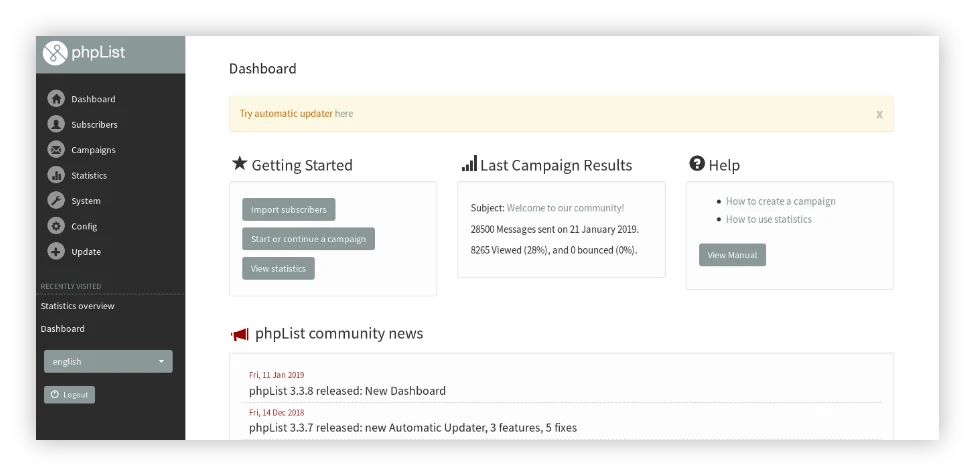

phpList manages mailing lists, subscribers and newsletter campaigns. It includes segmentation, personalization, scheduling, bounce handling and campaign statistics. You can host it yourself or use the project’s phpList Hosted service; those are distinct deployment choices.
A self-hosted copy is not a mail-delivery service by itself. Sender reputation, provider limits, authenticated domains and unsubscribe handling still decide whether newsletters reach inboxes responsibly.
Quick start
Researched from the current project README and system requirements on November 15, 2026.
PHP web server
Start with phpList’s official download and system setup requirements. The requirements page recommends PHP 8.1 or later and lists the extensions; check support for your exact release and plugins before choosing a PHP version. It uses a MySQL or MariaDB database.
- Download the release package and put the
listsdirectory in your site’s web root, following the project’s installation instructions. - Configure the database and application in
lists/config/config.php. Keep that directory inaccessible to web visitors and keep credentials out of repositories. - Open the site’s
/lists/admin/page and complete initialization. - Configure the actual mail transport and queue processing, then test sending and bounce handling with addresses you control.
Do not treat the README’s upgrade sequence as a new-install recipe on an existing database. Back up the database and configuration before an upgrade.
PHP web server · Self-hosted mailing lists and newsletters with subscriber management and bounce handling. Paste into your AI assistant. It may only be able to guide you. Review changes before running anything.
Researched from the project's documentation. Checked 2026-11-15. No AI account or connection is needed here.
Read or copy the prompt manually
First steps
Create a private test list and check signup, confirmation, unsubscribe and bounce flows. Set an appropriate sending rate for your provider. Only then import a permission-based list and send a small pilot campaign. Message opens and clicks are engagement signals, not proof that a person read a mail.
Why it’s listed
A long-running FOSS choice for newsletters when you want to keep the list and campaign system under your control. The hosted option can reduce server work, but it does not turn an imported address list into permission to send.
Documentation
Tags: Communication, Self-hosted
Want help setting this up? Ask FOSSadmin ↗