Privacy & access
Cryptomator
Client-side encryption for files you keep in cloud storage.
Release notes / 1.19.6
Released 2026-10-30. Snapshot from the included release data, not a live check.
For a comprehensive view of changes, read the [CHANGELOG](https://github.com/cryptomator/cryptomator/blob/1.19.6/CHANGELOG.md). ### Bugfixes 🐛 * Fixed supporter certificates being rejected once the certificate that signed them was rotated out: the certificate chain is now required to be valid at the certificate's issue date instead of at verification time --- **Full Changelog**: https://github.com/cryptomator/cryptomator/compare/1.19.5...1.19.6 --- 💾 SHA-256 checksums of release artifacts: ``` 8cf31cbd7f5c825c4a4d931c2a02a718f6a5044ef85cb9de434d2ad125bbf3e8 cryptomator-1.19.6.
Read the full release notes on GitHub ↗Available on these platforms
The mobile apps are open source but not every feature is free. The current download page says free mobile use is read-only; write access requires a platform-specific purchase. This is not a hosted storage service.
Compatibility details and official sources
Official availability checked 2026-11-12. Availability is not feature parity. The recorded release and license refer to the linked source project; separate clients can differ. No install or compatibility test was run.
Before you install
Encrypt first, then let any cloud sync it.
- What does it actually do?
- It encrypts files into a vault before they sync. It works alongside Nextcloud, Syncthing or any cloud folder - it is not a sync service itself.
- Where is my data?
- The vault is an ordinary folder of encrypted files. Your password unlocks it; lose the password and the files are unrecoverable.
- What about mobile?
- This listing covers the desktop app. The mobile apps are separate products with their own terms.
Advice and funding routes source-checked November 12, 2026. Researched, not an install or restore test. Installation source ↗ · Report a correction
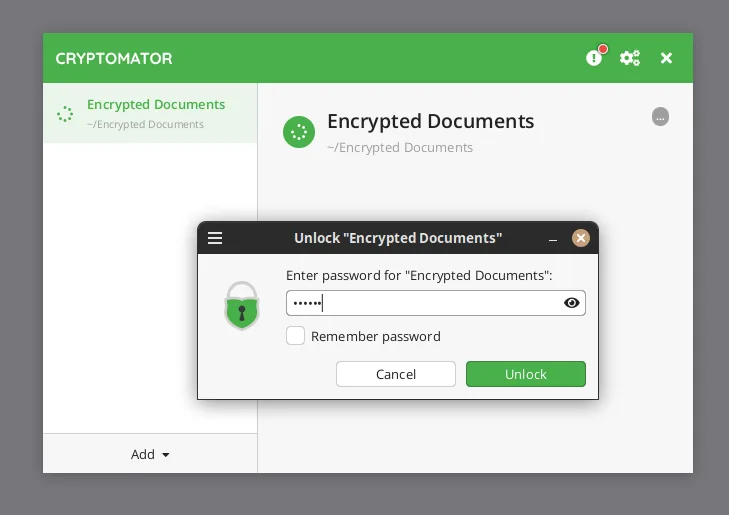

Cryptomator is a desktop app for Windows, macOS and Linux that encrypts files on your computer before they sync to a cloud folder. It works alongside a sync service such as Nextcloud or Syncthing rather than replacing it.
This listing covers the desktop app in this repository. The README says the project is dual-licensed: GPL-3.0 for free and open-source use, plus a commercial license for software vendors and resellers. The project’s mobile apps are separate products and are not covered here.
Quick start
Checked against the project’s own documentation on November 9, 2026. We have not run these installs ourselves. Commands are copied from the project’s pages, or from Flathub and Homebrew where the section says so.
Linux, Windows and macOS
The Flathub package is verified by its publisher:
flatpak install flathub org.cryptomator.CryptomatorOr download the installer for your system from cryptomator.org/downloads and run it. Homebrew has a cask for it. That is Homebrew’s packaging, not the project’s own:
brew install --cask cryptomatorWhat it does
Cryptomator makes an encrypted vault folder inside a folder you choose (for example one your cloud storage app already syncs). When you unlock it, Cryptomator shows the decrypted contents as a virtual drive. Whatever you put on that drive is stored encrypted in the vault folder.
NixOS
nixpkgs packages Cryptomator as cryptomator (source: pkgs/by-name/cr/cryptomator/package.nix):
environment.systemPackages = [ pkgs.cryptomator ];Rebuild with sudo nixos-rebuild switch, then launch Cryptomator from the application menu.
First steps
- Open Cryptomator and choose Add Vault > Create New Vault.
- The wizard asks for a vault name, where to store it, and a password. It can also show a recovery key. The recovery key lets you set a new password if you forget the old one, so store it as carefully as the password.
- Unlock the vault and copy a test file onto the new drive. Lock it and confirm the file is no longer visible.
- Don’t put your only copy of anything in a new vault until you’ve unlocked it again and read the file back.
Sources: adding vaults and password and recovery key.
Linux, Windows and macOS · Client-side encryption for files you keep in cloud storage. Paste into your AI assistant. It may only be able to guide you. Review changes before running anything.
Researched, not run by the Index. Checked 2026-11-12. No AI account or connection is needed here.
Read or copy the prompt manually
NixOS · Client-side encryption for files you keep in cloud storage. Paste into your AI assistant. It may only be able to guide you. Review changes before running anything.
Researched, not run by the Index. Checked 2026-11-12. No AI account or connection is needed here.
Read or copy the prompt manually
Tags: Security