Privacy & access
SimpleX Chat
Messenger with no user identifiers of any kind.
Release notes / v7.1.3
Released 2026-11-11. Snapshot from the included release data, not a live check.
New in v7.1-7.1.3: Supporter badges: larger files, available for longer. SimpleX public names: sale starts on December 12. Safer channels: add moderators and sign every message. Flat layout and markdown: enable in Appearance settings. Get your badge: https://simplex.chat/badges/ Read more about SimpleX public names: https://simplex.domains Commits: - ios: update to 371 v7.1.2, reduce app size (#8129) - android, desktop: show What's new once while conditions are pending (#812…
Read the full release notes on GitHub ↗Available on these platforms
Use the official download selector for desktop or phone. Mobile and desktop features and release availability can differ.
Compatibility details and official sources
Official availability checked 2026-11-12. Availability is not feature parity. The recorded release and license refer to the linked source project; separate clients can differ. No install or compatibility test was run.
Before you install
Messaging with no user identifiers at all.
- How do people find me?
- They do not, by default: contacts connect through one-time links or QR codes. No user IDs exist to look up.
- Should I trust it for sensitive talk?
- Read the linked Trail of Bits security assessment and the project's documentation first, then decide.
- What is the license?
- The code is AGPL-3.0 and the protocols are described as open and public domain; the SimpleX names and logos are not covered by that license.
Advice and funding routes source-checked November 12, 2026. Researched, not an install or restore test. Installation source ↗ · Report a correction
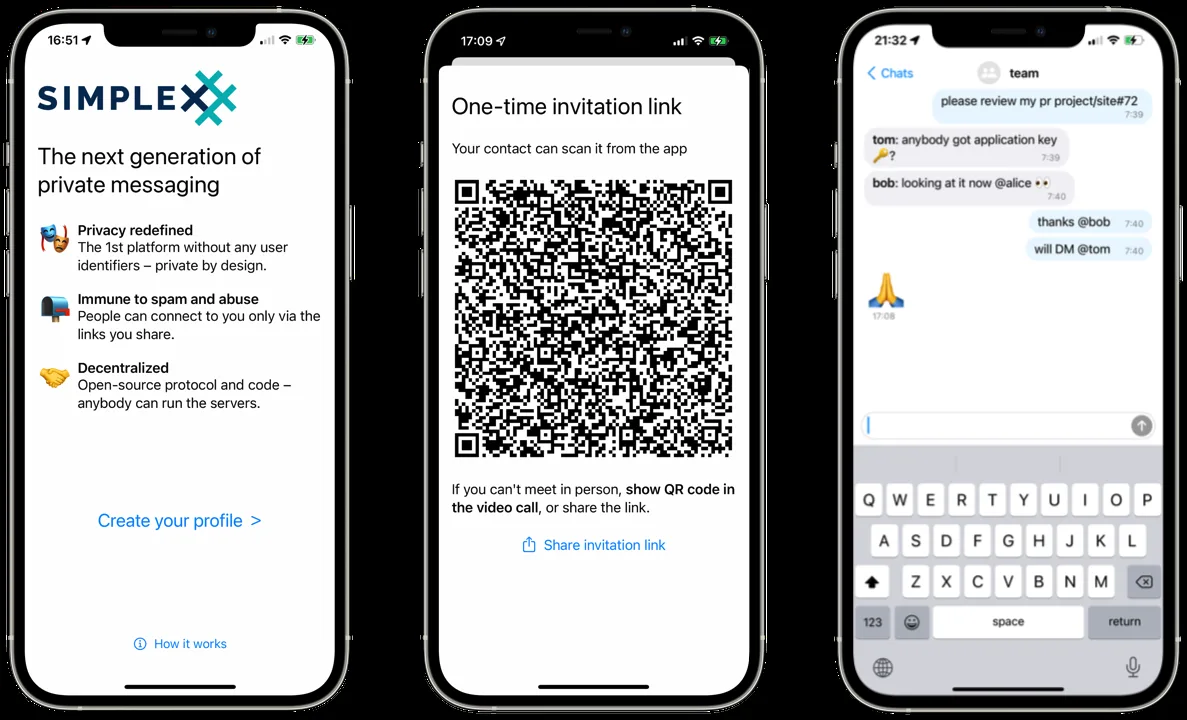

SimpleX Chat is a messaging app that does not assign user identifiers. The README says an implementation security assessment by Trail of Bits is linked from the project; read it and the project’s own documentation before trusting it with anything sensitive.
The repository is licensed under the AGPL-3.0. The README adds that the SimpleX and SimpleX Chat names, logos and branding are not covered by that license. The protocols are described as open and in the public domain.
Quick start
Checked against the project’s own documentation on November 9, 2026. We have not run these installs ourselves. Commands are copied from the project’s pages, or from Flathub and Homebrew where the section says so.
Linux, Windows and macOS
Download from simplex.chat/downloads. The page lists a Linux AppImage for x86_64 and aarch64, a Windows x86_64 build, and macOS builds for Apple Silicon and Intel.
Homebrew has a cask for it. That is Homebrew’s packaging, not the project’s own:
brew install --cask simplexLinux Flatpak
The Flathub package is verified by its publisher:
flatpak install flathub chat.simplex.simplexNixOS
nixpkgs packages SimpleX Chat as simplex-chat-desktop (source: pkgs/by-name/si/simplex-chat-desktop/package.nix):
environment.systemPackages = [ pkgs.simplex-chat-desktop ];Rebuild with sudo nixos-rebuild switch, then launch SimpleX Chat from the application menu.
First steps
- Open the app and choose Create your profile on desktop. Enter a profile name. It is stored on your device.
- You have no account or ID on the network, so nobody can contact you until you share a one-time invitation link or a contact address.
- Create a one-time link for each person, send it to them over any channel, and they connect with it.
Sources: SimpleX guide and making connections.
Linux, Windows and macOS · Messenger with no user identifiers of any kind. Paste into your AI assistant. It may only be able to guide you. Review changes before running anything.
Researched, not run by the Index. Checked 2026-11-12. No AI account or connection is needed here.
Read or copy the prompt manually
Linux Flatpak · Messenger with no user identifiers of any kind. Paste into your AI assistant. It may only be able to guide you. Review changes before running anything.
Researched, not run by the Index. Checked 2026-11-12. No AI account or connection is needed here.
Read or copy the prompt manually
NixOS · Messenger with no user identifiers of any kind. Paste into your AI assistant. It may only be able to guide you. Review changes before running anything.
Researched, not run by the Index. Checked 2026-11-12. No AI account or connection is needed here.
Read or copy the prompt manually
Tags: Communication