Privacy & access
Signal
Private messaging and calls, with phone apps and a linked desktop client.
Release notes / v8.35.0
Released 2026-11-11. Snapshot from the included release data, not a live check.
- Small tweaks, bug fixes, and performance enhancements. Thanks for using Signal!
Read the full release notes on GitHub ↗Available on these platforms
This listing and recorded release cover Signal Desktop. The phone apps have their own source repositories and releases. Signal Desktop must link to Signal installed on a phone; it is not an independent phone-free account.
Compatibility details and official sources
Official availability checked 2026-11-12. Availability is not feature parity. The recorded release and license refer to the linked source project; separate clients can differ. No install or compatibility test was run.
Before you install
The desktop app is a companion to your phone.
- Do I need the phone app?
- Yes: Signal Desktop links to the Signal account on your phone. It is not a standalone account, so set up the phone app first.
- What is open source here?
- The client code. The messaging service it connects to is run by Signal - using the app means using their service.
- Where do messages live?
- On your devices. They sync from the phone at link time, and disappearing messages still disappear.
Advice and funding routes source-checked November 12, 2026. Researched, not an install or restore test. Installation source ↗ · Report a correction
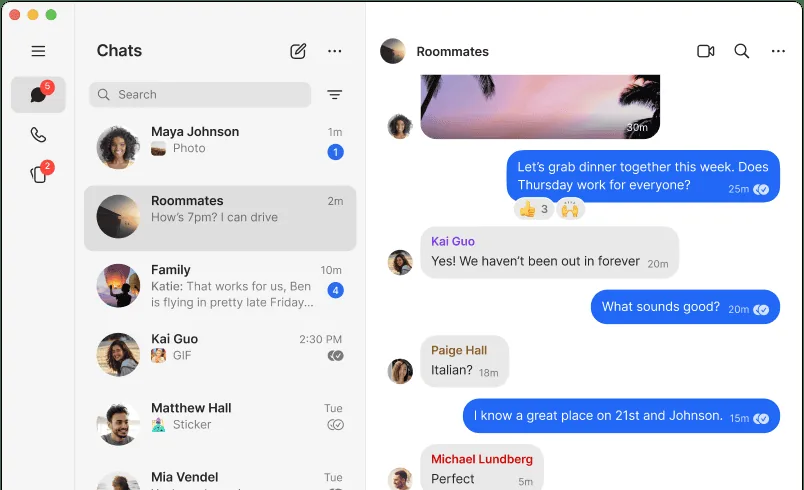
Signal is a private messenger with open-source phone and desktop apps. This page keeps the existing desktop setup instructions and source link; the platform section links the Android and iOS clients separately. Signal Desktop links to your Signal account on a phone.
The client code is open source. The messaging service it connects to is run by Signal, so using the app means using their service.
Quick start
Checked against the project’s own documentation on November 9, 2026. We have not run these installs ourselves. Commands are copied from the project’s pages, or from Flathub and Homebrew where the section says so.
Debian and Ubuntu
From signal.org/download/linux, for 64-bit Debian-based systems:
curl https://updates.signal.org/desktop/apt/keys.asc | gpg --dearmor > signal-desktop-keyring.gpg
cat signal-desktop-keyring.gpg | sudo tee /usr/share/keyrings/signal-desktop-keyring.gpg > /dev/null
curl -o signal-desktop.sources https://updates.signal.org/static/desktop/apt/signal-desktop.sources
cat signal-desktop.sources | sudo tee /etc/apt/sources.list.d/signal-desktop.sources > /dev/null
sudo apt update && sudo apt install signal-desktop
The page also offers an AppImage with a signing key for other distributions.
Windows and macOS
Signal Desktop is linked to the Signal app on your phone, so install Signal on your phone first. Then download the desktop app from signal.org/download.
Homebrew has a cask for it. That is Homebrew’s packaging, not the project’s own:
brew install --cask signalNixOS
nixpkgs packages Signal as signal-desktop (source: pkgs/by-name/si/signal-desktop/package.nix):
environment.systemPackages = [ pkgs.signal-desktop ];Rebuild with sudo nixos-rebuild switch, then launch Signal from the application menu and link your phone.
First steps
- Open Signal Desktop. It shows a QR code.
- On your phone, open Signal and scan the code with its linked devices screen. See Signal’s Linked Devices article.
- Your messages then show on both devices.
Debian and Ubuntu · Private messaging and calls, with phone apps and a linked desktop client. Paste into your AI assistant. It may only be able to guide you. Review changes before running anything.
Researched, not run by the Index. Checked 2026-11-12. No AI account or connection is needed here.
Read or copy the prompt manually
Windows and macOS · Private messaging and calls, with phone apps and a linked desktop client. Paste into your AI assistant. It may only be able to guide you. Review changes before running anything.
Researched, not run by the Index. Checked 2026-11-12. No AI account or connection is needed here.
Read or copy the prompt manually
NixOS · Private messaging and calls, with phone apps and a linked desktop client. Paste into your AI assistant. It may only be able to guide you. Review changes before running anything.
Researched, not run by the Index. Checked 2026-11-12. No AI account or connection is needed here.
Read or copy the prompt manually
Tags: Communication