Work & organize
Ledger
The original command-line double-entry accounting system, using plain text files.
Release notes / v3.4.1
Released 2025-10-26. Snapshot from the included release data, not a live check.
- Fix version number in binary
Read the full release notes on GitHub ↗Available on these platforms
The owning build documentation covers Linux and macOS workflows. A source reference to Windows/Python output is not enough to claim a normal supported Windows distribution. Other clients and wrappers are separate projects.
Compatibility details and official sources
Official availability checked 2026-11-12. Availability is not feature parity. The recorded release and license refer to the linked source project; separate clients can differ. No install or compatibility test was run.
Before you install
The original plain-text accounting tool.
- Why choose Ledger?
- It is the 2003 command-line original that inspired hledger and Beancount. Pick it if you want the classic.
- Where does my data live?
- In a text file of transactions; reports come from running ledger against it. Nothing leaves your machine.
- How do I install it?
- Distribution packages on Linux, Homebrew on macOS.
Advice and funding routes source-checked November 12, 2026. Researched, not an install or restore test. Installation source ↗ · Report a correction
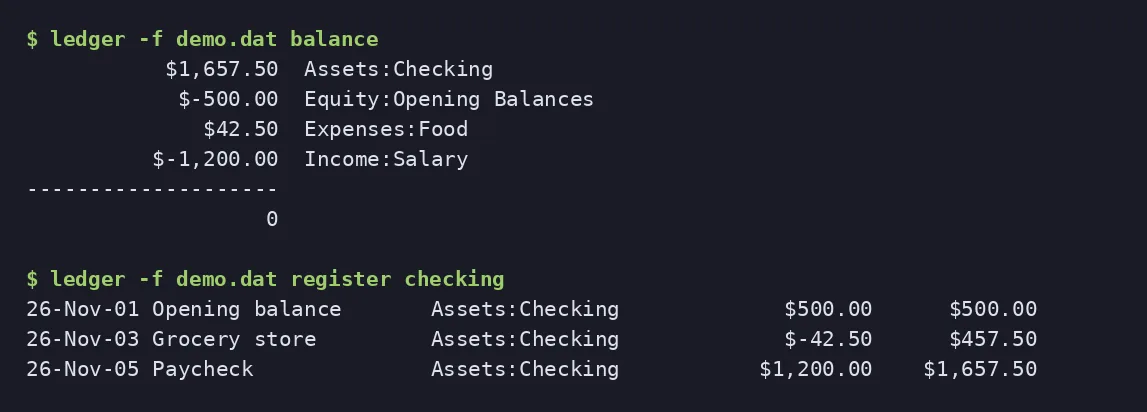
Ledger is a double-entry accounting program for the Unix command line. You keep transactions in a text file and run reports on them. The project’s site says it began in 2003, is written by John Wiegley, and has inspired ports in other languages, including hledger. Beancount takes a different approach with its own file format.
The repository’s LICENSE.md is the BSD 3-clause license. GitHub labels it “Other”, but the text has the three clauses, including no endorsement.
Quick start
Checked against the project’s own documentation on November 9, 2026. We have not run these installs ourselves. Commands are copied from the project’s pages, or from Flathub and Homebrew where the section says so.
Linux and macOS
Debian-family systems package ledger, and Homebrew has a ledger formula. Both are third-party packaging.
brew install ledgerWindows and building
We didn’t find an official Windows installer. The project’s README describes building from source, with Homebrew or MacPorts helping on macOS, and also mentions a Docker route. On Windows, WSL with the Linux package may work, but we haven’t verified that against the project’s docs.
NixOS
nixpkgs packages Ledger as ledger (source: pkgs/by-name/le/ledger/package.nix):
environment.systemPackages = [ pkgs.ledger ];Rebuild with sudo nixos-rebuild switch, then run ledger bal on your journal from a terminal.
First steps
Create a plain-text journal, for example journal.ledger:
2026/11/01 Opening balance
    Assets:Checking        $1000.00
    Equity:Opening

2026/11/02 Groceries
    Expenses:Food            $25.00
    Assets:Checking
Then:
ledger -f journal.ledger balance
ledger -f journal.ledger register
The Ledger 3 manual explains the file format and every report. Ledger and hledger read very similar files.
Linux and macOS · The original command-line double-entry accounting system, using plain text files. Paste into your AI assistant. It may only be able to guide you. Review changes before running anything.
Researched, not run by the Index. Checked 2026-11-12. No AI account or connection is needed here.
Read or copy the prompt manually
Windows and building · The original command-line double-entry accounting system, using plain text files. Paste into your AI assistant. It may only be able to guide you. Review changes before running anything.
Researched, not run by the Index. Checked 2026-11-12. No AI account or connection is needed here.
Read or copy the prompt manually
NixOS · The original command-line double-entry accounting system, using plain text files. Paste into your AI assistant. It may only be able to guide you. Review changes before running anything.
Researched, not run by the Index. Checked 2026-11-12. No AI account or connection is needed here.
Read or copy the prompt manually
Tags: Finance