Work & organize
Taskwarrior
Command-line task management.
Release notes / v3.5.0
Released 2026-08-16. Snapshot from the included release data, not a live check.
## What's Changed * #3961 - allow hyphens in tags (@smemsh) * #4111 - Git sync (@carmiac) * #4127 - Dependency performance improvement (@ashprice) * #4136 - Burndown performance improvement (@ashprice) * #4124 - Move default theme into a dedicated file (@dud-eisme) * #4144 - Fix handling of `scheduled` in recurring tasks (@ashprice, @scompo) ## New Contributors * @daeho-ro made their first contribution in https://github.com/GothenburgBitFactory/taskwarrior/pull/3976 * @gonsoos made their first contribution in https://github.com/GothenburgBitFactory/taskwarrior/pull/3998 * @ra
Read the full release notes on GitHub ↗Available on these platforms
The current project page says Cygwin is no longer supported and recommends Windows Subsystem for Linux. Phone clients are separate projects and are not counted here.
Compatibility details and official sources
- Linux - Command-line task manager
- macOS - Command-line task manager
- Windows - Through WSL, not native Windows
Official availability checked 2026-11-12. Availability is not feature parity. The recorded release and license refer to the linked source project; separate clients can differ. No install or compatibility test was run.
Before you install
To-do lists at the speed of the terminal.
- Is it for me?
- If you prefer the keyboard: tags, priorities, due dates and filters. For a web interface with sharing, see Vikunja.
- Which package?
- Your distribution packages it (task or taskwarrior3 depending on the distro); Homebrew on macOS.
- Where do my tasks live?
- In local files - easy to back up or sync yourself. A separate sync server exists but is optional.
Advice and funding routes source-checked November 12, 2026. Researched, not an install or restore test. Installation source ↗ · Report a correction
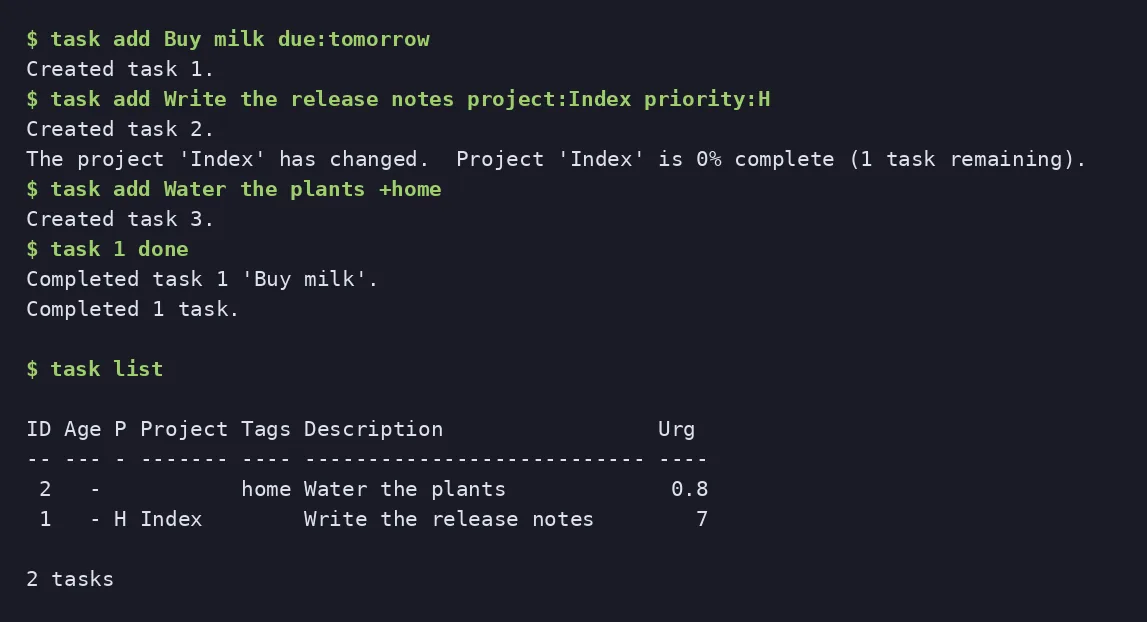
Taskwarrior manages to-do lists from the terminal, with tags, priorities, due dates and filters. It is a good fit if you prefer the keyboard. For a web interface with sharing, see Vikunja.
Quick start
Checked against the project’s own documentation on November 9, 2026. We have not run these installs ourselves. Commands are copied from the project’s pages, or from Flathub and Homebrew where the section says so.
Linux and macOS
Your distribution probably packages it. From the project’s download page: Debian and Ubuntu sudo apt-get install taskwarrior, Fedora sudo dnf install task, Arch pacman -S task, NixOS nix-env -i taskwarrior3. On macOS, Homebrew has it:
brew install taskTo build from source, the download page gives:
tar xzvf task-3.5.0.tar.gz
cd task-3.5.0
cmake -S . -B build -DCMAKE_BUILD_TYPE=Release
cmake --build build
sudo cmake --install build
The task program must be on your PATH.
Windows
Taskwarrior no longer supports Cygwin. The project’s download page says to use the Windows Subsystem for Linux, then install it the Linux way inside WSL.
NixOS
On NixOS the client installs with nix profile install nixpkgs#taskwarrior3. nixpkgs also carries a module for Taskwarrior 3’s own sync server (source: nixos/modules/services/misc/taskchampion-sync-server.nix):
services.taskchampion-sync-server = {
  enable = true;
  host = "0.0.0.0"; # default serves 127.0.0.1 only
  port = 10222;
};
Apply with sudo nixos-rebuild switch, then point clients at it with task config sync.server.url http://your-host:10222 and create a client ID per the module’s documentation. The older services.taskserver module is for the deprecated Taskwarrior 2 protocol and does not apply to Taskwarrior 3.
First steps
task add Buy milk
task add Prepare the first draft of the proposal due:friday
task list
task 1 done
On first run task asks whether to create its config file and data folder. See the getting started page.
Linux and macOS · Command-line task management. Paste into your AI assistant. It may only be able to guide you. Review changes before running anything.
Researched, not run by the Index. Checked 2026-11-12. No AI account or connection is needed here.
Read or copy the prompt manually
Windows · Command-line task management. Paste into your AI assistant. It may only be able to guide you. Review changes before running anything.
Researched, not run by the Index. Checked 2026-11-12. No AI account or connection is needed here.
Read or copy the prompt manually
NixOS · Command-line task management. Paste into your AI assistant. It may only be able to guide you. Review changes before running anything.
Researched, not run by the Index. Checked 2026-11-12. No AI account or connection is needed here.
Read or copy the prompt manually
Tags: Productivity