Files & sharing
restic
Fast, secure command-line backup program.
Release notes / v0.19.1
Released 2026-07-05. Snapshot from the included release data, not a live check.
Changelog for restic 0.19.1 (2026-07-05) ======================================= The following sections list the changes in restic 0.19.1 relevant to restic users. The changes are ordered by importance. Summary ------- * Fix [#5234](https://github.com/restic/restic/issues/5234): Prevent mounting over the repository directory * Fix [#5667](https://github.com/restic/restic/issues/5667): Skip inaccessible `backup` source paths * Fix [#5722](https://github.com/restic/restic/issues/5722): Update `mount` latest symlink after snapshot reload * Fix [#21866](https://github.com/restic/
Read the full release notes on GitHub ↗Available on these platforms
Choose the official package for your OS version and processor. This does not imply a phone app or identical features on every platform.
Compatibility details and official sources
Official availability checked 2026-11-12. Availability is not feature parity. The recorded release and license refer to the linked source project; separate clients can differ. No install or compatibility test was run.
Before you install
Scriptable, encrypted, deduplicated backups.
- When restic?
- A single binary for cron jobs and scripts: encrypted, deduplicated snapshots to local or remote backends. Choose Kopia if you want a graphical app.
- What should I do on day one?
- Run restic restore on one snapshot early. Backups that were never restored are hopes, not backups.
- What must I protect?
- The repository password - the only key to your data. Store it somewhere separate from the machine being backed up.
Advice and funding routes source-checked November 12, 2026. Researched, not an install or restore test. Installation source ↗ · Report a correction
restic is a command-line backup program that stores encrypted, deduplicated snapshots in a local folder or on a remote backend. It is a single binary and fits scripts and scheduled jobs.
Choose Kopia instead if you want a graphical app.
Quick start
Checked against the project’s own documentation on November 9, 2026. We have not run these installs ourselves. Commands are copied from the project’s pages, or from Flathub and Homebrew where the section says so.
Linux and macOS
From the installation docs. Choose the one line for your system. Do not run them all:
apt-get install restic   # Debian
dnf install restic       # Fedora
pacman -S restic         # Arch
zypper install restic    # openSUSE
brew install restic      # macOS
Distribution packages can be older than the current release. The page also covers a Docker image and downloading the binary.
Windows
Choose one of these. Do not run them all.
scoop install restic
winget install --exact --id restic.restic --scope Machine
The docs recommend --scope Machine with WinGet for system-wide backups.
NixOS
nixpkgs carries a module (source: nixos/modules/services/backup/restic.nix) that runs restic backups as systemd services with timers. One named job per backup set:
services.restic.backups.home = {
  repository = "s3:https://s3.example.com/backups/home";
  passwordFile = "/run/secrets/restic-password"; # keep outside the Nix store
  paths = [ "/home" ];
  timerConfig = {
    OnCalendar = "daily";
    Persistent = true;
  };
};
Apply with sudo nixos-rebuild switch. The first run initializes the repository; afterwards systemctl start restic-backups-home runs it by hand and the timer runs it daily. Credentials such as S3 keys go in environmentFile, also kept outside the Nix store.
First steps
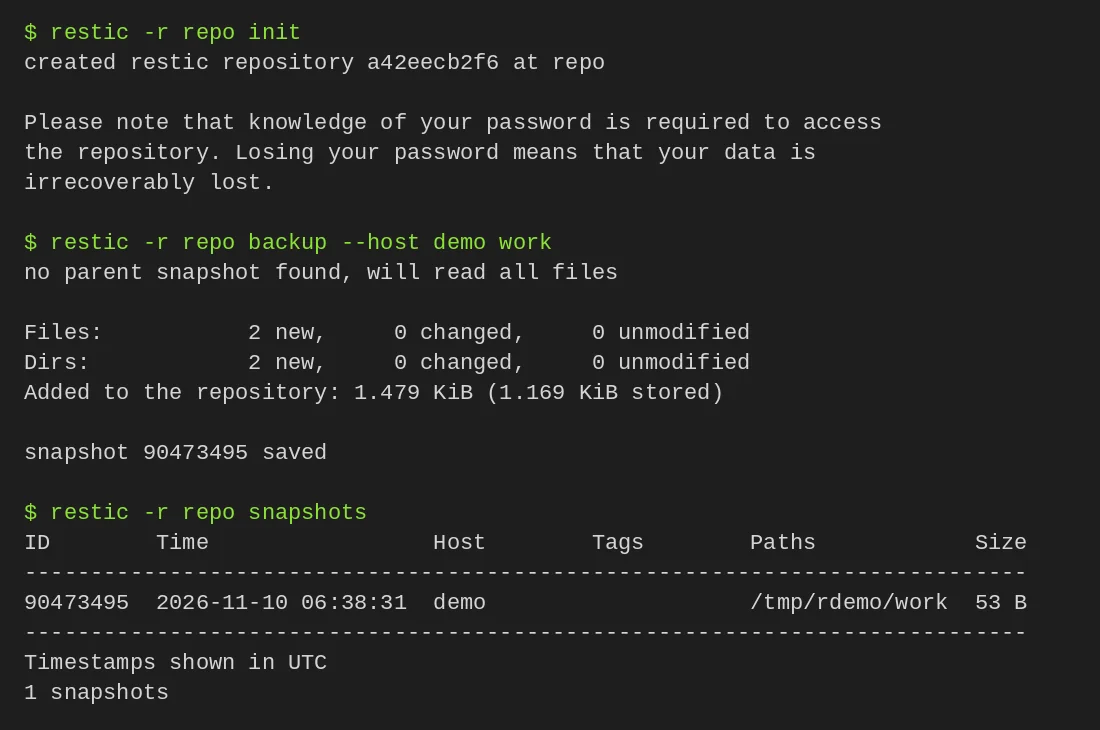
Create a repository somewhere other than the disk you’re backing up. restic asks for a password and encrypts everything with it. If you lose the password the backup can’t be read.
restic -r /path/to/repo init
restic -r /path/to/repo backup ~/work
restic -r /path/to/repo snapshots
Test a restore into a new, empty folder, never over your live files:
restic -r /path/to/repo restore --target /tmp/restore-work SNAPSHOT_ID
restic -r /path/to/repo check
Don’t use forget or prune until you’ve read the documentation, because they delete backup data.
Linux and macOS · Fast, secure command-line backup program. Paste into your AI assistant. It may only be able to guide you. Review changes before running anything.
Researched, not run by the Index. Checked 2026-11-12. No AI account or connection is needed here.
Read or copy the prompt manually
Windows · Fast, secure command-line backup program. Paste into your AI assistant. It may only be able to guide you. Review changes before running anything.
Researched, not run by the Index. Checked 2026-11-12. No AI account or connection is needed here.
Read or copy the prompt manually
NixOS · Fast, secure command-line backup program. Paste into your AI assistant. It may only be able to guide you. Review changes before running anything.
Researched, not run by the Index. Checked 2026-11-12. No AI account or connection is needed here.
Read or copy the prompt manually
Tags: Backup