Files & sharing
Kopia
Cross-platform backup tool with fast, incremental backups and both a GUI and a command line.
Release notes / v0.23.1
Released 2026-06-16. Snapshot from the included release data, not a live check.
<a name="v0.23.1"></a> ### Summary Kopia v0.23.1. is a bugfix release which fixes a rare race condition which might lead to a data loss - an upgrade is recommended - See https://github.com/kopia/kopia/issues/5371 ### Repository * Basic tests for getting epoch manager blob set ([#5418](https://github.com/kopia/kopia/issues/5418)) by Julio López * selection of next epoch to compact ([#5373](https://github.com/kopia/kopia/issues/5373)) by Julio López ### Storage Providers * no_extra_providers build tag ([#5375](https://github.com/kopia/kopia/issues/5375)) by Julio López ###
Read the full release notes on GitHub ↗Available on these platforms
Choose the official package for your OS version and processor. This does not imply a phone app or identical features on every platform.
Compatibility details and official sources
Official availability checked 2026-11-12. Availability is not feature parity. The recorded release and license refer to the linked source project; separate clients can differ. No install or compatibility test was run.
Before you install
Encrypted, deduplicated backups with a GUI or a CLI.
- What does it do?
- Incremental snapshots to local disks, network storage or cloud storage. The same repository works from the command line or the desktop app.
- What should I do on day one?
- A trial restore of one folder. A backup you have never restored from is a hope, not a backup.
- Kopia or restic?
- restic is the command-line-first alternative; Kopia adds the desktop app.
Advice and funding routes source-checked November 12, 2026. Researched, not an install or restore test. Installation source ↗ · Report a correction
Kopia backs up folders to local disks, network storage or cloud storage with incremental snapshots. The same data can be managed from the command line or the desktop app.
It is one of two backup listings. restic is a command-line-first alternative.
Quick start
Checked against the project’s own documentation on November 9, 2026. We have not run these installs ourselves. Commands are copied from the project’s pages, or from Flathub and Homebrew where the section says so.
Linux
The guide lists an APT repository for Debian and Ubuntu (it covers both the command line tool and KopiaUI) and Docker images. Follow its Linux section for the repository setup. We don’t copy those steps here so they stay current.
Windows and macOS
winget install Kopia.KopiaCLI
winget install Kopia.KopiaUI
The installation guide also offers Scoop (scoop bucket add kopia https://github.com/kopia/scoop-bucket.git then scoop install kopia), a KopiaUI-Setup installer for Windows, and Homebrew on macOS (brew install kopia for the CLI, brew install --cask kopiaui for the app).
NixOS
nixpkgs packages Kopia as kopia (source: pkgs/by-name/ko/kopia/package.nix):
environment.systemPackages = [ pkgs.kopia ];Rebuild with sudo nixos-rebuild switch, then run kopia commands from a terminal; kopia server start serves its web UI.
First steps
Before anything else you need somewhere to store the backup. Kopia doesn’t provide storage, so pick a folder on another drive, a NAS, or a cloud bucket you already pay for.
With the command line, from the project’s getting started guide:
kopia repository create filesystem --path /path/to/backup-folderIt asks for a password that encrypts everything. Keep that password safe, because without it the backup can’t be read. Then back up one folder and list what you have:
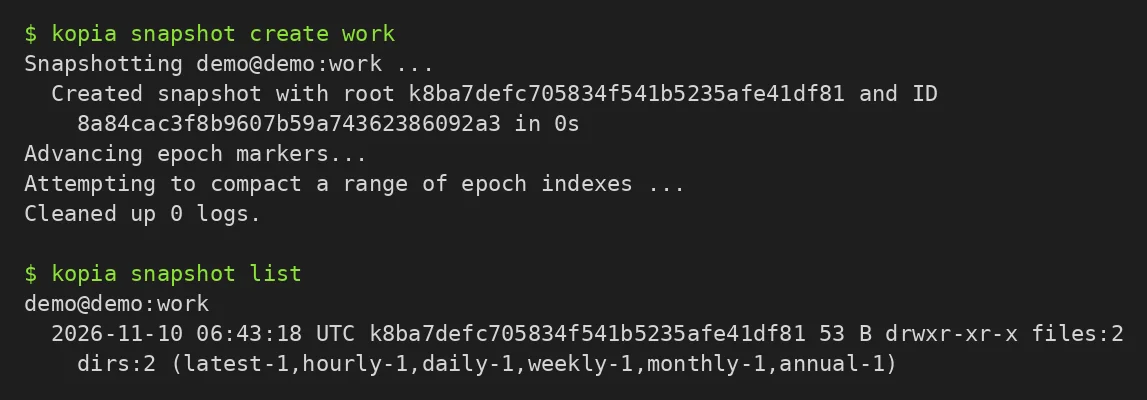
kopia snapshot create ~/Documents
kopia snapshot list
In KopiaUI, create the repository in the setup screen, then add a policy for the folder in the Policies tab. Browse a snapshot to restore single files. Test a restore of one file before relying on it.
Linux · Cross-platform backup tool with fast, incremental backups and both a GUI and a command line. Paste into your AI assistant. It may only be able to guide you. Review changes before running anything.
Researched, not run by the Index. Checked 2026-11-12. No AI account or connection is needed here.
Read or copy the prompt manually
Windows and macOS · Cross-platform backup tool with fast, incremental backups and both a GUI and a command line. Paste into your AI assistant. It may only be able to guide you. Review changes before running anything.
Researched, not run by the Index. Checked 2026-11-12. No AI account or connection is needed here.
Read or copy the prompt manually
NixOS · Cross-platform backup tool with fast, incremental backups and both a GUI and a command line. Paste into your AI assistant. It may only be able to guide you. Review changes before running anything.
Researched, not run by the Index. Checked 2026-11-12. No AI account or connection is needed here.
Read or copy the prompt manually
Tags: Backup