Media & photos
digiKam
Photo manager with tagging, face recognition, metadata editing and a raw workflow.
Version checked by hand on 2026-11-10. Snapshot from the included release data, not a live check.
No release-notes excerpt is recorded here.
Open the project's release source ↗Available on these platforms
Check the official download page for the supported OS version and processor architecture. A desktop download is not evidence of a native phone app.
Compatibility details and official sources
Official availability checked 2026-11-12. Availability is not feature parity. The recorded release and license refer to the linked source project; separate clients can differ. No install or compatibility test was run.
Before you install
A librarian for big photo collections, on your disk.
- Which package?
- The download page's AppImage (needs glibc 2.31 or newer) is the direct route on Linux; installers cover Windows and macOS.
- Where does my data live?
- Your photos stay where they are; digiKam catalogs them in its own database files. Tags can be written into file metadata if you choose.
- digiKam or darktable?
- digiKam organizes; darktable develops RAW files. Many people point both at the same folders.
Advice and funding routes source-checked November 12, 2026. Researched, not an install or restore test. Installation source ↗ · Report a correction
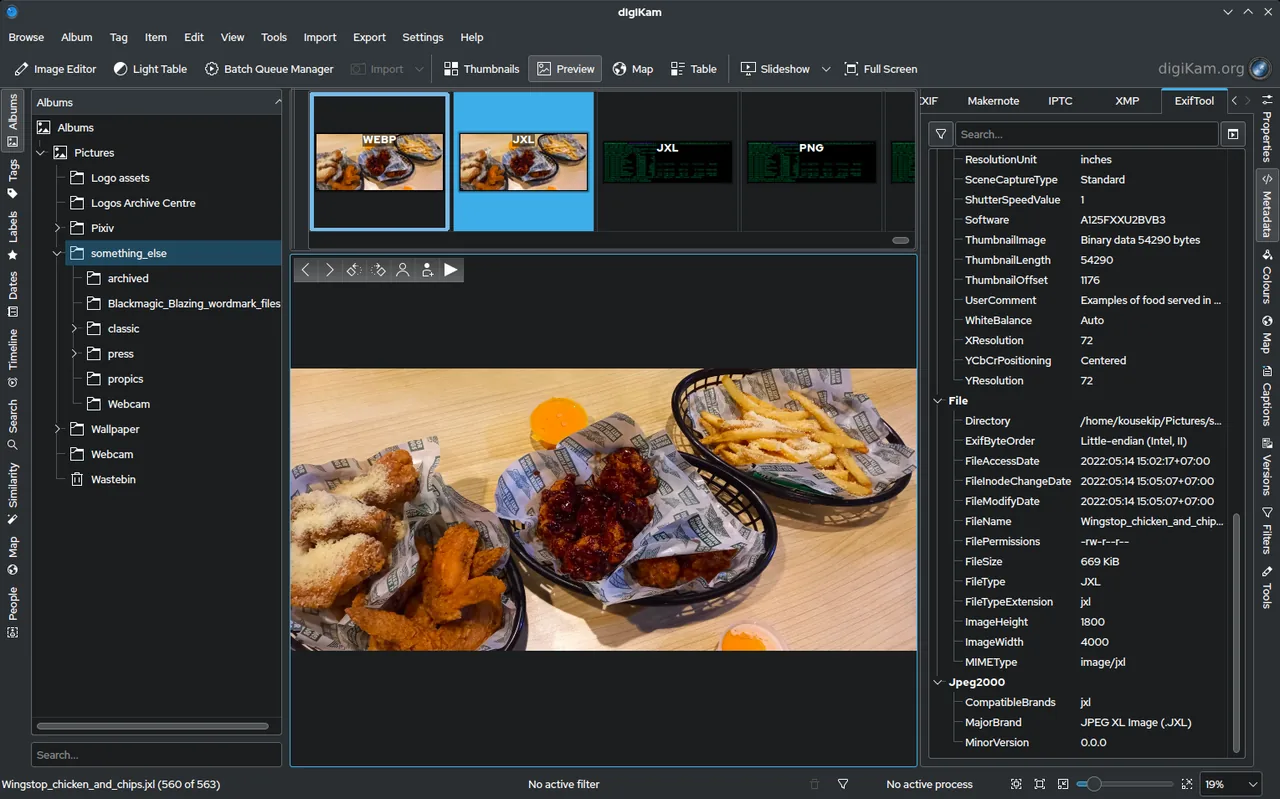

digiKam organizes large photo collections on your own computer. It handles tagging, ratings, albums, face recognition and metadata, and includes basic editing and raw support. It is a KDE project.
It differs from darktable, which is built around developing raw photos, and from Immich, which is a self-hosted photo server you reach from a browser or phone.
The repository’s COPYING file points to the GPL version 2 or later text, and individual source files carry their own license notices. This listing follows that file.
Quick start
Checked against the project’s own documentation on November 9, 2026. We have not run these installs ourselves. Commands are copied from the project’s pages, or from Flathub and Homebrew where the section says so.
Linux
The download page offers an Intel AppImage (it needs glibc 2.31 or newer) and suggests AppImageLauncher for desktop integration.
Flathub lists this app as verified by its publisher (checked on the Flathub API on November 9, 2026):
flatpak install flathub org.kde.digikamThis needs Flatpak set up on your system first (see flatpak.org/setup).
Windows and macOS
Installers are on the digiKam download page. The page also lists weekly pre-release snapshots; use the stable download unless you want to test.
NixOS
nixpkgs packages digiKam as digikam (source: pkgs/by-name/di/digikam/package.nix):
environment.systemPackages = [ pkgs.digikam ];Rebuild with sudo nixos-rebuild switch, then launch digiKam from the application menu.
First steps
- On first start digiKam asks a short series of setup questions. The first is where your photos live. Pick any local, removable or network folder. You can change every answer later.
- Each folder you register is a collection; its subfolders are albums. Add more under Settings > Configure digiKam > Collections.
- With the default SQLite setup, digiKam stores its databases in the collection folder, so keep that folder on storage you back up.
Sources: digiKam quick start and collection settings.
Linux · Photo manager with tagging, face recognition, metadata editing and a raw workflow. Paste into your AI assistant. It may only be able to guide you. Review changes before running anything.
Researched, not run by the Index. Checked 2026-11-12. No AI account or connection is needed here.
Read or copy the prompt manually
Windows and macOS · Photo manager with tagging, face recognition, metadata editing and a raw workflow. Paste into your AI assistant. It may only be able to guide you. Review changes before running anything.
Researched, not run by the Index. Checked 2026-11-12. No AI account or connection is needed here.
Read or copy the prompt manually
NixOS · Photo manager with tagging, face recognition, metadata editing and a raw workflow. Paste into your AI assistant. It may only be able to guide you. Review changes before running anything.
Researched, not run by the Index. Checked 2026-11-12. No AI account or connection is needed here.
Read or copy the prompt manually
Tags: Photos