Media & photos
UltiMaker Cura
Slicer that prepares 3D models for printing on FDM 3D printers.
Release notes / 5.14.0
Released 2026-11-05. Snapshot from the included release data, not a live check.
<H2>New features and improvements:</H2> **Paint-on-Support** You can now define custom support areas by manually by painting regions to enforce, avoid, or auto-generate supports using an interactive overhang angle slider. <img width="1280" height="720" alt="0" src="https://github.com/user-attachments/assets/d6b78ce1-694d-429b-ac66-3377efbde150" /> You can also **Paint Surface a surface** by selecting an entire contiguous faces or curved features in a single click to apply paint on support or **draw straight lines** for paint on support using Shift and Shift + Ctrl shortcuts. <img
Read the full release notes on GitHub ↗Available on these platforms
Check the official download page for the supported OS version and processor architecture. A desktop download is not evidence of a native phone app.
Compatibility details and official sources
Official availability checked 2026-11-12. Availability is not feature parity. The recorded release and license refer to the linked source project; separate clients can differ. No install or compatibility test was run.
Before you install
Slicing is local; the cloud extras are optional.
- Which package?
- The AppImage on Linux, or the project's installers for Windows and macOS. UltiMaker's cloud account features are optional, not required for slicing.
- Will it know my printer?
- Profiles exist for many printer brands, not just UltiMaker. Check your model in the printer list before committing.
- Cura or PrusaSlicer?
- Both are listed and both are free; trying the same model in each is normal.
Advice and funding routes source-checked November 12, 2026. Researched, not an install or restore test. Installation source ↗ · Report a correction
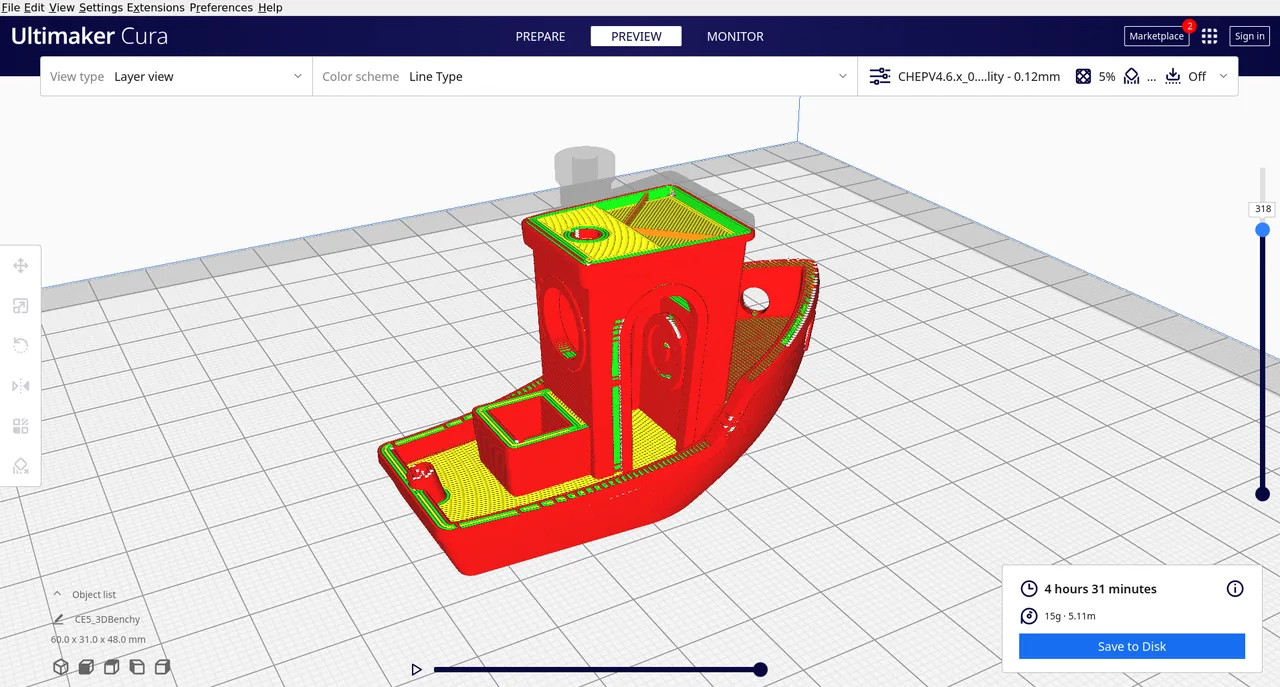

Cura turns a 3D model into instructions for a 3D printer. It sets layers, supports and print speed, and works with many printer brands.
The Cura application in the repository is under the GNU LGPL version 3. UltiMaker’s cloud services and some bundled printer or marketplace content are separate from this repository and are not covered by this listing. See also PrusaSlicer.
Quick start
Checked against the project’s own documentation on November 9, 2026. We have not run these installs ourselves. Commands are copied from the project’s pages, or from Flathub and Homebrew where the section says so.
Linux
The same page offers a Linux AppImage. Make it executable and run it:
chmod +x UltiMaker-Cura-*.AppImage
./UltiMaker-Cura-*.AppImage
Windows and macOS
Download the installer from UltiMaker’s Cura page. The page lists a Windows installer (.exe or enterprise .msi, including ARM64) and macOS .dmg files for Intel and Apple Silicon.
Homebrew has a cask for it. That is Homebrew’s packaging, not the project’s own:
brew install --cask ultimaker-curaNixOS
nixpkgs packages the official UltiMaker Cura AppImage as cura-appimage (source: pkgs/by-name/cu/cura-appimage/package.nix):
environment.systemPackages = [ pkgs.cura-appimage ];Rebuild with sudo nixos-rebuild switch, then launch Cura from the application menu.
First steps
- On first start Cura asks you to add a printer. Choose your printer model from the list.
- Open a model file (an STL, for example) and check it sits on the build plate.
- Pick a material and print profile in the recommended panel, then slice.
- Save the sliced file to a drive or send it to the printer, depending on what your printer accepts.
- Cura’s custom mode exposes every setting once the recommended mode isn’t enough.
Source: UltiMaker’s getting-started article.
Linux · Slicer that prepares 3D models for printing on FDM 3D printers. Paste into your AI assistant. It may only be able to guide you. Review changes before running anything.
Researched, not run by the Index. Checked 2026-11-12. No AI account or connection is needed here.
Read or copy the prompt manually
Windows and macOS · Slicer that prepares 3D models for printing on FDM 3D printers. Paste into your AI assistant. It may only be able to guide you. Review changes before running anything.
Researched, not run by the Index. Checked 2026-11-12. No AI account or connection is needed here.
Read or copy the prompt manually
NixOS · Slicer that prepares 3D models for printing on FDM 3D printers. Paste into your AI assistant. It may only be able to guide you. Review changes before running anything.
Researched, not run by the Index. Checked 2026-11-12. No AI account or connection is needed here.
Read or copy the prompt manually
Tags: Creative