Privacy & access
uBlock Origin
Efficient content blocker for Firefox and Chromium browsers.
Release notes / 1.76.0
Released 2026-11-08. Snapshot from the included release data, not a live check.
[Commits to master since this release](https://github.com/gorhill/uBlock/compare/1.76.0...master) [Commits since last release](https://github.com/gorhill/uBlock/compare/1.75.4...1.76.0) To install the stable build: - **Firefox**: Install from AMO: <https://addons.mozilla.org/en-US/firefox/addon/ublock-origin/> [uBO works best on Firefox](https://github.com/gorhill/uBlock/wiki/uBlock-Origin-works-best-on-Firefox) - **Chromium**: Install directly from [signed CRX package](https://github.com/gorhill/uBlock/releases/download/1.76.0/uBlock0_1.76.0.chromium.crx) - **Edge**: Install fro
Read the full release notes on GitHub ↗Available on these platforms
uBlock Origin documents Firefox desktop and Android support. Chrome removed the Manifest V2 listing on August 31, 2026; do not confuse uBlock Origin Lite with this project or promise Safari/iOS support.
Compatibility details and official sources
Official availability checked 2026-11-12. Availability is not feature parity. The recorded release and license refer to the linked source project; separate clients can differ. No install or compatibility test was run.
Before you install
Check your browser's extension rules first.
- Which browser?
- Firefox is the project's own recommendation. Chrome's store no longer carries full uBlock Origin - the separate uBlock Origin Lite is the official Manifest V3 option there.
- Is the store listing the real one?
- Install only through the links in the project's README, and check the developer identity and store entry ID. Lookalike extensions trade on the name.
- What does it change?
- It filters what pages load: ads, trackers, malware domains. It is not an antivirus, and an over-aggressive list can break sites - the per-site power button is the first fix.
Advice and funding routes source-checked November 12, 2026. Researched, not an install or restore test. Installation source ↗ · Report a correction
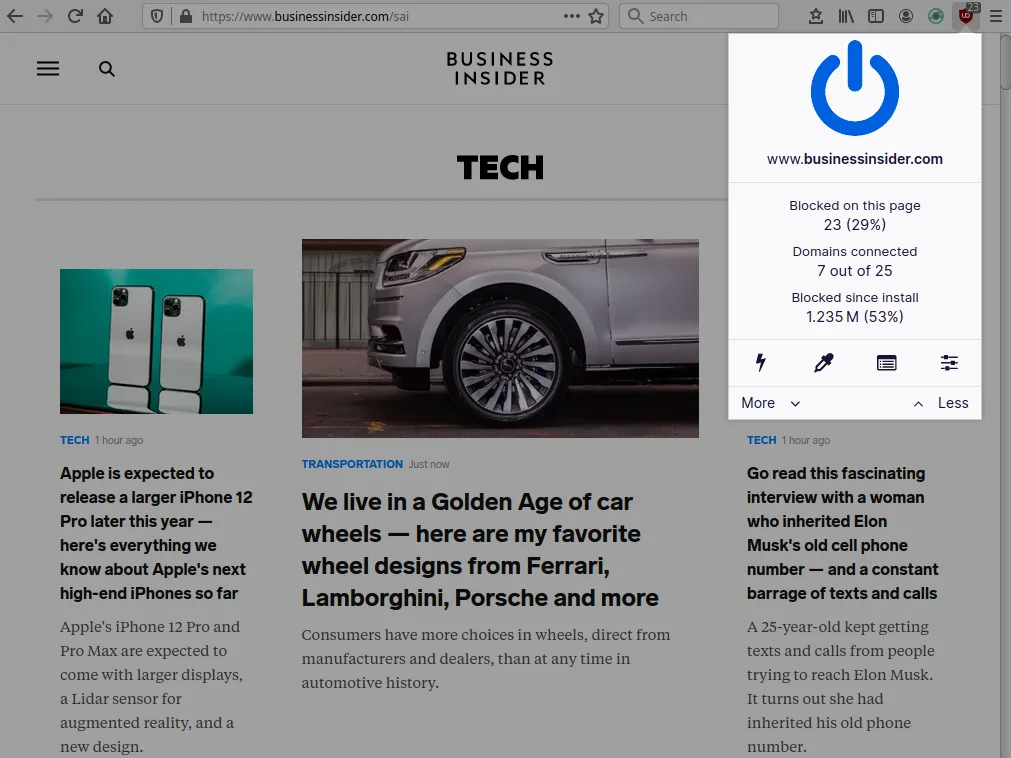
uBlock Origin is a browser extension that blocks ads, trackers and other unwanted content using filter lists. It runs inside your browser, with no server involved.
Browser vendors differ in how much extension blocking they allow; check the project’s own notes for your browser.
Quick start
Checked against the project’s own documentation on November 9, 2026. We have not run these installs ourselves. Commands are copied from the project’s pages, or from Flathub and Homebrew where the section says so.
Firefox, Edge and Opera
Install from your browser’s own add-on store, using the links in the project’s README. It says uBO works best on Firefox. The README also quotes Microsoft’s note that Edge is moving to Manifest V3 during 2026, so check it before you choose.
Chrome and Chromium
The README marks the Chrome Web Store listing as removed, because Google is removing Manifest V2 extensions, and points to uBlock Origin Lite as a related, separate extension. It also says Chromium MV2 builds are on GitHub Releases, must be installed by hand, and usually won’t auto-update. Check what your browser still allows first.
First steps
- After installing, click the uBO icon in the toolbar. The big power button turns blocking on or off for the current site.
- Open the dashboard to see the filter lists. The defaults include EasyList, EasyPrivacy and a malware list. Untick any list that breaks sites for you.
- If a page looks broken, turn uBO off for that site and reload before changing lists.
Source: uBlock Origin’s README.
Firefox, Edge and Opera · Add uBlock Origin to my browser from its official store listing. Paste into your AI assistant. It may only be able to guide you. Review changes before running anything.
Researched, not run by the Index. Checked 2026-11-12. No AI account or connection is needed here.
Read or copy the prompt manually
Chrome and Chromium · my options after the Chrome Web Store removed Manifest V2 extensions, including uBlock Origin Lite as a separate extension. Paste into your AI assistant. It may only be able to guide you. Review changes before running anything.
Researched, not run by the Index. Checked 2026-11-12. No AI account or connection is needed here.
Read or copy the prompt manually
Tags: Security