Work & organize
Trilium Notes
Rich notes in a linked hierarchy, with search, revisions and scripting.
Release notes / v0.107.0
Released 2026-11-08. Snapshot from the included release data, not a live check.
# v0.107.0 > [!NOTE] > If you enjoyed this release, consider showing a token of appreciation by: > > * Pressing the “Star” button on [GitHub](https://github.com/TriliumNext/Trilium) (top-right). > * Considering a one-time or recurrent donation to the [lead developer](https://github.com/eliandoran) via [GitHub Sponsors](https://github.com/sponsors/eliandoran) or [PayPal](https://paypal.me/eliandoran). > [!TIP] > For Linux users: Trilium is now available on [Flathub](https://flathub.org/en/apps/org.triliumnotes.Trilium)! This is the release where a text note stops being a single document. Notes can be embedded, quoted and referenced inside other notes and edited where they appear, laid out in columns and tabs, and mixed with drawings, attached files and video. Tables in text notes get…
Read the full release notes on GitHub ↗Available on these platforms
Official desktop apps are available for Linux, Windows and macOS. A server installation has a mobile browser interface. Native Android/iOS clients linked by the project are separate community projects, not the desktop source/version shown here.
Compatibility details and official sources
- Linux - Native desktop app
- Windows - Native desktop app
- macOS - Native desktop app
- Web - Browser interface to a Trilium server
Official availability checked 2026-11-12. Availability is not feature parity. The recorded release and license refer to the linked source project; separate clients can differ. No install or compatibility test was run.
Before you install
A large knowledge base, structured as a tree.
- What does it run on?
- A desktop app, a self-hosted server for sync and web access, or both - desktop apps can sync with your server.
- Where is my data?
- Notes, links, attributes and revisions live in your own database. A note can appear in more than one place without duplication.
- What will I maintain?
- Updates and database backups. This is a structured, power-user tool - richer than plain-Markdown notes.
Advice and funding routes source-checked November 12, 2026. Researched, not an install or restore test. Installation source ↗ · Report a correction
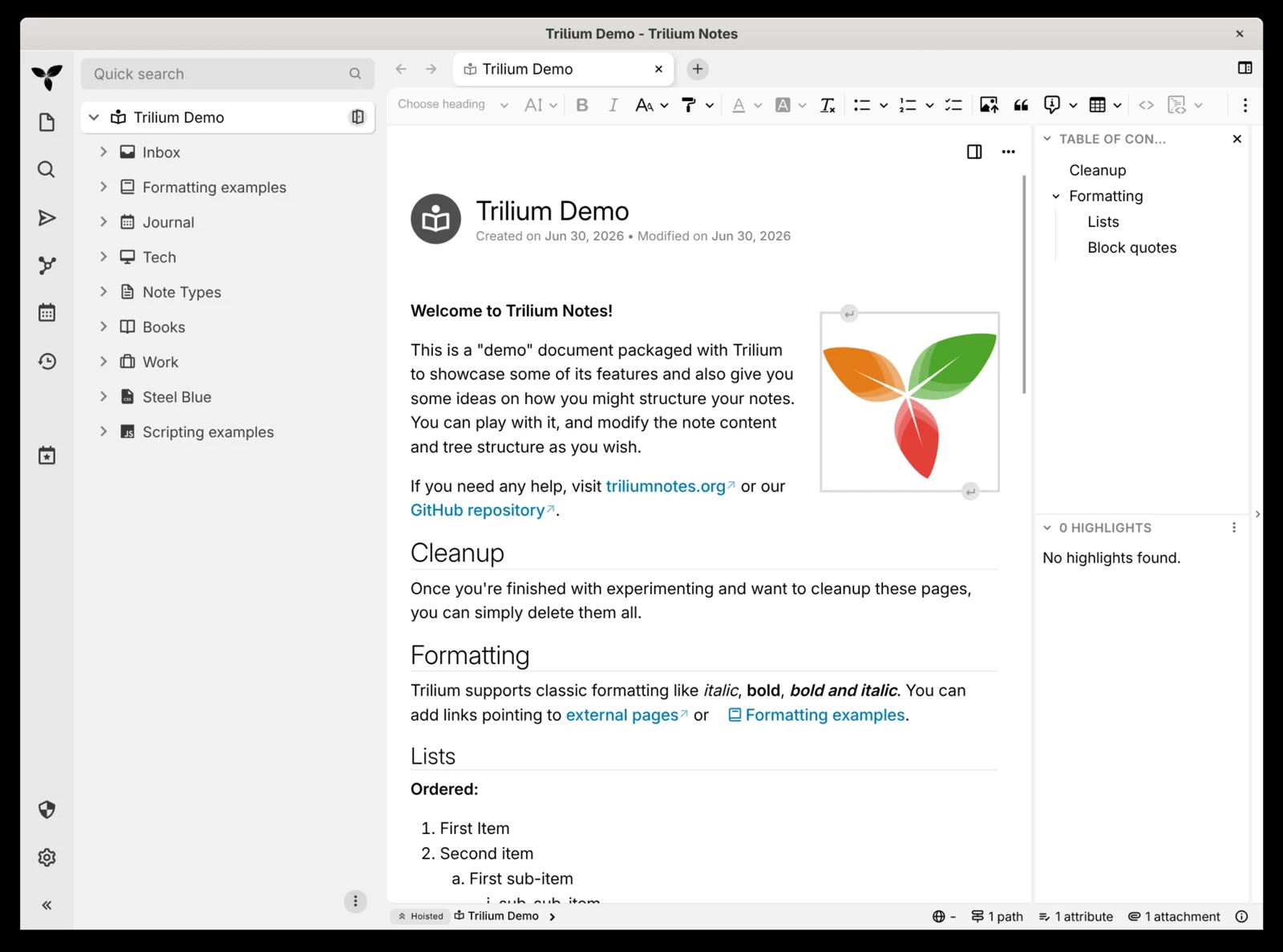

Trilium Notes organizes a large personal knowledge base as a tree of rich-text and code notes. A note can appear in more than one place; links, attributes, search and revisions help connect the information without duplicating it. Desktop apps can sync with a self-hosted server.
This is a structured note database, not a directory of Markdown files. Plan exports and backups before depending on it, and check version compatibility before upgrading a server that syncs with desktop clients.
Quick start
Checked against the official docs on November 9, 2026. We have not run these setups ourselves.
Docker and the desktop app are upstream-documented routes. The NixOS module is maintained in nixpkgs and may package a different version than the pinned Docker example.
Docker Compose
Requires Docker and the Compose plugin. This adapts the official server
example to localhost and pins the researched release rather than latest.
Save as compose.yaml:
services:
  trilium:
    image: triliumnext/trilium:v0.107.0
    ports:
      - "127.0.0.1:8080:8080"
    volumes:
      - ./trilium-data:/home/node/trilium-data
    restart: unless-stopped
Run docker compose up -d, open http://localhost:8080 on the host, and follow
the setup wizard. The mounted data directory must be writable by the
container. Back up trilium-data and test a restore before entrusting it with
your only copy of important notes.
For remote clients, follow upstream’s HTTPS/reverse-proxy and sync guidance.
Keep server and desktop versions compatible. Review release notes and backups
before changing the pinned version; an automatic latest update can create
an unwanted sync mismatch.
Desktop app
Download the appropriate app from the official release page. You can use Trilium locally without deploying a server first. A server is useful when you want browser access or synchronization, not a prerequisite to trying the editor.
NixOS
services.trilium-server.enable = true;Run sudo nixos-rebuild switch, then open http://localhost:8080 on the host
and follow the setup wizard. The module listens on localhost by default
(services.trilium-server.host) and keeps data in /var/lib/trilium; back
it up and test a restore before trusting it with important notes.
Why it’s listed
A rich, linked notebook for a substantial personal knowledge base. Its hierarchy and database model offer a different tradeoff from SilverBullet’s plain-file approach.
Documentation
Docker Compose · Rich notes in a linked hierarchy, with search, revisions and scripting. Paste into your AI assistant. It may only be able to guide you. Review changes before running anything.
Researched, not run by the Index. Checked 2026-11-12. No AI account or connection is needed here.
Read or copy the prompt manually
Desktop app · Rich notes in a linked hierarchy, with search, revisions and scripting. Paste into your AI assistant. It may only be able to guide you. Review changes before running anything.
Researched, not run by the Index. Checked 2026-11-12. No AI account or connection is needed here.
Read or copy the prompt manually
NixOS · Rich notes in a linked hierarchy, with search, revisions and scripting. Paste into your AI assistant. It may only be able to guide you. Review changes before running anything.
Researched, not run by the Index. Checked 2026-11-12. No AI account or connection is needed here.
Read or copy the prompt manually
Tags: Notes