Files & sharing
Syncthing
Continuous file synchronization between your devices, with no cloud copy in the middle.
Release notes / v2.1.7
Released 2026-10-21. Snapshot from the included release data, not a live check.
## What's Changed Built with Go 1.27.3. ### Fixes * fix: handle missing max-sequence file entries by @calmh in https://github.com/syncthing/syncthing/pull/10912 * fix(sqlite): avoid early garbage collection of deleted recv-enc files by @calmh in https://github.com/syncthing/syncthing/pull/10916 * fix(sqlite): do not generate unbounded prepared statements (ref #10913) by @calmh in https://github.com/syncthing/syncthing/pull/10915 * fix(discover): skip unnecessary identical global announce updates; obey retry-after by @calmh in https://github.com/syncthing/syncthing/pull/10918 * fix(p…
Read the full release notes on GitHub ↗Available on these platforms
These are supported core downloads, not identical desktop GUI packages. OS integrations are separate projects. Do not treat a third-party phone client or the discontinued official Android wrapper as current core mobile support.
Compatibility details and official sources
- Linux - File-sync service with browser UI
- Windows - File-sync service with browser UI
- macOS - File-sync service with browser UI
Official availability checked 2026-11-12. Availability is not feature parity. The recorded release and license refer to the linked source project; separate clients can differ. No install or compatibility test was run.
Before you install
Folders in sync, no third-party cloud.
- What does it run on?
- Runs on each device you want to sync - laptop, phone, server. Devices pair by exchanging keys; traffic is encrypted end to end.
- Where is my data?
- Your files exist only on your devices - nothing is stored on a third party's servers. File versioning options protect against accidental deletes and overwrites.
- What will I maintain?
- Client updates on each device and occasional conflict resolution. No central server to maintain unless you add one as another peer.
Advice and funding routes source-checked November 12, 2026. Researched, not an install or restore test. Installation source ↗ · Report a correction
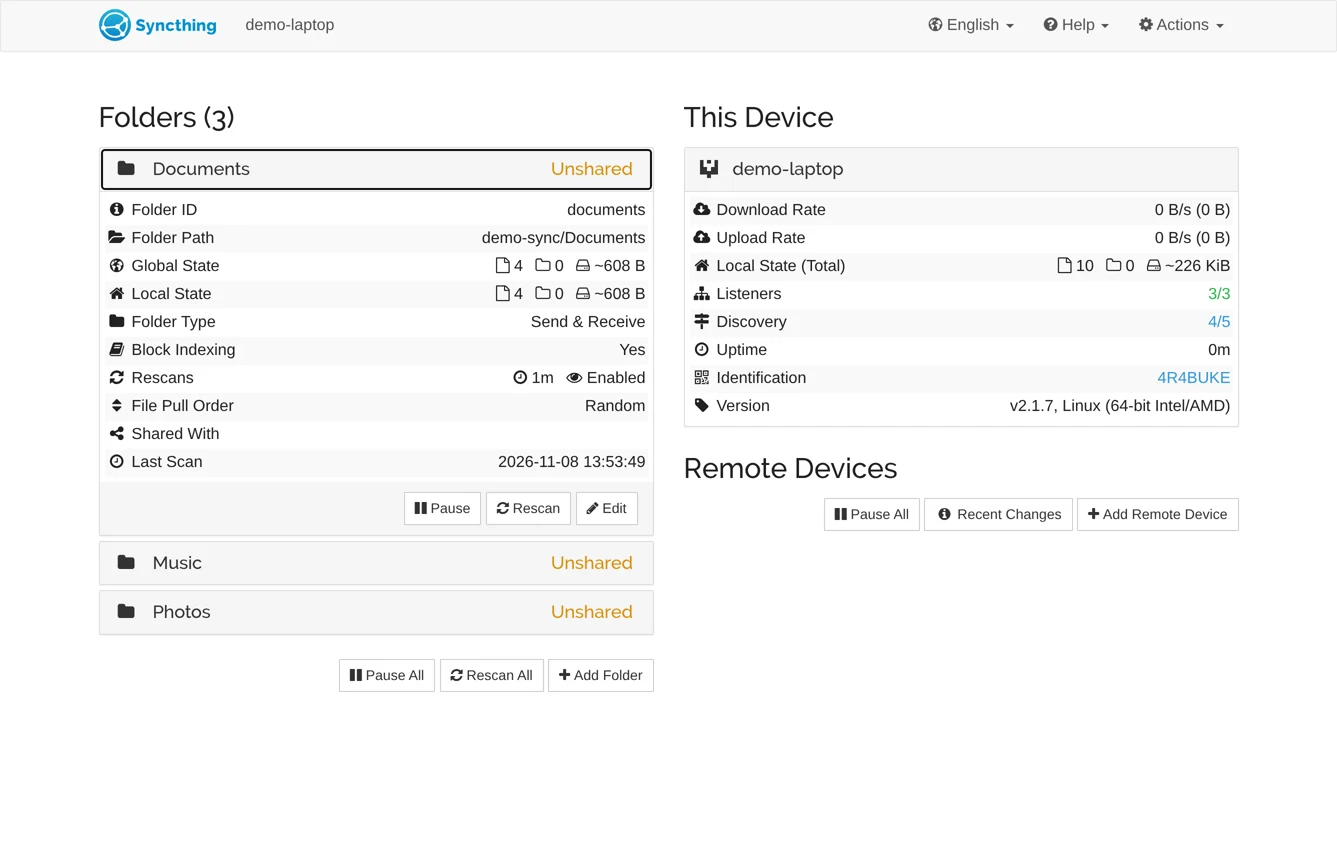
Syncthing keeps folders in sync between your devices directly - laptop, phone, server - without storing anything on a third party’s servers. Devices pair by exchanging keys, traffic is encrypted end to end, and file versioning options protect you against accidental deletes and overwrites.
Quick start
Verified against Syncthing’s own documentation on November 8, 2026; we haven’t run these setups ourselves.
All three routes are first-class: an official Docker image, an official Debian/Ubuntu repository, and a nixpkgs module.
Docker Compose
Save this as compose.yaml, from the project’s Docker README:
services:
  syncthing:
    image: syncthing/syncthing
    container_name: syncthing
    hostname: my-syncthing
    environment:
      - PUID=1000
      - PGID=1000
    volumes:
      - ./sync:/var/syncthing
    network_mode: host
    restart: unless-stopped
Then docker compose up -d and open the web GUI at
http://localhost:8384. network_mode: host is deliberate: local device
discovery needs to see real LAN addresses, which Docker’s default
bridge networking hides. Synced files land in ./sync; add more folder
volumes as you need them. Works on any host with Docker and the Compose plugin: on Ubuntu Server,
sudo apt install docker.io docker-compose-v2 covers both; on NixOS,
virtualisation.docker.enable = true; enables Docker.
Ubuntu Server
Syncthing maintains its own apt repository:
sudo mkdir -p /etc/apt/keyrings
sudo curl -L -o /etc/apt/keyrings/syncthing-archive-keyring.gpg https://syncthing.net/release-key.gpg
echo "deb [signed-by=/etc/apt/keyrings/syncthing-archive-keyring.gpg] https://apt.syncthing.net/ syncthing stable-v2" | sudo tee /etc/apt/sources.list.d/syncthing.list
sudo apt-get update
sudo apt-get install syncthing
Run it under your user with the packaged systemd unit:
sudo systemctl enable --now syncthing@$USER. The web GUI is on
http://127.0.0.1:8384.
NixOS
services.syncthing = {
  enable = true;
  openDefaultPorts = true;
};
Then sudo nixos-rebuild switch. openDefaultPorts opens the transfer
ports (TCP/UDP 22000) and local discovery (UDP 21027); the web GUI
stays on http://127.0.0.1:8384. Devices and folders can be declared
under services.syncthing.settings or managed in the GUI.
Why it’s listed
It’s the private answer to Dropbox: no account, no quota, no copy of your files on someone else’s infrastructure. Mature, quiet, and it pairs well with nearly everything else in this directory.
Docker Compose · Continuous file synchronization between your devices, with no cloud copy in the middle. Paste into your AI assistant. It may only be able to guide you. Review changes before running anything.
Researched, not run by the Index. Checked 2026-11-12. No AI account or connection is needed here.
Read or copy the prompt manually
Ubuntu Server · Continuous file synchronization between your devices, with no cloud copy in the middle. Paste into your AI assistant. It may only be able to guide you. Review changes before running anything.
Researched, not run by the Index. Checked 2026-11-12. No AI account or connection is needed here.
Read or copy the prompt manually
NixOS · Continuous file synchronization between your devices, with no cloud copy in the middle. Paste into your AI assistant. It may only be able to guide you. Review changes before running anything.
Researched, not run by the Index. Checked 2026-11-12. No AI account or connection is needed here.
Read or copy the prompt manually
Tags: File Sync
Want help running it? Ask FOSSadmin about hosting and maintenance ↗