Work & organize
Super Productivity
To-do list, time tracker and daily planner for focused personal work.
Released 2026-11-06. Snapshot from the included release data, not a live check.
No release-notes excerpt is recorded here.
Open the project's release source ↗Available on these platforms
The project lists desktop, mobile and browser versions. Capabilities and release channels can differ; choose the official installation route for your device.
Compatibility details and official sources
- Linux - Native desktop app
- Windows - Native desktop app
- macOS - Native desktop app
- Android - Native mobile app
- iOS - Native mobile app
- Web - Browser app
Official availability checked 2026-11-12. Availability is not feature parity. The recorded release and license refer to the linked source project; separate clients can differ. No install or compatibility test was run.
Before you install
Tasks, time tracking and planning - offline first.
- Does it need an account?
- No: the README says it collects no data and you decide where data lives. Local files are the default.
- Can it sync?
- Optionally, through Dropbox, WebDAV or the project's SuperSync service. It can also import tasks from tools like GitHub and Jira.
- Which package?
- Desktop apps for Linux, Windows and macOS, plus a web app; the quick start covers each route.
Advice and funding routes source-checked November 12, 2026. Researched, not an install or restore test. Installation source ↗ · Report a correction
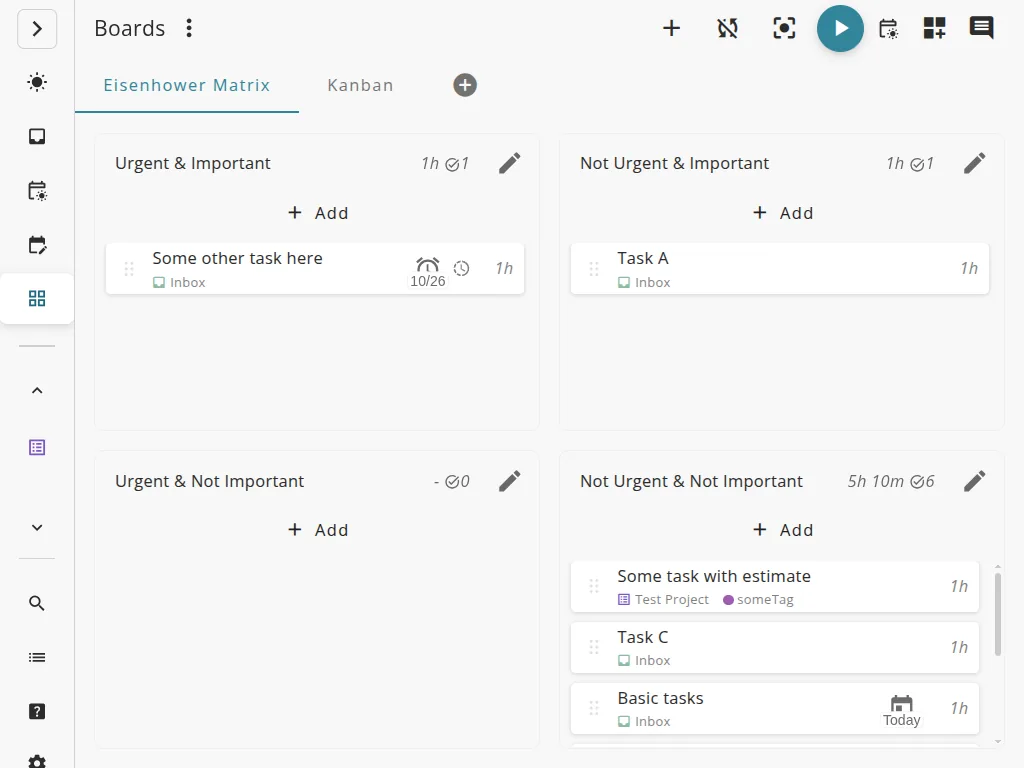
Super Productivity combines a task list, a time tracker and a daily planner. The README describes it as offline-first, says it collects no data and needs no account, and says you decide where your data is stored.
It can sync through Dropbox, WebDAV or the project’s own SuperSync service, and it can import tasks from tools such as GitHub and Jira, per the README.
Quick start
Checked against the project’s own documentation on November 9, 2026. We have not run these installs ourselves. Commands are copied from the project’s pages, or from Flathub and Homebrew where the section says so.
Desktop apps
Downloads and platform notes are on the project’s wiki, linked from its README.
Homebrew has a cask for it. That is Homebrew’s packaging, not the project’s own:
brew install --cask super-productivityFlathub lists this app as verified by its publisher (checked on the Flathub API on November 9, 2026):
flatpak install flathub com.super_productivity.SuperProductivityThis needs Flatpak set up on your system first (see flatpak.org/setup).
Web app
The README links an open-in-browser web app. The project notes it has limits compared with the desktop app, listed in its web versus desktop comparison.
NixOS
nixpkgs packages Super Productivity as super-productivity (source: pkgs/by-name/su/super-productivity/package.nix):
environment.systemPackages = [ pkgs.super-productivity ];Rebuild with sudo nixos-rebuild switch, then launch Super Productivity from the application menu.
First steps
- Add a task with the add-task bar, then give it a time estimate and start tracking.
- Group tasks with projects and tags.
- Sync is optional. The README lists SuperSync (the project’s own end-to-end encrypted service), Dropbox and WebDAV.
The README describes the app as private and offline-first.
Desktop apps · To-do list, time tracker and daily planner for focused personal work. Paste into your AI assistant. It may only be able to guide you. Review changes before running anything.
Researched, not run by the Index. Checked 2026-11-12. No AI account or connection is needed here.
Read or copy the prompt manually
NixOS · To-do list, time tracker and daily planner for focused personal work. Paste into your AI assistant. It may only be able to guide you. Review changes before running anything.
Researched, not run by the Index. Checked 2026-11-12. No AI account or connection is needed here.
Read or copy the prompt manually
Tags: Productivity