Operating systems
Qubes OS
Security-focused desktop operating system that isolates your work into separately trusted virtual machines called qubes.
Release notes / 4.3.2
Version checked by hand on 2026-11-12. Snapshot from the included release data, not a live check.
Downloads page lists Qubes OS 4.3.2 as the latest stable release, recommended for all new and existing users. Verify the ISO with the detached PGP signature and release signing key published beside it.
Read the full release notes ↗Device compatibility
Official hardware and installation choices ↗
Qubes OS needs 64-bit x86 hardware with VT-x/EPT and VT-d (or AMD equivalents): minimum 6 GB RAM and 32 GB storage, 16 GB RAM, SSD and Intel graphics recommended. Consult the HCL before choosing hardware.
Compatibility details and official sources
Official availability checked 2026-11-12. Availability is not feature parity. The recorded release and license refer to the linked source project; separate clients can differ. No install or compatibility test was run.
Before you install
Security by isolation - check the hardware before anything else.
- Will it run on my machine?
- Qubes has unusually strict requirements: hardware virtualization (VT-x/VT-d or AMD-V/IOMMU) enabled in firmware, generous RAM, and a compatible network card. Read the system requirements first.
- What is daily use like?
- Work happens in separate virtual machines called qubes: one for banking, one for random browsing, disposable ones for risky files. It is a deliberate workflow change, not a themed Linux.
- Can I try before committing?
- A live USB session gives a basic look, but real evaluation needs an install. Use Qubes' own backup tool before migrating anything into it.
Advice and funding routes source-checked November 12, 2026. Researched, not an install or restore test. Installation source ↗ · Report a correction
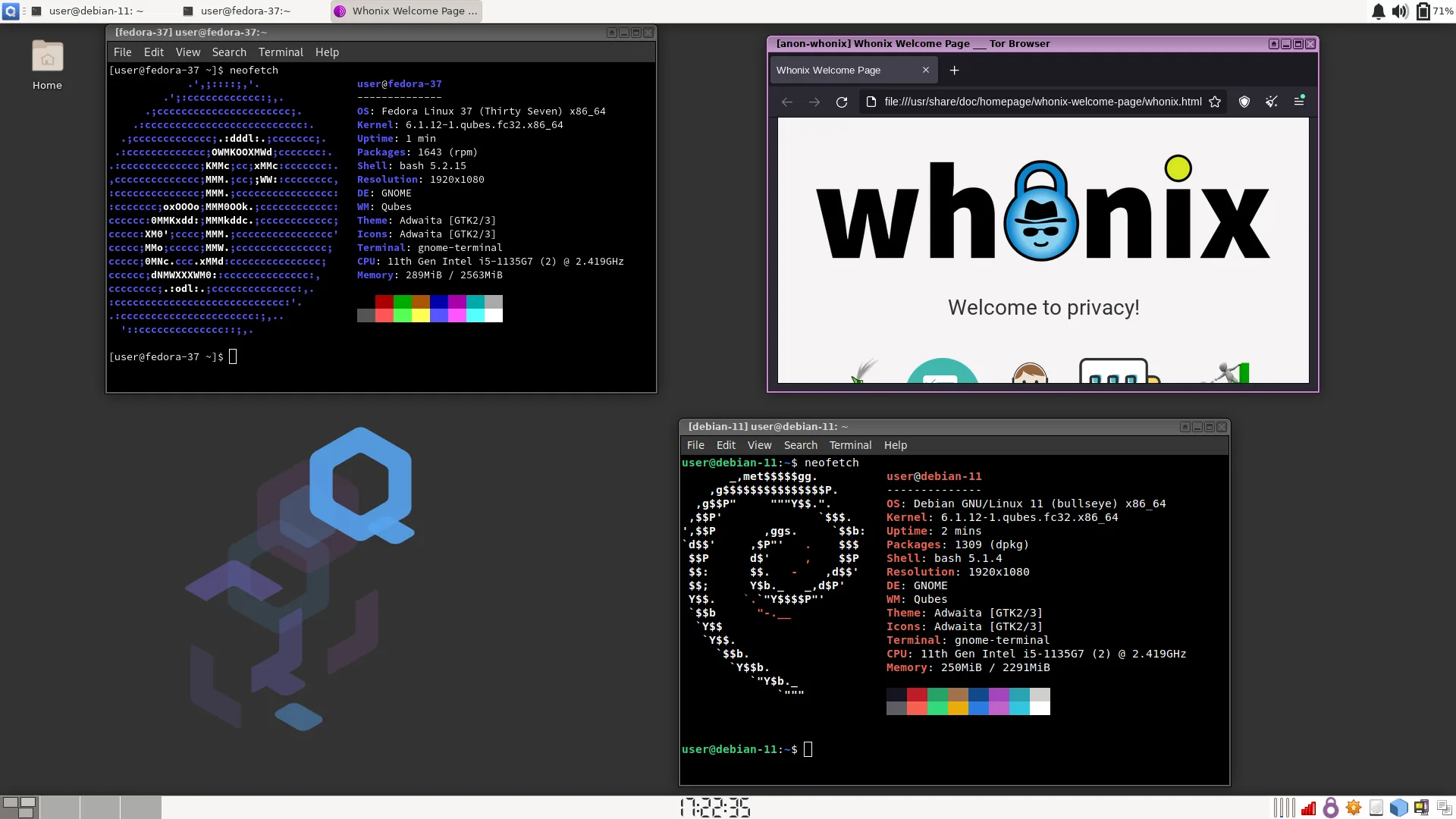

Qubes OS is a security-focused operating system that isolates different parts of your digital life into separate virtual machines, called qubes, so a compromise in one stays contained. It is endorsed by organizations such as the Freedom of the Press Foundation and Let’s Encrypt for sensitive work.
Qubes is free and open-source software. It is built from many components under their own licenses (the core administration component, for example, is LGPL-2.1), so there is no single license for the whole system. Qubes is a mark of the project. This is an independent listing, not an official Qubes resource or an endorsement.
Quick start
Researched from Qubes’ download page, installation documentation and system requirements on November 12, 2026. We have not downloaded, booted or installed an operating system.
Check hardware first
Qubes needs a 64-bit Intel or AMD machine with hardware virtualization: minimum 6 GB RAM and 32 GB storage with VT-x/EPT (or AMD-V) and VT-d (or AMD-Vi). The recommended target is 16 GB RAM, a 128 GB SSD and Intel integrated graphics. Consult the system requirements and the hardware compatibility list before choosing a machine - meeting the minimums does not guarantee a successful install.
Download and verify
Get the current ISO (Qubes OS 4.3.2 at our check) from the official downloads page. Verify it with the detached PGP signature and release signing key linked beside the image; the project documents this verification as part of installation security. Third-party mirrors are outside the project’s control, which is exactly why the signature check matters.
Write and install
Write the verified ISO to a USB drive (this overwrites the target drive - confirm the device and back up first), boot it, and follow the installation guide. The installer sets up disk encryption and your initial qubes.
First use
Review the default qubes (work, personal, untrusted and the disposable templates) and update dom0 and templates through the Qubes Update tool. Move existing data carefully; qubes are isolated by design, so copying between them uses the project’s own mechanisms.
NixOS compatibility
Qubes OS is an operating system built on the Xen hypervisor, not a NixOS application or service. Test it in a spare machine or a supported virtual setup rather than expect a Nix package to replace NixOS. Back up any system you intend to replace.
Documentation
Check hardware first · Plan a safe Qubes OS install. Paste into your AI assistant. It may only be able to guide you. Review changes before running anything.
Researched, not run by the Index. Checked 2026-11-12. No AI account or connection is needed here.
Read or copy the prompt manually
Tags: Operating systems