Privacy & access
Pi-hole
Network-wide DNS filtering for ads and trackers, with a local administration dashboard.
Release notes / Core 6.6
Version checked by hand on 2026-11-11. Snapshot from the included release data, not a live check.
## Security This release fixes the following security advisories (credit to the reporters named): **High** - [GHSA-wp3p-45h3-2v82](https://github.com/pi-hole/pi-hole/security/advisories/GHSA-wp3p-45h3-2v82) (CVSS 7.3): `pihole -r` and `pihole -up` still followed symlinks in `/etc/pihole` when writing `install.log`, `migration_backup_v6` and `hosts/custom.list`, so a `pihole` user could get root to take over files of their choice. Found by @cerodah, reported by @pmagayon. - [GHSA-5w4v-f65…
Read the full release notes on GitHub ↗Available on these platforms
This is the browser administration interface for a Pi-hole host. The phone is not running the DNS service merely because it opens the dashboard.
Compatibility details and official sources
- Web - Browser interface
Official availability checked 2026-11-12. Availability is not feature parity. The recorded release and license refer to the linked source project; separate clients can differ. No install or compatibility test was run.
Before you install
Network-wide DNS filtering from one small box.
- What does it run on?
- A Raspberry Pi, a small Linux server or a Docker container that your devices use for DNS - including devices that cannot run browser extensions.
- Where is my data?
- Blocklists, rules and query logs live on your Pi-hole. Nothing routes through an outside filter service.
- What will I maintain?
- Updates, blocklist choices and router DNS settings. It is not a firewall or VPN: DNS filtering cannot remove every ad inside an allowed site or app.
Advice and funding routes source-checked November 12, 2026. Researched, not an install or restore test. Installation source ↗ · Report a correction
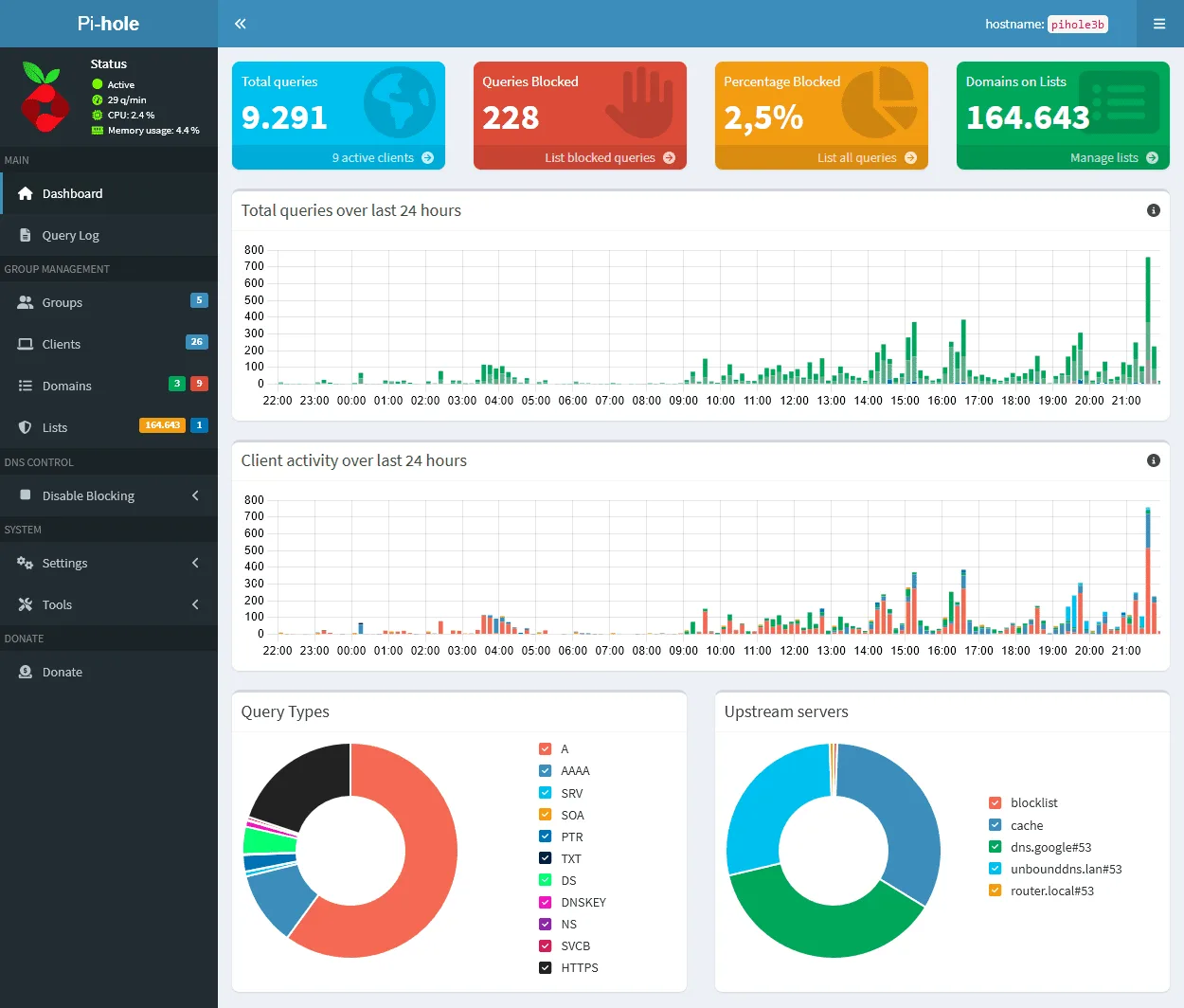

Pi-hole filters DNS requests for your network. Point devices at its DNS service and it can block known advertising and tracking domains, including on devices that cannot run browser extensions. It is not a firewall, VPN or a complete replacement for browser content blocking. DNS filtering cannot distinguish an advertisement from wanted content served from the same domain.
Core, FTL and the web interface currently publish EUPL-1.2 license texts. Their notices preserve exceptions for older code; bundled components retain their own licenses. Pi-hole is a registered trademark of Pi-hole, LLC. This independent listing does not imply affiliation or endorsement.
Quick start
Researched against upstream documentation and nixpkgs sources on November 11, 2026. We have not installed Pi-hole or tested these configurations.
Docker Compose
Use a Linux host with a stable LAN address. Port 53 must be available; check
for an existing DNS resolver before starting. Save this as compose.yaml:
services:
  pihole:
    image: pihole/pihole:2026.10.1
    ports:
      - "53:53/tcp"
      - "53:53/udp"
      - "127.0.0.1:8080:80/tcp"
    environment:
      TZ: UTC
      FTLCONF_webserver_api_password: ${PIHOLE_PASSWORD:?Set a unique dashboard password}
      FTLCONF_dns_listeningMode: ALL
    volumes:
      - ./etc-pihole:/etc/pihole
    restart: unless-stopped
Put PIHOLE_PASSWORD in a local .env file and keep it out of Git. Start with
docker compose up -d. On the host open http://127.0.0.1:8080/admin/ and sign in
with that password. For a headless server use an SSH tunnel rather than exposing
the admin port publicly. This example does not provide DHCP and does not need
the DHCP-specific NET_ADMIN capability.
Allow DNS port 53 only from your trusted LAN in the host firewall; do not forward it from the internet or run an open resolver. Set one test device’s DNS server to the Pi-hole host’s LAN address. Visit a few sites and check the dashboard’s query log before changing DNS for the whole network. Keep the old DNS settings so you can undo the test.
Linux
The native installer supports selected Linux distributions. Check the current supported operating systems and prerequisites first. Upstream documents a download-and-review route:
wget -O basic-install.sh https://install.pi-hole.net
# Read the script before running it with administrator privileges.
less basic-install.sh
sudo bash basic-install.sh
Follow the installer to select the interface, upstream resolver and blocklist. Open the admin URL shown at completion, keep the generated password private, and test one device before changing your router’s DNS settings. Do not use the mutable upstream installer on NixOS; use its modules instead.
NixOS
The DNS engine and dashboard are separate modules. An isolated local test can start with the dashboard bound to loopback and no firewall ports opened:
services.pihole-ftl = {
  enable = true;
  settings.dns = {
    listeningMode = "LOCAL";
    upstreams = [ "1.1.1.1" ];
  };
};
services.pihole-web = {
  enable = true;
  ports = [ "127.0.0.1:8080" ];
};
Check that another service is not using DNS port 53, rebuild with
sudo nixos-rebuild switch, then set a dashboard password with
sudo pihole setpassword. Open http://127.0.0.1:8080/admin/. Review and add your
chosen blocklists in the dashboard, then update gravity. Before using it from
other devices, deliberately configure its listening interface and allow DNS
only on the trusted LAN. No broad firewall openings are made in this example.
nixpkgs patches Pi-hole’s update/reinstall commands out: upgrade through your
NixOS configuration. Check your channel for services.pihole-ftl and
services.pihole-web; older channels may not provide them.
First use
Avoid a second unfiltered DNS server if you expect all device queries to be filtered. Check IPv6 DNS and encrypted-DNS settings too: clients can bypass the resolver you selected. DNS logs can reveal browsing patterns, so review privacy and retention settings and do not expose the dashboard to the internet.
Documentation
Docker Compose · Network-wide DNS filtering for ads and trackers, with a local administration dashboard. Paste into your AI assistant. It may only be able to guide you. Review changes before running anything.
Researched, not run by the Index. Checked 2026-11-12. No AI account or connection is needed here.
Read or copy the prompt manually
Linux · Network-wide DNS filtering for ads and trackers, with a local administration dashboard. Paste into your AI assistant. It may only be able to guide you. Review changes before running anything.
Researched, not run by the Index. Checked 2026-11-12. No AI account or connection is needed here.
Read or copy the prompt manually
NixOS · Network-wide DNS filtering for ads and trackers, with a local administration dashboard. Paste into your AI assistant. It may only be able to guide you. Review changes before running anything.
Researched, not run by the Index. Checked 2026-11-12. No AI account or connection is needed here.
Read or copy the prompt manually
Tags: Networking
Want help running it? Ask FOSSadmin about hosting and maintenance ↗