Work & organize
Paperless-ngx
Scan, index, and search your documents. OCRs paper into a searchable archive on your own hardware.
Release notes / v3.4.2
Released 2026-11-03. Snapshot from the included release data, not a live check.
## paperless-ngx 3.4.2 ### Bug Fixes - Fix: mobile save button display obsessing @shamoon ([#14676](https://github.com/paperless-ngx/paperless-ngx/pull/14676)) - Fix: make index and llmindex init wait for tesseract language install @stumpylog ([#14670](https://github.com/paperless-ngx/paperless-ngx/pull/14670)) - Fix: prevent loss of save view name on save + close @shamoon ([#14667](https://github.com/paperless-ngx/paperless-ngx/pull/14667)) - Fixhancement: doc detail mobile ux tweaks @shamoon ([#14664](https://github.com/paperless-ngx/paperless-ngx/pull/14664)) - Fix: Bumps filelock…
Read the full release notes on GitHub ↗Available on these platforms
The project provides a browser document-management interface. Third-party mobile clients are separate projects; the document server does not run on your phone merely because a client exists.
Compatibility details and official sources
- Web - Browser interface
Official availability checked 2026-11-12. Availability is not feature parity. The recorded release and license refer to the linked source project; separate clients can differ. No install or compatibility test was run.
Before you install
Paper in, searchable archive out.
- What does it run on?
- A Docker Compose stack: the app, a database and a document queue. Drop files into its consumption folder and it OCRs, tags and files them.
- Where is my data?
- Scans, OCR text, tags and the full-text index live on your server.
- What will I maintain?
- The stack, storage growth and backups of both documents and database. Worth the setup if paper keeps piling up.
Advice and funding routes source-checked November 12, 2026. Researched, not an install or restore test. Installation source ↗ · Report a correction
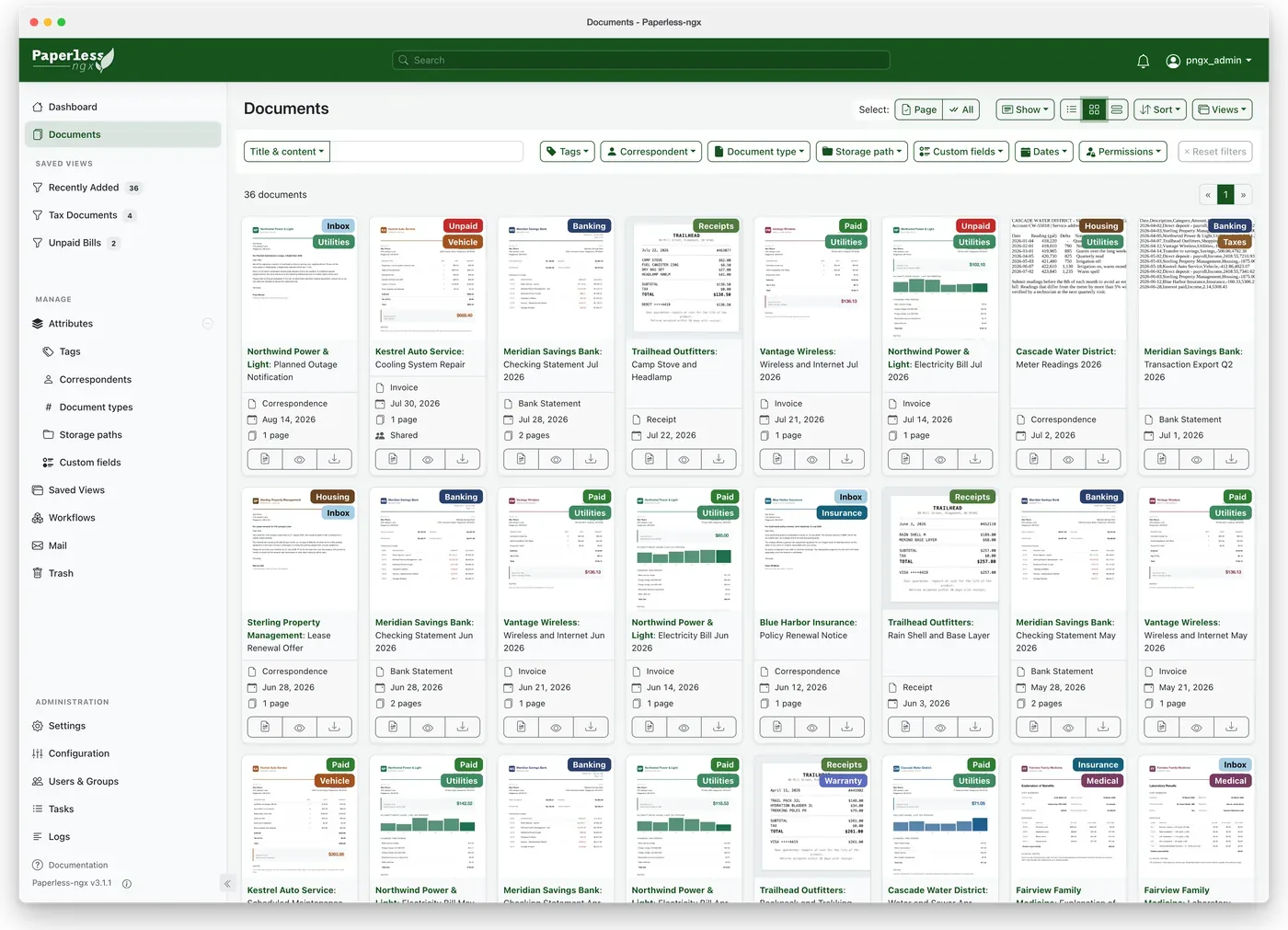

Paperless-ngx turns scanned paper and digital files into a searchable document archive. Drop a PDF or a phone photo of a letter into its consumption folder and it OCRs the text, detects the correspondent and date, applies your tags, and files it. Everything stays full-text searchable from the web app, and it can also pull attachments straight out of a mailbox.
Quick start
Verified against Paperless-ngx’s own documentation on November 8, 2026; we haven’t run these setups ourselves.
Docker Compose is the documented install; a bare-metal route exists for advanced setups, so on Ubuntu use Docker. The NixOS module is maintained in nixpkgs.
Docker Compose
Save this as compose.yaml, adapted from the official SQLite compose
file:
services:
  broker:
    image: docker.io/valkey/valkey:9-alpine
    restart: unless-stopped
    volumes:
      - redisdata:/data
  webserver:
    image: ghcr.io/paperless-ngx/paperless-ngx:latest
    restart: unless-stopped
    depends_on:
      - broker
    ports:
      - "8000:8000"
    volumes:
      - data:/usr/src/paperless/data
      - media:/usr/src/paperless/media
      - ./export:/usr/src/paperless/export
      - ./consume:/usr/src/paperless/consume
    environment:
      PAPERLESS_REDIS: redis://broker:6379
      PAPERLESS_DBENGINE: sqlite
      PAPERLESS_SECRET_KEY: change-me-to-a-long-random-string
volumes:
  data:
  media:
  redisdata:
Set PAPERLESS_SECRET_KEY to a long random string first; recent
versions refuse the placeholder. Then docker compose up -d and open
http://localhost:8000 - the web interface prompts you to create the
admin account on first visit. Documents copied into ./consume get
OCRed and imported automatically. The project also ships PostgreSQL
compose variants and an interactive setup script that asks the questions
for you. Works on any host with Docker and the Compose plugin: on Ubuntu Server,
sudo apt install docker.io docker-compose-v2 covers both; on NixOS,
virtualisation.docker.enable = true; enables Docker.
NixOS
services.paperless = {
  enable = true;
};
Then sudo nixos-rebuild switch. The module generates the required
secret key on first start, keeps data in /var/lib/paperless, and
serves the web interface on http://127.0.0.1:28981. Drop files into
/var/lib/paperless/consume or upload them in the web app.
Why it’s listed
Paper admin is where small offices and households quietly drown. Paperless-ngx is the most mature open-source answer: a filing cabinet that OCRs and searches itself, with an active community keeping it current.
Docker Compose · Scan, index, and search your documents. OCRs paper into a searchable archive on your own hardware. Paste into your AI assistant. It may only be able to guide you. Review changes before running anything.
Researched, not run by the Index. Checked 2026-11-12. No AI account or connection is needed here.
Read or copy the prompt manually
NixOS · Scan, index, and search your documents. OCRs paper into a searchable archive on your own hardware. Paste into your AI assistant. It may only be able to guide you. Review changes before running anything.
Researched, not run by the Index. Checked 2026-11-12. No AI account or connection is needed here.
Read or copy the prompt manually
Tags: Documents
Want help running it? Ask FOSSadmin about hosting and maintenance ↗