Media & photos
OpenSCAD
Script-based 3D CAD for making parametric models, often for 3D printing.
Release notes / openscad-2021.01
Released 2021-02-07. Snapshot from the included release data, not a live check.
**Language Features** * New * Add function literals * Add exponent function (e.g. 2^3) * Add convexity parameter to resize() * Add support for generic tail recursion * Add $vpf for viewport field of view * Add warnings for ranges with begin < end * Add warnings for matrix structure problems * Changed * Allow random seeds to stick between rands() calls * Make comparison operators on mixed types return undef * Track reason for values turning undef * Fixed * Fix Range precision * Fix empty geometry handling * Fix search order for imported modules
Read the full release notes on GitHub ↗Available on these platforms
Check the official download page for the supported OS version and processor architecture. A desktop download is not evidence of a native phone app.
Compatibility details and official sources
Official availability checked 2026-11-12. Availability is not feature parity. The recorded release and license refer to the linked source project; separate clients can differ. No install or compatibility test was run.
Before you install
3D models as code.
- When is OpenSCAD the right tool?
- When you want exact, parametric models - mechanical parts and 3D printing - rather than sculpting. For sculpting, see Blender.
- Which package?
- Distribution packages on Linux; downloads for Windows and macOS from the project.
- How do files work?
- Models are .scad text files - version them in Git like code. Export STL or 3MF for the slicer.
Advice and funding routes source-checked November 12, 2026. Researched, not an install or restore test. Installation source ↗ · Report a correction
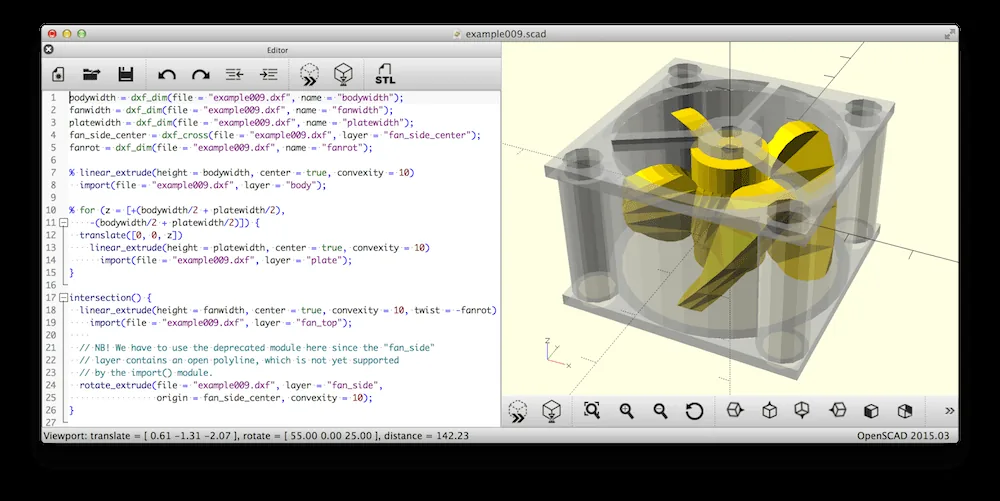
OpenSCAD makes 3D models from text. You describe a shape in code, and change its dimensions by changing numbers, so designs are easy to version and repeat. It is used for mechanical parts and 3D printing.
The repository’s COPYING file is the GNU GPL version 2, with an added exception that allows linking with the CGAL library.
Quick start
Checked against the project’s own documentation on November 9, 2026. We have not run these installs ourselves. Commands are copied from the project’s pages, or from Flathub and Homebrew where the section says so.
Linux
The downloads page shows sudo apt-get install openscad for Debian-family systems and offers AppImages for x86-64 and ARM64. The Flathub package is verified by its publisher:
flatpak install flathub org.openscad.OpenSCADWindows and macOS
Installers (exe, zip, dmg) are on openscad.org/downloads. The page also mentions Homebrew for snapshots:
brew install openscad@snapshotNixOS
nixpkgs packages OpenSCAD as openscad (source: pkgs/by-name/op/openscad/package.nix):
environment.systemPackages = [ pkgs.openscad ];Rebuild with sudo nixos-rebuild switch, then launch OpenSCAD from the application menu.
First steps
OpenSCAD models are code. Type this in the editor:
cube([10, 20, 30]);
translate([20, 0, 0]) sphere(r = 8);- Press F5 for a quick preview and F6 for a full render.
- After rendering with F6, use the File > Export menu. It offers STL and other formats.
- Save the
.scadfile. That is your real source.
These keys and menus come from the OpenSCAD user interface and STL export manual pages. More at the OpenSCAD documentation.
Linux · Script-based 3D CAD for making parametric models, often for 3D printing. Paste into your AI assistant. It may only be able to guide you. Review changes before running anything.
Researched, not run by the Index. Checked 2026-11-12. No AI account or connection is needed here.
Read or copy the prompt manually
Windows and macOS · Script-based 3D CAD for making parametric models, often for 3D printing. Paste into your AI assistant. It may only be able to guide you. Review changes before running anything.
Researched, not run by the Index. Checked 2026-11-12. No AI account or connection is needed here.
Read or copy the prompt manually
NixOS · Script-based 3D CAD for making parametric models, often for 3D printing. Paste into your AI assistant. It may only be able to guide you. Review changes before running anything.
Researched, not run by the Index. Checked 2026-11-12. No AI account or connection is needed here.
Read or copy the prompt manually
Tags: Creative