Files & sharing
Nextcloud
File sync and sharing plus calendars, contacts, mail, chat and office documents in one self-hosted hub.
Release notes / v33.0.11
Released 2026-11-12. Snapshot from the included release data, not a live check.
https://github.com/nextcloud-releases/server/releases/tag/v33.0.11
Read the full release notes on GitHub ↗Available on these platforms
These are ways to use a Nextcloud server, not platforms that run the full Nextcloud server. Mobile Files and Talk are separate apps; calendar and contact integration has its own setup. The recorded source and release describe the server.
Compatibility details and official sources
- Linux - Client app
- Windows - Client app
- macOS - Client app
- Android - Client app
- iOS - Client app
- Web - Browser client
Official availability checked 2026-11-12. Availability is not feature parity. The recorded release and license refer to the linked source project; separate clients can differ. No install or compatibility test was run.
Before you install
A collaboration hub on your own server.
- What does it run on?
- A full server stack - the All-in-One Docker image is the documented easy route, classic installs and a NixOS module exist too.
- Where is my data?
- Files, calendars, contacts and mail live on your server and sync to desktop and mobile clients. Link sharing, co-editing and calls stay inside your account.
- What will I maintain?
- A full stack rather than one container: updates across it, storage, backups and app compatibility at upgrade time. Nextcloud GmbH sells enterprise support separately.
Advice and funding routes source-checked November 12, 2026. Researched, not an install or restore test. Installation source ↗ · Report a correction
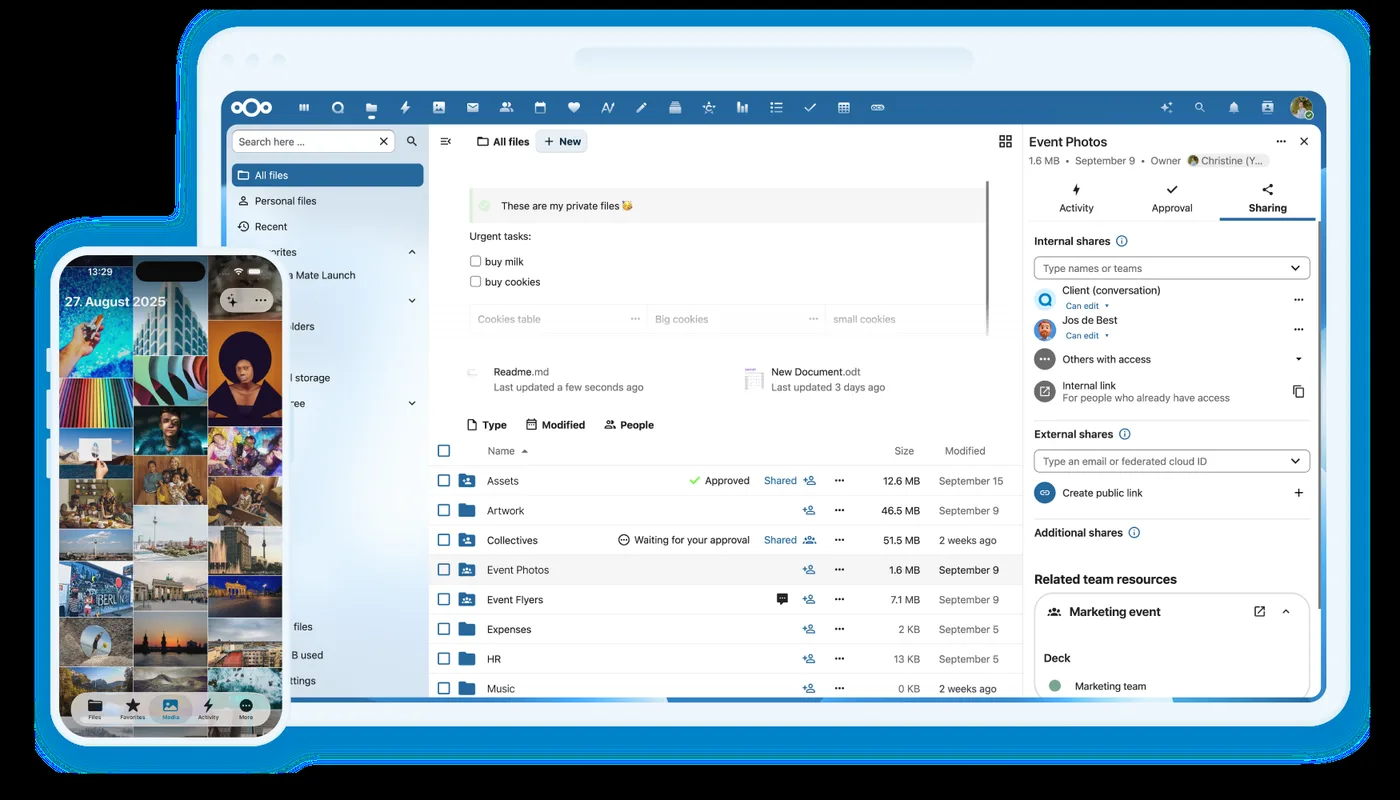

Nextcloud is a self-hosted collaboration hub: it stores files, calendars, contacts and mail on your own server and syncs them to desktop and mobile clients. People can share links, co-edit documents and hold calls without leaving the same account. An app store adds more tools on top.
It is developed by Nextcloud GmbH together with a large community, and the company funds the work through enterprise subscriptions rather than donations. The Include fund recorded in the project’s funding file supports diversity in its community.
Where Syncthing syncs folders between devices and Radicale serves only calendars and contacts, Nextcloud covers all of it in one place. That scope has a cost: it is a large PHP application that needs regular updates and more care than a small single-purpose service. It usually faces the internet, so plan for prompt upgrades, HTTPS and backups from the start.
Quick start
Verified against Nextcloud’s own documentation on November 8, 2026; we haven’t run these setups ourselves.
The official installation method is Nextcloud All-in-One (AIO), a
Docker-based setup maintained by Nextcloud GmbH that bundles the database,
caching, office and backup pieces. The NixOS module is maintained in
nixpkgs. Both routes expect a domain name and a valid TLS certificate for
real use; AIO’s setup interface can register a free dedyn.io subdomain
for you if you do not have one.
Docker (Nextcloud All-in-One)
Run the master container with the command from the AIO documentation, here with its management interface bound to localhost:
sudo docker run \
  --init \
  --sig-proxy=false \
  --name nextcloud-aio-mastercontainer \
  --restart always \
  --publish 127.0.0.1:8080:8080 \
  --volume nextcloud_aio_mastercontainer:/mnt/docker-aio-config \
  --volume /var/run/docker.sock:/var/run/docker.sock:ro \
  ghcr.io/nextcloud-releases/all-in-one:latest
Reach the AIO interface through an SSH tunnel (ssh -L 8080:localhost:8080 user@server) at https://localhost:8080 and accept the
self-signed certificate. It asks for the domain Nextcloud will answer to
and validates it: point a domain at the server, register the free deSEC
subdomain offered in the interface, or follow the reverse-proxy and
local-network guides in the AIO repository. Only then does it start the
Nextcloud containers; automatic certificates need ports 80 and 8443
reachable, so add those --publish flags or use your own reverse proxy.
This needs Docker. On Ubuntu Server, sudo apt install docker.io docker-compose-v2 covers it; on NixOS, virtualisation.docker.enable = true; enables Docker. Use AIO’s built-in Borg-based backup, and keep the
nextcloud_aio_mastercontainer volume - the backups depend on it.
NixOS
services.nextcloud = {
  enable = true;
  hostName = "nextcloud.example.com";
};
Run sudo nixos-rebuild switch. The module installs Nextcloud and serves
it through nginx on the configured host name, and without database options
the installer uses SQLite - fine for a first look. For real use, pick
PostgreSQL:
services.nextcloud = {
  enable = true;
  hostName = "nextcloud.example.com";
  database.createLocally = true;
  config.dbtype = "pgsql";
};
Then create the administrator account from the command line:
sudo nextcloud-occ user:add admin
sudo nextcloud-occ group:adduser admin admin
The module keeps its data in /var/lib/nextcloud; include that in your
backup plan, and serve the site over HTTPS before accounts and files go
through it.
Why it’s listed
A household or small team often wants files, calendars and contacts without splitting them across three providers. Nextcloud puts them on one server with open protocols and apps for every platform, and it is the tool many self-hosters already know.
Documentation
Docker (Nextcloud All-in-One) · File sync and sharing plus calendars, contacts, mail, chat and office documents in one self-hosted hub. Paste into your AI assistant. It may only be able to guide you. Review changes before running anything.
Researched, not run by the Index. Checked 2026-11-12. No AI account or connection is needed here.
Read or copy the prompt manually
NixOS · File sync and sharing plus calendars, contacts, mail, chat and office documents in one self-hosted hub. Paste into your AI assistant. It may only be able to guide you. Review changes before running anything.
Researched, not run by the Index. Checked 2026-11-12. No AI account or connection is needed here.
Read or copy the prompt manually
Tags: Collaboration
Want help running it? Ask FOSSadmin about hosting and maintenance ↗