Media & photos
Kdenlive
Free video editor built on the MLT Framework and KDE Frameworks.
Version checked by hand on 2026-11-10. Snapshot from the included release data, not a live check.
No release-notes excerpt is recorded here.
Open the project's release source ↗Available on these platforms
Check the official download page for the supported OS version and processor architecture. A desktop download is not evidence of a native phone app.
Compatibility details and official sources
Official availability checked 2026-11-12. Availability is not feature parity. The recorded release and license refer to the linked source project; separate clients can differ. No install or compatibility test was run.
Before you install
Multi-track video editing without a subscription.
- Which package?
- Distribution packages, the project's AppImage, or the Windows and macOS builds. The GitHub repository is a mirror of KDE's own.
- Where does my work live?
- Projects are files on your disk and source footage stays where you keep it. Rendering happens locally.
- Will it run on my machine?
- Timeline playback likes a decent CPU and GPU; proxy clips let slower machines edit big footage.
Advice and funding routes source-checked November 12, 2026. Researched, not an install or restore test. Installation source ↗ · Report a correction
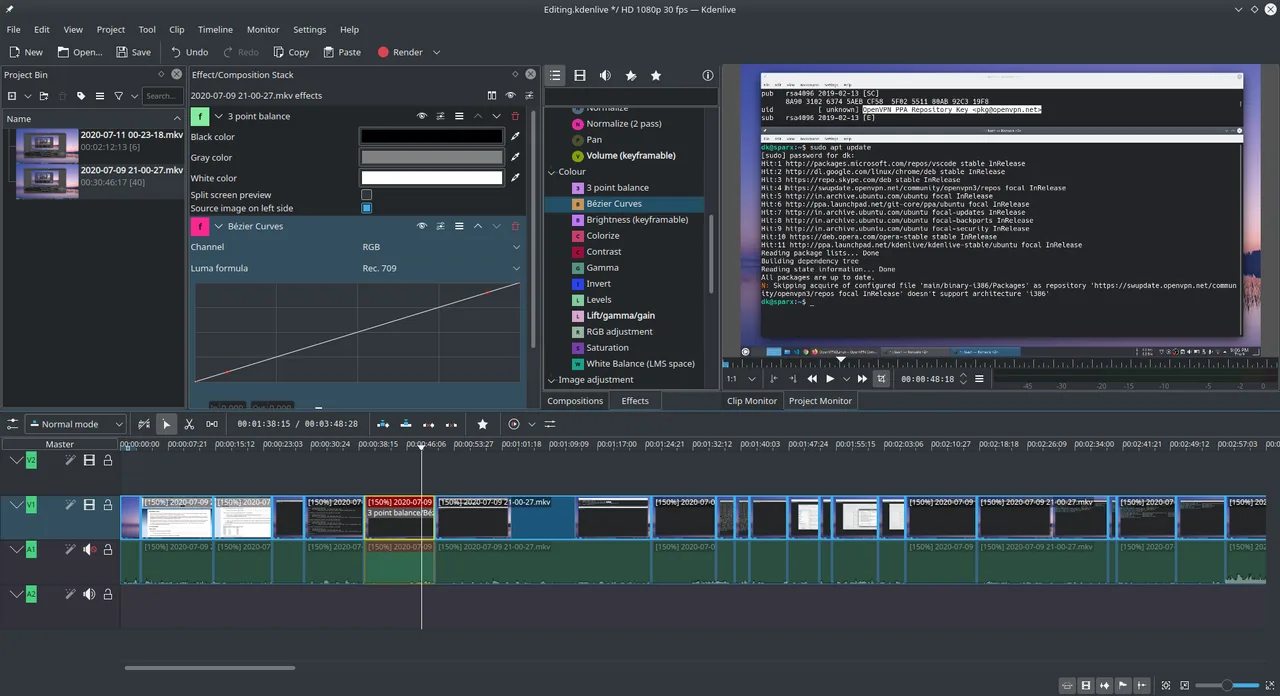

Kdenlive is a desktop video editor for Linux, Windows and macOS. It handles multi-track editing on your own computer.
The repository’s COPYING file is the GPL version 3. The GitHub repository is a mirror of the project’s KDE repository.
Quick start
Checked against the project’s own documentation on November 9, 2026. We have not run these installs ourselves. Commands are copied from the project’s pages, or from Flathub and Homebrew where the section says so.
Linux
The download page offers an AppImage and a Flatpak. The Flathub package is verified by its publisher:
flatpak install flathub org.kde.kdenliveWindows and macOS
Installers are on the Kdenlive download page.
NixOS
nixpkgs packages Kdenlive as kdePackages.kdenlive (source: pkgs/kde/gear/kdenlive/default.nix):
environment.systemPackages = [ pkgs.kdePackages.kdenlive ];Rebuild with sudo nixos-rebuild switch, then launch Kdenlive from the application menu.
First steps
- Make a folder for the project and put your video clips in it.
- Open Kdenlive and create a project with File > New.
- Add clips to the project bin and drag them onto the timeline, then trim and arrange them.
- Export with the Render dialog when you’re done.
Source: Kdenlive quick start, which uses sample clips you can download.
Linux · Free video editor built on the MLT Framework and KDE Frameworks. Paste into your AI assistant. It may only be able to guide you. Review changes before running anything.
Researched, not run by the Index. Checked 2026-11-12. No AI account or connection is needed here.
Read or copy the prompt manually
Windows and macOS · Free video editor built on the MLT Framework and KDE Frameworks. Paste into your AI assistant. It may only be able to guide you. Review changes before running anything.
Researched, not run by the Index. Checked 2026-11-12. No AI account or connection is needed here.
Read or copy the prompt manually
NixOS · Free video editor built on the MLT Framework and KDE Frameworks. Paste into your AI assistant. It may only be able to guide you. Review changes before running anything.
Researched, not run by the Index. Checked 2026-11-12. No AI account or connection is needed here.
Read or copy the prompt manually
Tags: Creative