Work & organize
Karakeep
Self-hosted bookmark-everything app. Saves the content, not just the link, with search and AI tagging.
Release notes / v0.34.1
Released 2026-10-22. Snapshot from the included release data, not a live check.
This is a security release on top of 0.34.0. The docker images move from the pinned `node:24.18.1-slim` back to `node:24-slim` (currently Node 24.22.1) to pick up the [October 2026 Node.js security releases](https://nodejs.org/en/blog/vulnerability/october-2026-security-releases). Among other fixes, these patch a Brotli decoder out-of-bounds write (CVE-2026-111497) and several TLS certificate hostname validation bypasses (CVE-2026-105483, CVE-2026-106069, CVE-2026-106072). Thanks @eriktews for the fix (#3217)! The node version was pinned in 0.33.2 because of the better-sqlite3 crash loop (#29…
Read the full release notes on GitHub ↗Available on these platforms
The mobile apps connect to a Karakeep server. Browser extensions and the web interface are separate ways to use it; Android and iOS are not server-hosting targets.
Compatibility details and official sources
Official availability checked 2026-11-12. Availability is not feature parity. The recorded release and license refer to the linked source project; separate clients can differ. No install or compatibility test was run.
Before you install
Bookmark everything, keep it searchable.
- What does it run on?
- A Docker Compose stack: the app, a Meilisearch index for full-text search, and optional AI tagging.
- Where is my data?
- Saved links, notes, images and PDFs are crawled and stored on your server - search still works when the original page disappears.
- What will I maintain?
- The Compose stack, storage for archived pages, and updates. Automatic AI tagging is optional and needs a model provider you choose.
Advice and funding routes source-checked November 12, 2026. Researched, not an install or restore test. Installation source ↗ · Report a correction
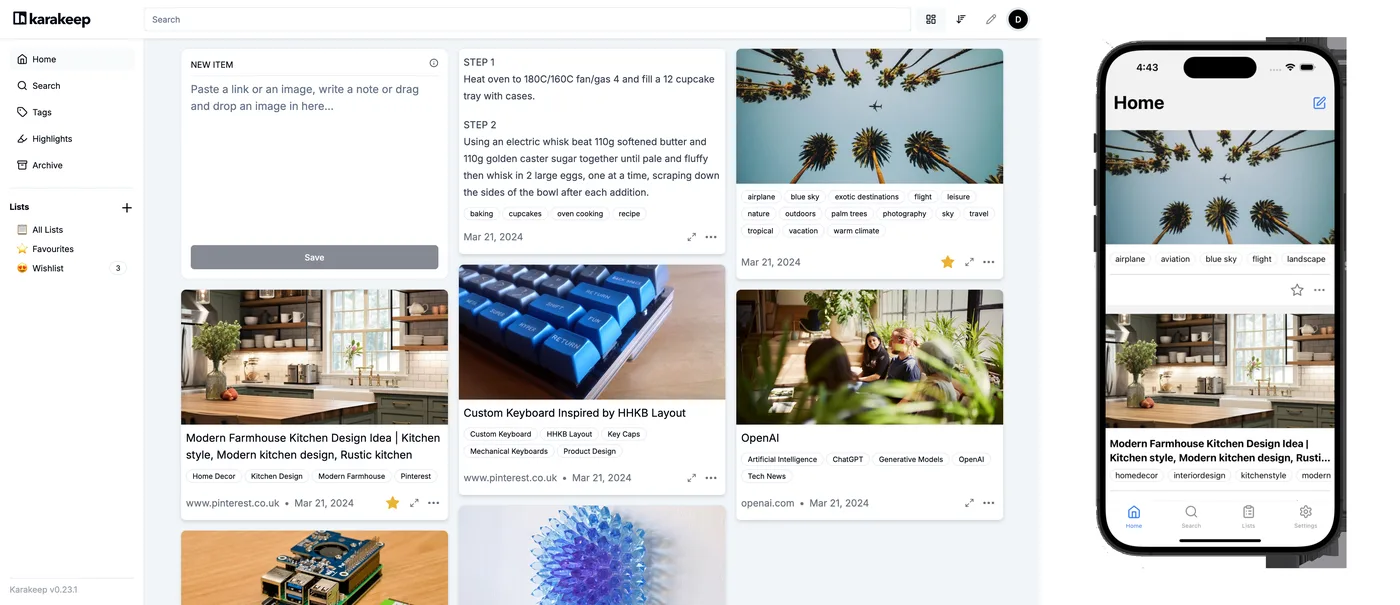

Karakeep is a self-hosted “bookmark everything” app. Save links, notes, images, and PDFs from the browser extension or the mobile apps, and it crawls and stores the content itself - so search still works when the original page disappears. Full-text search runs on Meilisearch, and automatic AI tagging is optional.
Quick start
Verified against Karakeep’s own documentation on November 8, 2026; we haven’t run these setups ourselves.
Docker Compose is the documented install; there is no native Ubuntu package, so on Ubuntu use Docker. The NixOS module is maintained in nixpkgs.
Docker Compose
Download the official compose file and environment template:
mkdir karakeep && cd karakeep
wget -O docker-compose.yml https://raw.githubusercontent.com/karakeep-app/karakeep/main/docker/docker-compose.yml
wget -O .env https://raw.githubusercontent.com/karakeep-app/karakeep/main/docker/.env.sample
The stack is three containers: the app, Meilisearch for search, and
headless Chrome for archiving pages. Edit .env and set the two
required secrets before starting:
# generate each with: openssl rand -base64 36 | tr -dc 'A-Za-z0-9'
MEILI_MASTER_KEY=
NEXTAUTH_SECRET=
Then docker compose up -d, open http://localhost:3000, and create your
account. Once you’re in, set DISABLE_SIGNUPS=true in .env if the
instance is just for you. Data persists in the compose-managed volumes.
Works on any host with Docker and the Compose plugin: on Ubuntu Server,
sudo apt install docker.io docker-compose-v2 covers both; on NixOS,
virtualisation.docker.enable = true; enables Docker.
NixOS
services.karakeep = {
  enable = true;
  browser.enable = true;
};
Then sudo nixos-rebuild switch. The module starts Meilisearch for you,
generates the required secrets into /var/lib/karakeep/settings.env on
first run, and serves the app on http://localhost:3000.
browser.enable adds the headless Chrome that archives page contents.
Why it’s listed
Bookmarks in a browser sync service are links that rot; Karakeep keeps the content, searchable, on your own hardware. It turns “save it for later” into a pile you can actually find things in.
Docker Compose · Self-hosted bookmark-everything app. Saves the content, not just the link, with search and AI tagging. Paste into your AI assistant. It may only be able to guide you. Review changes before running anything.
Researched, not run by the Index. Checked 2026-11-12. No AI account or connection is needed here.
Read or copy the prompt manually
NixOS · Self-hosted bookmark-everything app. Saves the content, not just the link, with search and AI tagging. Paste into your AI assistant. It may only be able to guide you. Review changes before running anything.
Researched, not run by the Index. Checked 2026-11-12. No AI account or connection is needed here.
Read or copy the prompt manually
Tags: Bookmarks
Want help running it? Ask FOSSadmin about hosting and maintenance ↗