Work & organize
Joplin
Note-taking apps with sync, in Markdown.
Release notes / v3.7.22
Released 2026-10-28. Snapshot from the included release data, not a live check.
- Improved: Add read_notes MCP tool (#16845) (#16782) - Improved: Reduce read_note token consumption with outline and section navigation (#16838) (#16777) - Improved: Return the enclosing section with each search_notes result (#16842) (#16778) - Improved: Treat private network AI providers as local (#16837) - Improved: Upgrade app banner shows the wrong minimum app version (#16819) (#16721 by [@Rygaa](https://github.com/Rygaa)) - Fixed: Security: Upgrade to Electron 42.11.18 (#16964) (#16939 by [@personalizedrefrigerator](https://github.com/personalizedrefrigerator))
Read the full release notes on GitHub ↗Available on these platforms
Desktop and mobile apps share the Joplin project. Choose the download for your device; sync services are a separate choice.
Compatibility details and official sources
Official availability checked 2026-11-12. Availability is not feature parity. The recorded release and license refer to the linked source project; separate clients can differ. No install or compatibility test was run.
Before you install
Notes with sync you choose, end to end.
- What does this listing cover?
- The apps, under AGPL-3.0. Joplin Server carries a Personal Use License that is not open source, so it is not part of this listing.
- Where do my notes live?
- Locally first; sync goes to a service you pick (Nextcloud, WebDAV, Dropbox, Joplin Cloud). End-to-end encryption is a setting worth turning on.
- How do I add devices?
- Set sync up on one device and let it finish before adding the next; the same account covers the mobile apps.
Advice and funding routes source-checked November 12, 2026. Researched, not an install or restore test. Installation source ↗ · Report a correction
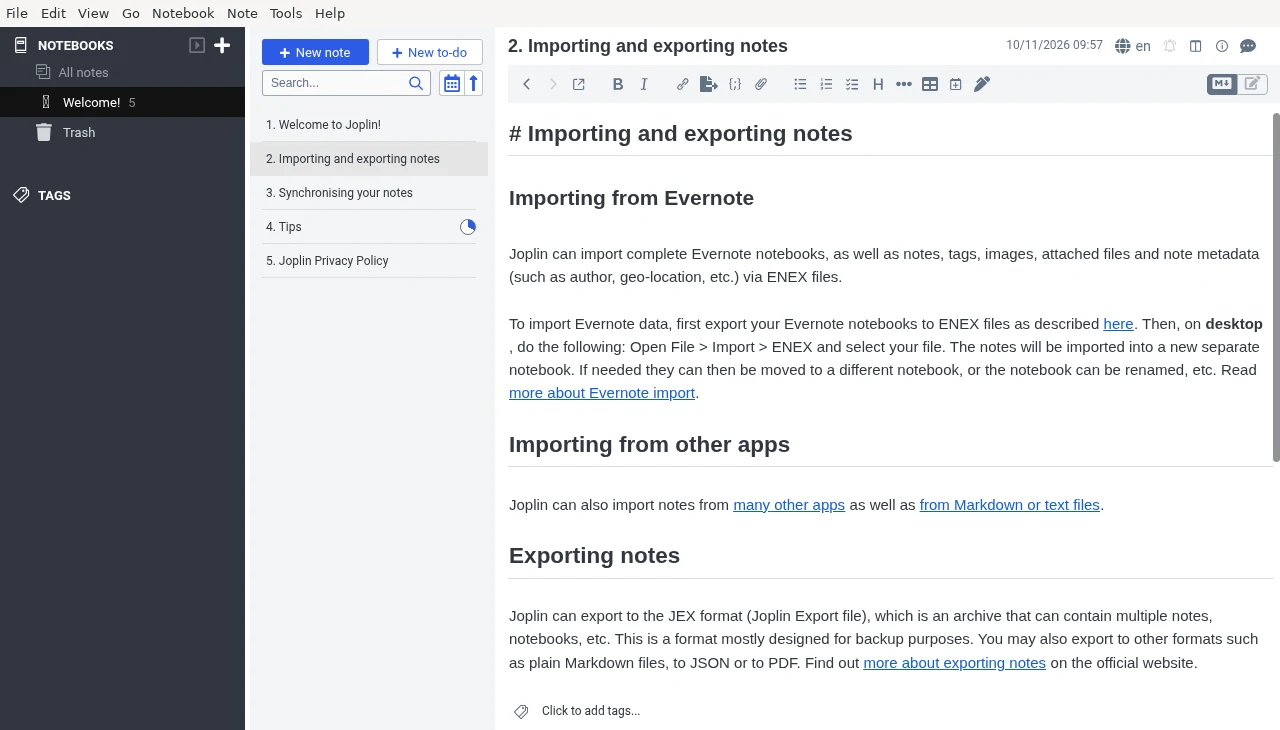
Joplin is a privacy-focused note-taking app for Windows, macOS, Linux and mobile, with sync to a service you choose.
This listing covers the Joplin apps. The repository’s license file says code is AGPL-3.0-or-later unless a directory has its own license file, and packages/server has one: the Joplin Server Personal Use License, which is not an open-source license. Joplin Server is therefore not part of this listing.
Quick start
Checked against the project’s own documentation on November 9, 2026. We have not run these installs ourselves. Commands are copied from the project’s pages, or from Flathub and Homebrew where the section says so.
Linux
The project recommends its install script, which also sets up the desktop icon:
wget -O - https://raw.githubusercontent.com/laurent22/joplin/dev/Joplin_install_and_update.sh | bashThat pipes a script from the internet into your shell. If you prefer, download it first and read it.
Windows and macOS
Download from joplinapp.org/help/install. Windows also has a portable build you can copy to a USB key.
Homebrew has a cask for it. That is Homebrew’s packaging, not the project’s own:
brew install --cask joplinNixOS
nixpkgs packages Joplin as joplin-desktop (source: pkgs/by-name/jo/joplin-desktop/package.nix):
environment.systemPackages = [ pkgs.joplin-desktop ];Rebuild with sudo nixos-rebuild switch, then launch Joplin from the application menu.
First steps
- Create a notebook, then a note in it, and write in Markdown.
- Notes stay on your device until you set up sync. Under the desktop app’s options, choose a synchronisation target such as Nextcloud or Dropbox. Joplin supports several. See Synchronisation.
- The Web Clipper browser extension saves pages and screenshots into Joplin.
- If you sync, turn on end-to-end encryption in the options before adding a lot of notes.
Linux · Note-taking apps with sync, in Markdown. Paste into your AI assistant. It may only be able to guide you. Review changes before running anything.
Researched, not run by the Index. Checked 2026-11-12. No AI account or connection is needed here.
Read or copy the prompt manually
Windows and macOS · Note-taking apps with sync, in Markdown. Paste into your AI assistant. It may only be able to guide you. Review changes before running anything.
Researched, not run by the Index. Checked 2026-11-12. No AI account or connection is needed here.
Read or copy the prompt manually
NixOS · Note-taking apps with sync, in Markdown. Paste into your AI assistant. It may only be able to guide you. Review changes before running anything.
Researched, not run by the Index. Checked 2026-11-12. No AI account or connection is needed here.
Read or copy the prompt manually
Tags: Notes