Servers & monitoring
Homepage
A fast, self-hosted start page for your services, with live widgets for over a hundred apps.
Release notes / v2.8.0
Released 2026-11-11. Snapshot from the included release data, not a live check.
## What's Changed ## 🚀 Features - Enhancement: add BookOrbit API key authentication support (#7339) @mehalter - Enhancement: use language in html document, consolidate normalize handler (#7313) @shamoon - Enhancement: sort Deluge leech progress by completion (#7304) @prashantsolanki3 - Enhancement: add more optional fields to beszel widget (#7303) @remc0r - Enhancement: localize the sign-in page (#7293) @brushax - Enhancement: allow disabling quicklaunch (#7288) @shamoon - Enhanceme…
Read the full release notes on GitHub ↗Available on these platforms
This is the web dashboard served by a Homepage installation, not a native app for each browser operating system.
Compatibility details and official sources
- Web - Browser interface
Official availability checked 2026-11-12. Availability is not feature parity. The recorded release and license refer to the linked source project; separate clients can differ. No install or compatibility test was run.
Before you install
A front door for your server.
- What does it run on?
- A Docker container or a Node.js service next to the things it links to. Everything is configured in a few readable YAML files.
- Where is my data?
- Only configuration lives in Homepage; it pulls live status and widgets from over a hundred self-hosted apps without holding their data.
- What will I maintain?
- A YAML file and container updates. Widgets need API tokens for the apps they show - treat those tokens as secrets.
Advice and funding routes source-checked November 12, 2026. Researched, not an install or restore test. Installation source ↗ · Report a correction
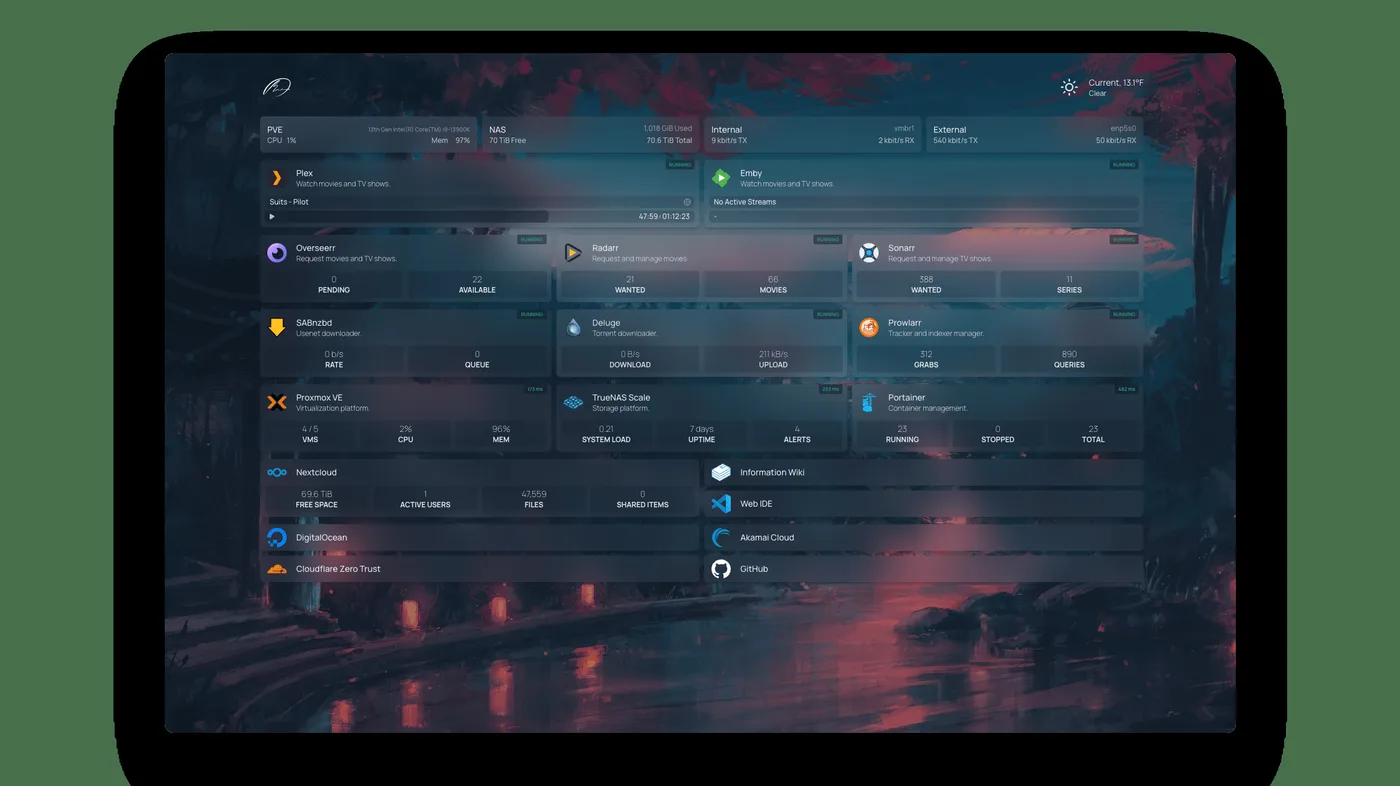

Homepage gives your server a front door: one start page with links, live status, and widgets for the things you run. Everything is configured in a few readable YAML files, and built-in integrations pull live data - queue depth, disk health, stream counts - from over a hundred self-hosted apps.
Quick start
Verified against Homepage’s own documentation on November 8, 2026; we haven’t run these setups ourselves.
Homepage runs as a container or from source; there is no native Ubuntu package, so on Ubuntu use Docker. The NixOS module is maintained in nixpkgs.
Docker Compose
Save this as compose.yaml, from the official installation docs:
services:
  homepage:
    image: ghcr.io/gethomepage/homepage:latest
    container_name: homepage
    ports:
      - 3000:3000
    environment:
      HOMEPAGE_ALLOWED_HOSTS: localhost:3000
    volumes:
      - ./config:/app/config
    restart: unless-stopped
Then docker compose up -d and open http://localhost:3000.
HOMEPAGE_ALLOWED_HOSTS is required - list every hostname you browse it
under, comma-separated. Your apps go in ./config/services.yaml (the
config directory holds the other YAML files too); mount
/var/run/docker.sock read-only as well if you want container status
widgets. Works on any host with Docker and the Compose plugin: on Ubuntu Server,
sudo apt install docker.io docker-compose-v2 covers both; on NixOS,
virtualisation.docker.enable = true; enables Docker.
NixOS
services.homepage-dashboard = {
  enable = true;
};
Then sudo nixos-rebuild switch. The service listens on port 8082 and
only answers for localhost until you set
services.homepage-dashboard.allowedHosts to the hostname or IP you
browse it under. Bookmarks, service entries, and widgets are declared
under services.homepage-dashboard.bookmarks, .services, .widgets
and .settings.
Why it’s listed
Once more than a couple of tools from this directory are running, remembering ports becomes the chore. Homepage replaces the bookmark folder with a start page that shows what’s actually up.
Docker Compose · A fast, self-hosted start page for your services, with live widgets for over a hundred apps. Paste into your AI assistant. It may only be able to guide you. Review changes before running anything.
Researched, not run by the Index. Checked 2026-11-12. No AI account or connection is needed here.
Read or copy the prompt manually
NixOS · A fast, self-hosted start page for your services, with live widgets for over a hundred apps. Paste into your AI assistant. It may only be able to guide you. Review changes before running anything.
Researched, not run by the Index. Checked 2026-11-12. No AI account or connection is needed here.
Read or copy the prompt manually
Tags: Dashboard
Want help running it? Ask FOSSadmin about hosting and maintenance ↗