Servers & monitoring
Gotify
A private notification server for alerts from your own scripts and services.
Release notes / v3.1.1
Released 2026-09-15. Snapshot from the included release data, not a live check.
- Require an elevated session for creating users (GHSA-phfm-q6fr-wv34 via #1048) - Move theme selection and password change to separate settings page (#1040 via #1041 by @justadityaraj) - Disable password change form when [`GOTIFY_LOCALAUTH_ENABLED`](https://gotify.net/docs/config#gotify-localauth-enabled) is disabled (#1040 via #1041 by @justadityaraj) - Fix crash when a Let's Encrypt request fails (#1046 by @NotAFlightRisk) - Update dependencies
Read the full release notes on GitHub ↗Available on these platforms
The server includes a web UI. The official Android client has separate source and releases; an iOS client is not asserted.
Compatibility details and official sources
Official availability checked 2026-11-12. Availability is not feature parity. The recorded release and license refer to the linked source project; separate clients can differ. No install or compatibility test was run.
Before you install
Push notifications without a commercial middleman.
- What does it run on?
- A small server (Docker or a binary) with a web interface and an Android app. Other services send messages through its HTTP API.
- Where is my data?
- Messages pass through your server only - no commercial push service sees their contents. Each application gets its own revocable token.
- What will I maintain?
- The server, its tokens and updates. Keep it reachable from the services that alert you; it is simple by design.
Advice and funding routes source-checked November 12, 2026. Researched, not an install or restore test. Installation source ↗ · Report a correction
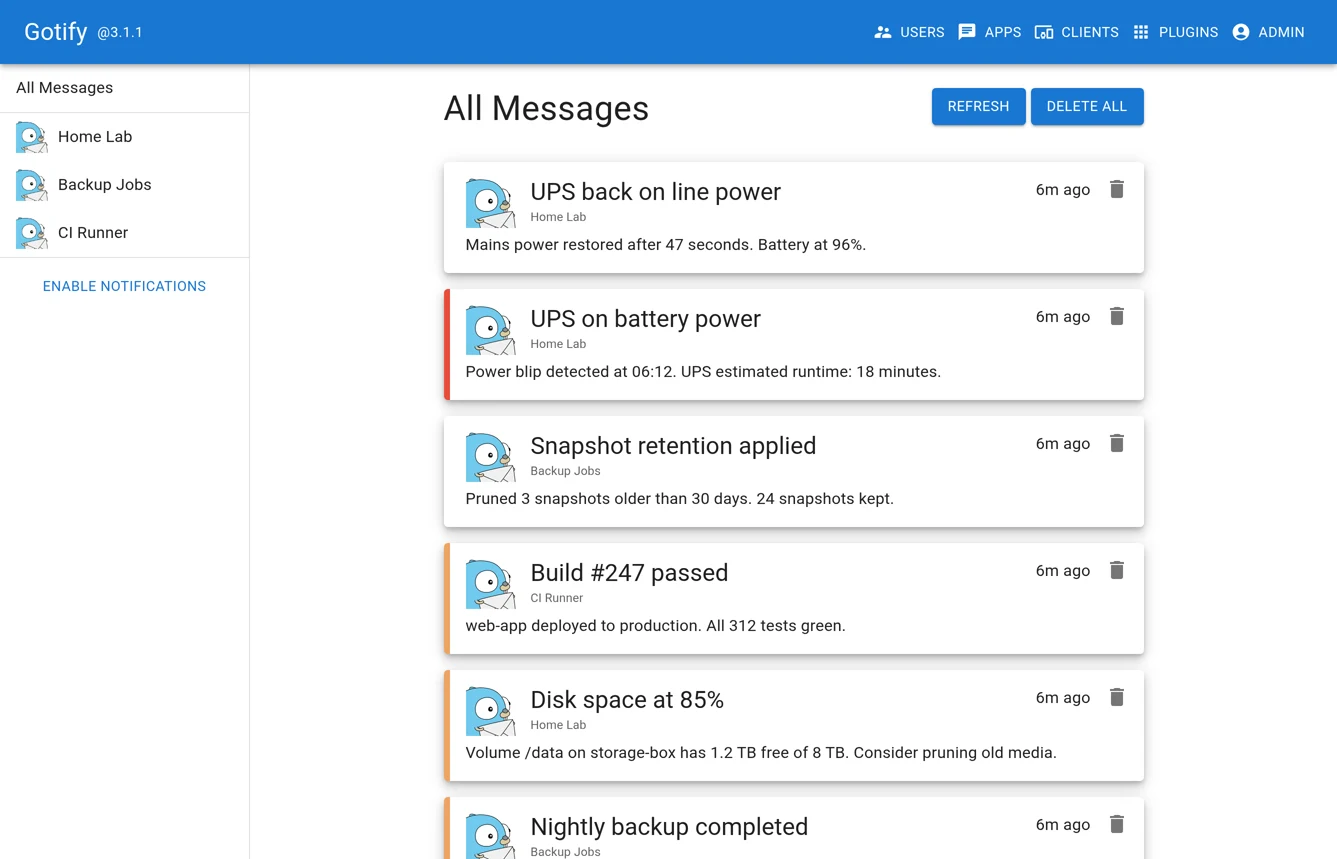
Gotify receives messages through an HTTP API and delivers them to its web interface and Android app. A backup script, uptime monitor or server job can send a short alert without routing its contents through a commercial push-notification service.
Applications get their own tokens, so you can revoke one sender without changing every integration. It is an alert inbox, not team chat. The Android app needs a connection to your server; consider network access and battery settings when relying on it for time-sensitive alerts.
Quick start
Verified against Gotify’s own documentation on November 8, 2026; we haven’t run these setups ourselves.
Docker and downloadable binaries are supported upstream. The NixOS module is maintained in nixpkgs and may package a different version. These examples bind only to localhost; use an SSH tunnel for initial setup and HTTPS through a reverse proxy for remote clients. Keep tokens and passwords out of version control.
Docker Compose
Create a private .env file in a new project directory. Set
GOTIFY_ADMIN_PASSWORD to a strong, unique initial password, then run
chmod 600 .env. Save this as compose.yaml:
services:
  gotify:
    image: gotify/server
    ports:
      - "127.0.0.1:8080:80"
    environment:
      GOTIFY_DEFAULTUSER_NAME: admin
      GOTIFY_DEFAULTUSER_PASS: ${GOTIFY_ADMIN_PASSWORD:?Set it in .env first}
    volumes:
      - gotify-data:/app/data
    restart: unless-stopped

volumes:
  gotify-data:
Run docker compose up -d, then open http://localhost:8080 on the host
and log in as admin with that password. This adapts the official Compose
example to avoid its default admin password and public port binding.
The initial-user settings apply only when the database is first created;
change an existing account’s password in the web interface, not in .env.
Create an application in the web interface to obtain its sending token,
then follow the push-message guide.
Back up /app/data, which holds the database and uploaded images.
This needs Docker and the Compose plugin. On Ubuntu Server,
sudo apt install docker.io docker-compose-v2 installs both; on NixOS,
virtualisation.docker.enable = true; enables Docker.
NixOS
Before the first start, create /var/lib/gotify-secrets.env as a
root-owned file with mode 600, containing
GOTIFY_DEFAULTUSER_PASS= followed by a strong, unique password. Do not
put that password directly in Nix configuration: the Nix store is readable
by other local users.
services.gotify = {
  enable = true;
  environment = {
    GOTIFY_SERVER_LISTENADDR = "127.0.0.1";
    GOTIFY_SERVER_PORT = 8080;
    GOTIFY_DEFAULTUSER_NAME = "admin";
  };
  environmentFiles = [ "/var/lib/gotify-secrets.env" ];
};
Run sudo nixos-rebuild switch, then open http://127.0.0.1:8080 on
the host. Log in as admin with the password from the secret file.
The module stores state in /var/lib/gotify-server. Initial-user
settings do not reset an existing account’s password.
Why it’s listed
Useful automation should tell you when something needs attention. Gotify gives Uptime Kuma and your own scripts a small, self-hosted place to send those messages, without becoming another chat platform to manage.
Documentation
Gotify’s server code is MIT-licensed. Its logo has separate CC BY 4.0 terms in the repository’s LICENSE file; no logo is included here.
Docker Compose · A private notification server for alerts from your own scripts and services. Paste into your AI assistant. It may only be able to guide you. Review changes before running anything.
Researched, not run by the Index. Checked 2026-11-12. No AI account or connection is needed here.
Read or copy the prompt manually
NixOS · A private notification server for alerts from your own scripts and services. Paste into your AI assistant. It may only be able to guide you. Review changes before running anything.
Researched, not run by the Index. Checked 2026-11-12. No AI account or connection is needed here.
Read or copy the prompt manually
Tags: Notifications
Want help running it? Ask FOSSadmin about hosting and maintenance ↗