Operating systems
FreeBSD
Unix-like operating system with an integrated base system, jails and a large ports collection.
Release notes / 15.1-RELEASE
Version checked by hand on 2026-11-11. Snapshot from the included release data, not a live check.
The official release page identifies 15.1 as the production release. Legacy releases have separate support windows. Base-system BSD-style terms do not replace the licenses of all imported components or installed packages.
Read the full release notes ↗Device compatibility
Official hardware and installation choices ↗
FreeBSD is an operating system. Its platform list distinguishes support tiers; a port existing is not identical support for every architecture or device. It is not an iPhone or Android replacement.
Compatibility details and official sources
Official availability checked 2026-11-12. Availability is not feature parity. The recorded release and license refer to the linked source project; separate clients can differ. No install or compatibility test was run.
Before you install
A complete Unix system, not a Linux distribution.
- Is FreeBSD right for my goal?
- It suits servers, storage and network appliances, and people who want an integrated base system. Desktop use is possible but more hands-on than a Linux desktop.
- Where does it run?
- Standard 64-bit PCs and virtual machines; other architectures have their own support tiers. A VM or spare machine is the sensible first install.
- Packages or ports?
- Prebuilt packages cover most needs; the ports collection builds from source when you need compile-time options changed. Both are normal, documented routes.
Advice and funding routes source-checked November 12, 2026. Researched, not an install or restore test. Installation source ↗ · Report a correction
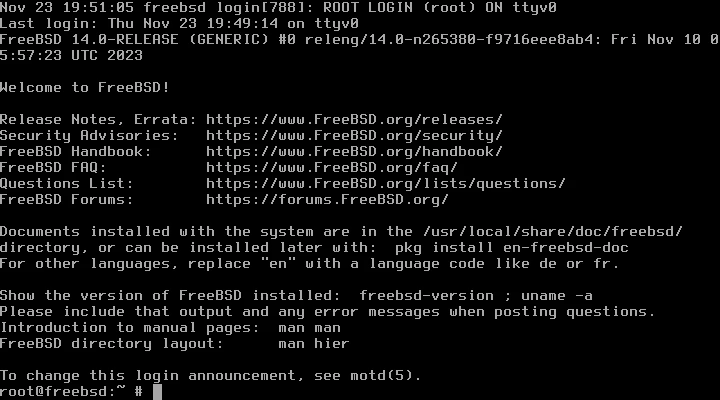

FreeBSD is a Unix-like operating system, not a Linux distribution. Its integrated base system includes the kernel and core utilities; applications are available through packages and the ports collection. The core uses BSD-style terms, including the FreeBSD two-clause license. Imported components and packages have their own licenses, so the whole installation is not uniformly BSD-2-Clause.
FreeBSD is a registered trademark of The FreeBSD Foundation. This independent listing does not imply affiliation or endorsement. A standalone logo is omitted while permission for its commercial/marketing use remains unresolved.
Quick start
Researched against the FreeBSD Handbook and current release pages on November 11, 2026. We have not downloaded, booted or installed FreeBSD.
Isolated VM or spare computer
Get the image
Use Getting FreeBSD and choose a supported production release for your hardware. The release page identified 15.1 as the production release at our check; legacy releases have different support windows. For a first test, use a virtual machine with a new empty disk rather than replace your working system.
Download the installer image and verify its signed checksums using that
release’s instructions. A memstick image is intended for writing to USB;
ISO images are useful for virtual optical drives. Confirm the architecture
matches your machine. Writing an image erases the target USB drive.
Install
Boot the installer and follow bsdinstall: select keymap, hostname, optional
components, target disk, networking, time zone and users. Automatic partitioning
can erase the selected disk. Check the target carefully and make a backup first.
Create a regular user and grant the documented administrative access only if
needed. Do not enable SSH for root or expose an unconfigured system publicly.
After installation, reboot and remove the installation media. A normal FreeBSD base install starts at a console, not a graphical desktop. A desktop requires additional packages and configuration from the Handbook.
First use
Log in as your regular user. Check the installed version with freebsd-version
and consult the release-specific updating chapter before applying updates.
Use man hier to learn the filesystem layout and man pkg for package
management. On a new installation, pkg offers to bootstrap the package tool
when first used with administrative privileges. Review the package source,
permissions and service settings before installing or enabling applications.
NixOS compatibility
FreeBSD is a separate operating system, not a NixOS module. Test it in a VM or on
separate hardware. Linux/NixOS service configuration is not a FreeBSD install
recipe; FreeBSD uses its own base tools and rc.conf service settings.
Documentation
- FreeBSD Handbook installation chapter
- Production and legacy release information
- Getting FreeBSD
- FreeBSD copyright and license
- Foundation trademark terms
Isolated VM or spare computer · Plan a safe FreeBSD install. Paste into your AI assistant. It may only be able to guide you. Review changes before running anything.
Researched, not run by the Index. Checked 2026-11-12. No AI account or connection is needed here.
Read or copy the prompt manually
Tags: Operating systems