Servers & monitoring
Forgejo
Self-hosted software forge for Git repositories, issues and pull requests.
Version checked by hand on 2026-11-10. Snapshot from the included release data, not a live check.
No release-notes excerpt is recorded here.
Open the project's release source ↗Available on these platforms
Use the browser interface of a Forgejo server. Mobile browsers do not run the server; Git clients are a separate tool choice.
Compatibility details and official sources
- Web - Browser interface
Official availability checked 2026-11-12. Availability is not feature parity. The recorded release and license refer to the linked source project; separate clients can differ. No install or compatibility test was run.
Before you install
Your own Git forge, community-governed.
- What does it run on?
- A server you run - Docker, binaries or a NixOS module - hosting Git repositories with issues, pull requests and a web interface.
- Where is my data?
- Repositories, issues and user accounts live on your server. Nothing depends on a hosted forge.
- What will I maintain?
- Updates, storage, backups and user administration. The project describes itself as community-governed; from v9.0 it is GPL v3-or-later.
Advice and funding routes source-checked November 12, 2026. Researched, not an install or restore test. Installation source ↗ · Report a correction
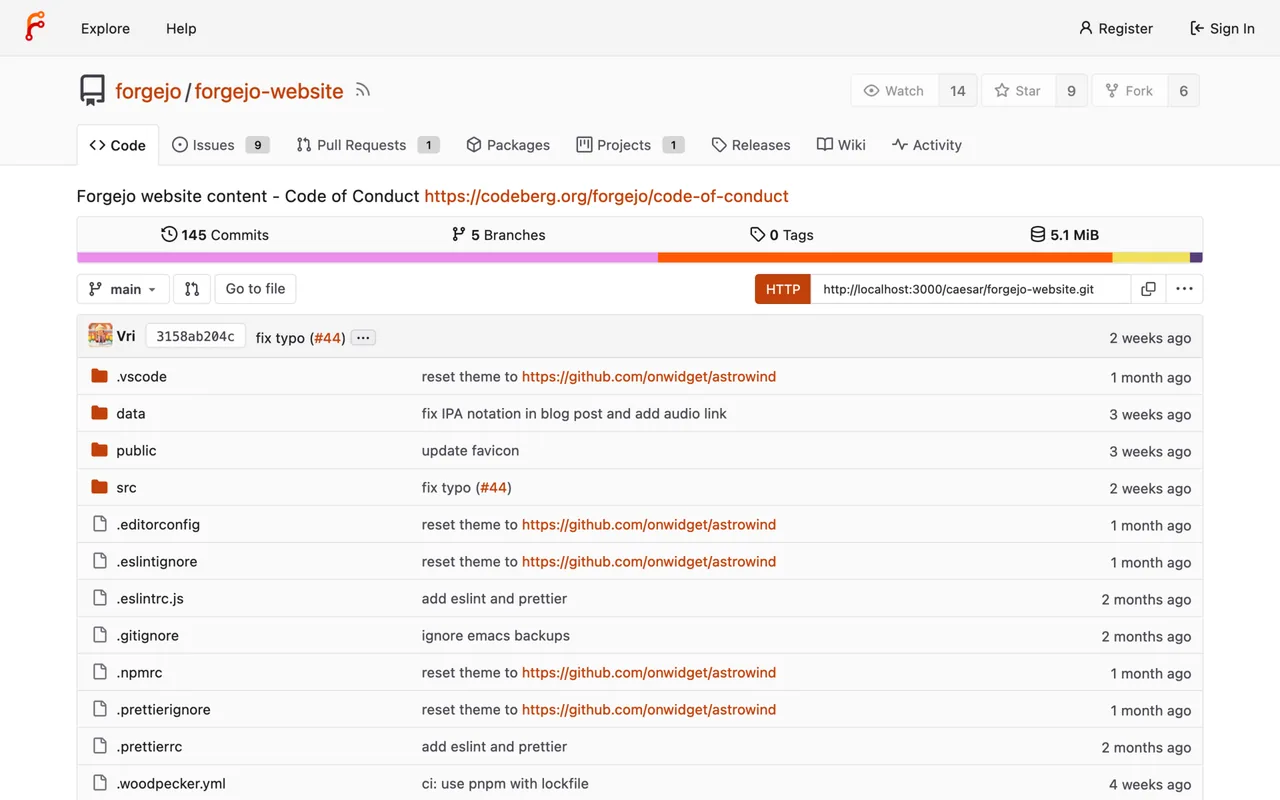

Forgejo hosts Git repositories with issues, pull requests and a web interface, on a server you run. The project describes itself as a community-governed forge.
Forgejo’s README says it is distributed under GPL version 3 or any later version, implemented from Forgejo v9.0. All versions before v9.0 were under the MIT license. The project is developed on Codeberg, so release data for this listing is not tracked by the site’s GitHub-based release check.
Quick start
Checked against the project’s own documentation on November 9, 2026. We have not run these installs ourselves. Commands are copied from the project’s pages, or from Flathub and Homebrew where the section says so.
Docker Compose
Forgejo’s Docker guide gives this example. Save it as compose.yaml:
networks:
  forgejo:
    external: false
services:
  server:
    image: codeberg.org/forgejo/forgejo:17
    container_name: forgejo
    environment:
      - USER_UID=1000
      - USER_GID=1000
    restart: always
    networks:
      - forgejo
    volumes:
      - ./forgejo:/data
      - /etc/localtime:/etc/localtime:ro
    ports:
      - '3000:3000'
      - '222:22'
Then run docker compose up -d. The folder you mount must be owned by the UID and GID you set, or the container may not start. The 17 tag followed the latest 17.x release when we checked. Moving up a major version needs a manual step, so read the upgrade notes first. If you don’t configure a database it uses SQLite.
Other routes
The project also documents Podman, binary and package installs under installation. Docker is the route we checked most closely.
NixOS
nixpkgs carries a full module (source: nixos/modules/services/misc/forgejo.nix). A minimal host:
services.forgejo = {
  enable = true;
  settings.server = {
    DOMAIN = "git.example.com";
    HTTP_PORT = 3000;
  };
};
Apply with sudo nixos-rebuild switch. State lives in /var/lib/forgejo and the module defaults to SQLite, so a small instance needs no database setup. Git over SSH is exposed through the host’s own services.openssh when enabled.
First steps
- Open http://localhost:3000 in a browser. The first visit shows Forgejo’s onboarding page to set up the instance.
- Choose the database (SQLite is fine for a small instance), the site URL and the admin account, then create the first repository.
- Git over SSH is mapped to port 222 in the example above. Clone with the SSH port included, or use HTTP.
- Keep the
./forgejodata folder in your backups.
Forgejo is hosted on Codeberg, so this site’s release checker skips it and shows no recorded release for it.
Docker Compose · Self-hosted software forge for Git repositories, issues and pull requests. Paste into your AI assistant. It may only be able to guide you. Review changes before running anything.
Researched, not run by the Index. Checked 2026-11-12. No AI account or connection is needed here.
Read or copy the prompt manually
NixOS · Self-hosted software forge for Git repositories, issues and pull requests. Paste into your AI assistant. It may only be able to guide you. Review changes before running anything.
Researched, not run by the Index. Checked 2026-11-12. No AI account or connection is needed here.
Read or copy the prompt manually
Tags: Development