Work & organize
Flameshot
Screenshot tool with annotations: arrows, text, blur and highlights.
Release notes / v15.0.0
Released 2026-11-07. Snapshot from the included release data, not a live check.
# What's Changed ## New Features * Let the GUI colors be choosen via hex values by @IndolikarQuantifier in https://github.com/flameshot-org/flameshot/pull/4738 * Add arrow style selector by @serebryakov02 in https://github.com/flameshot-org/flameshot/pull/4769 * Increment/decrement circle counter on mouse wheel by @milnadar in https://github.com/flameshot-org/flameshot/pull/4698 * Add keyboard controls to monitor selector by @serebryakov02 in https://github.com/flameshot-org/flameshot/pull/4811 * Fall back to native X11 capture when the portal is unavailable by @jmcarthur in https://gith
Read the full release notes on GitHub ↗Available on these platforms
Choose the official package for your OS version and processor. This does not imply a phone app or identical features on every platform.
Compatibility details and official sources
Official availability checked 2026-11-12. Availability is not feature parity. The recorded release and license refer to the linked source project; separate clients can differ. No install or compatibility test was run.
Before you install
Screenshots with markup, straight from the keyboard.
- Which package?
- One command per distribution on the install page - run only the one for yours. Windows and macOS have their own packages.
- Anything special on Wayland?
- Screenshot permissions differ by compositor; check the project's notes if captures come out blank.
- Where do captures go?
- To files or the clipboard. Nothing is uploaded unless you ask.
Advice and funding routes source-checked November 12, 2026. Researched, not an install or restore test. Installation source ↗ · Report a correction
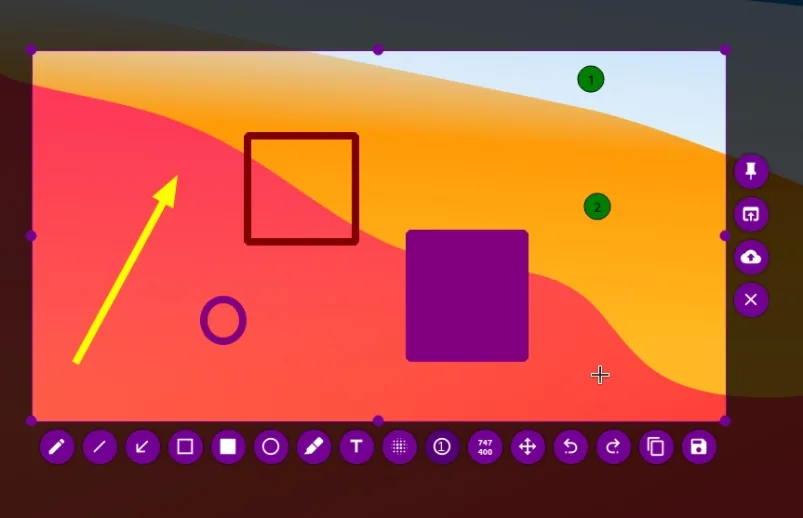
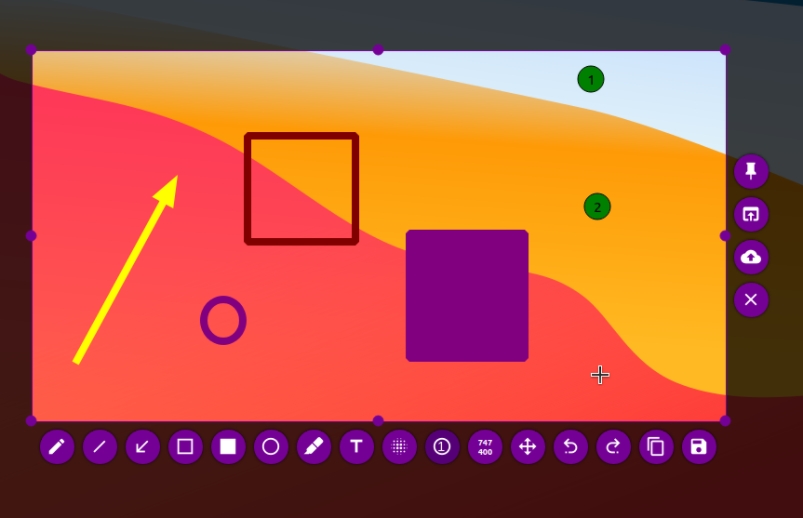
Flameshot takes screenshots and lets you mark them up before you save or share them, with arrows, boxes, text, blur and highlights. It runs on Linux, Windows and macOS.
The repository’s LICENSE file is the GNU GPL version 3.
Quick start
Checked against the project’s own documentation on November 9, 2026. We have not run these installs ourselves. Commands are copied from the project’s pages, or from Flathub and Homebrew where the section says so.
Linux
Flameshot’s Linux install page gives one command per distribution. For example:
Pick the one line for your distribution. Do not run them all.
sudo apt install flameshot    # Debian 10+, Ubuntu 18.04+
sudo dnf install flameshot    # Fedora
sudo pacman --sync flameshot  # Arch
sudo zypper install flameshot # openSUSE
Flathub lists this app as verified by its publisher (checked on the Flathub API on November 9, 2026):
flatpak install flathub org.flameshot.FlameshotThis needs Flatpak set up on your system first (see flatpak.org/setup).
Windows and macOS
The project has an install page for each: Windows and macOS. Follow the route it gives. On Windows, the command-line tool is called flameshot-cli instead of flameshot.
NixOS
nixpkgs packages Flameshot as flameshot (source: pkgs/by-name/fl/flameshot/package.nix):
environment.systemPackages = [ pkgs.flameshot ];Rebuild with sudo nixos-rebuild switch, then launch Flameshot from the application menu; flameshot gui starts a capture.
First steps
- Run
flameshot gui(on Windows,flameshot-cli gui). Your screen freezes and you drag a box over the part you want. - Annotate with the toolbar: pencil, arrow, rectangle, text, blur or pixelate, and a numbered counter. Keyboard shortcuts such as
afor arrow,rfor rectangle andtfor text work in this mode. - Save or copy the result with the buttons on the toolbar.
flameshot gui --path ~/Picturessets the save folder andflameshot gui --delay 2000waits two seconds first.
Sources: command-line options and key bindings.
Linux · Screenshot tool with annotations: arrows, text, blur and highlights. Paste into your AI assistant. It may only be able to guide you. Review changes before running anything.
Researched, not run by the Index. Checked 2026-11-12. No AI account or connection is needed here.
Read or copy the prompt manually
Windows and macOS · Screenshot tool with annotations: arrows, text, blur and highlights. Paste into your AI assistant. It may only be able to guide you. Review changes before running anything.
Researched, not run by the Index. Checked 2026-11-12. No AI account or connection is needed here.
Read or copy the prompt manually
NixOS · Screenshot tool with annotations: arrows, text, blur and highlights. Paste into your AI assistant. It may only be able to guide you. Review changes before running anything.
Researched, not run by the Index. Checked 2026-11-12. No AI account or connection is needed here.
Read or copy the prompt manually
Tags: Utilities