Files & sharing
Copyparty
Portable single-file file server with a web UI - uploads, downloads, search, media players and sharing over HTTP, WebDAV, FTP, SFTP and SMB.
Release notes / v1.20.26
Released 2026-10-14. Snapshot from the included release data, not a live check.
Latest GitHub release at check time.
Read the full release notes on GitHub ↗Available on these platforms
Official hardware and installation choices ↗
Runs anywhere Python 3 does; web UI on port 3923 by default. Shares are reachable by anyone who can reach the port until you add accounts.
Compatibility details and official sources
- Linux - Single-file Python server (also PyPI and Docker)
- macOS - Single-file Python server
- Windows - Single-file Python server
- Web - Browser interface
Official availability checked 2026-11-12. Availability is not feature parity. The recorded release and license refer to the linked source project; separate clients can differ. No install or compatibility test was run.
Before you install
A file server in a single Python file.
- What does it run on?
- Almost anywhere Python runs - one file, no database, no build step. Also available as Docker images and packages.
- Where is my data?
- Whatever folder you point it at stays yours. Uploads, downloads, thumbnails and search run from that one process on your machine.
- What will I maintain?
- Almost nothing to start; more if you expose it. WebDAV, FTP, SFTP and SMB come from the same process, so plan access rules before opening ports.
Advice and funding routes source-checked November 12, 2026. Researched, not an install or restore test. Installation source ↗ · Report a correction
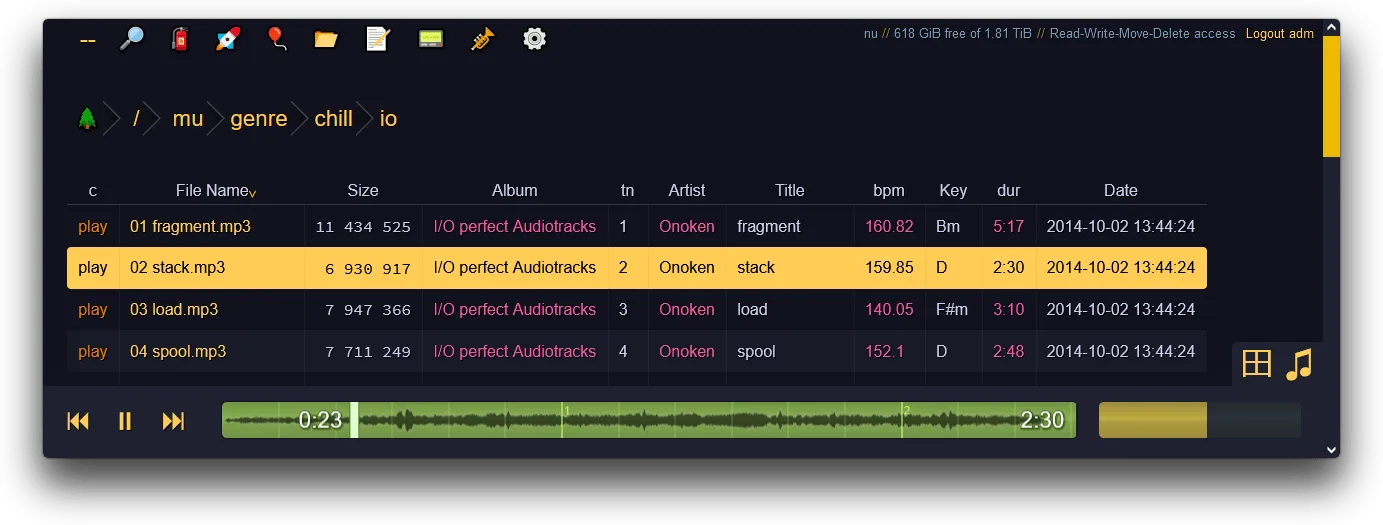
Copyparty is an MIT-licensed portable file server packed into a single Python file: point it at a folder and you get a fast web UI for uploads, downloads, thumbnails, full-text and media search, plus WebDAV, FTP, SFTP and SMB from the same process. It runs almost anywhere Python does, needs no database for a basic share, and scales from tossing a file to a phone to serving a whole media library.
The name and logo belong to the project. This is an independent listing, not an official copyparty resource or an endorsement.
Quick start
Researched from copyparty’s README and documentation on November 12, 2026. We have not installed or run it.
Linux / macOS / Windows
The README’s quickest route is the single-file script with Python 3:
python3 copyparty-sfx.py -v /path/to/share:/mnt/share:rthen open http://127.0.0.1:3923. The :r makes the share read-only; use
:rw for uploads, and add accounts before anything writable or reachable
beyond your machine - by default a share is accessible to anyone who can
reach the port. PyPI (pip install copyparty) and a Docker image are the
other documented routes.
NixOS
Copyparty is packaged in nixpkgs as copyparty. For a quick share:
nix run nixpkgs#copyparty -- -v /path/to/share:/mnt/share:rThere is no NixOS service module at check time; for a permanent service, wrap the package in your own systemd unit.
First use
Lock down permissions before exposing a port: read the accounts and volume-flag sections of the README, prefer read-only shares by default, and put it behind TLS (a reverse proxy or its own flags) outside a trusted LAN.
Documentation
Linux / macOS / Windows · Portable single-file file server with a web UI - uploads, downloads, search, media players and sharing over HTTP, WebDAV, FTP, SFTP and SMB. Paste into your AI assistant. It may only be able to guide you. Review changes before running anything.
Researched, not run by the Index. Checked 2026-11-12. No AI account or connection is needed here.
Read or copy the prompt manually
NixOS · Portable single-file file server with a web UI - uploads, downloads, search, media players and sharing over HTTP, WebDAV, FTP, SFTP and SMB. Paste into your AI assistant. It may only be able to guide you. Review changes before running anything.
Researched, not run by the Index. Checked 2026-11-12. No AI account or connection is needed here.
Read or copy the prompt manually
Tags: File Sync