Media & photos
Blender
3D creation suite for modeling, animation, rendering, video editing and compositing.
Version checked by hand on 2026-11-10. Snapshot from the included release data, not a live check.
No release-notes excerpt is recorded here.
Open the project's release source ↗Available on these platforms
Check the official download page for the supported OS version and processor architecture. A desktop download is not evidence of a native phone app.
Compatibility details and official sources
Official availability checked 2026-11-12. Availability is not feature parity. The recorded release and license refer to the linked source project; separate clients can differ. No install or compatibility test was run.
Before you install
One big download; no account, no cloud.
- Which package?
- The project's own builds from blender.org can sit side by side, so you can keep several versions. Distribution packages work too but may lag.
- Where do projects live?
- In .blend files wherever you save them. Renders and caches go where you point them.
- What hardware does it want?
- Any reasonably modern 64-bit machine; heavier scenes want a supported GPU. Check the requirements page before a big project.
Advice and funding routes source-checked November 12, 2026. Researched, not an install or restore test. Installation source ↗ · Report a correction
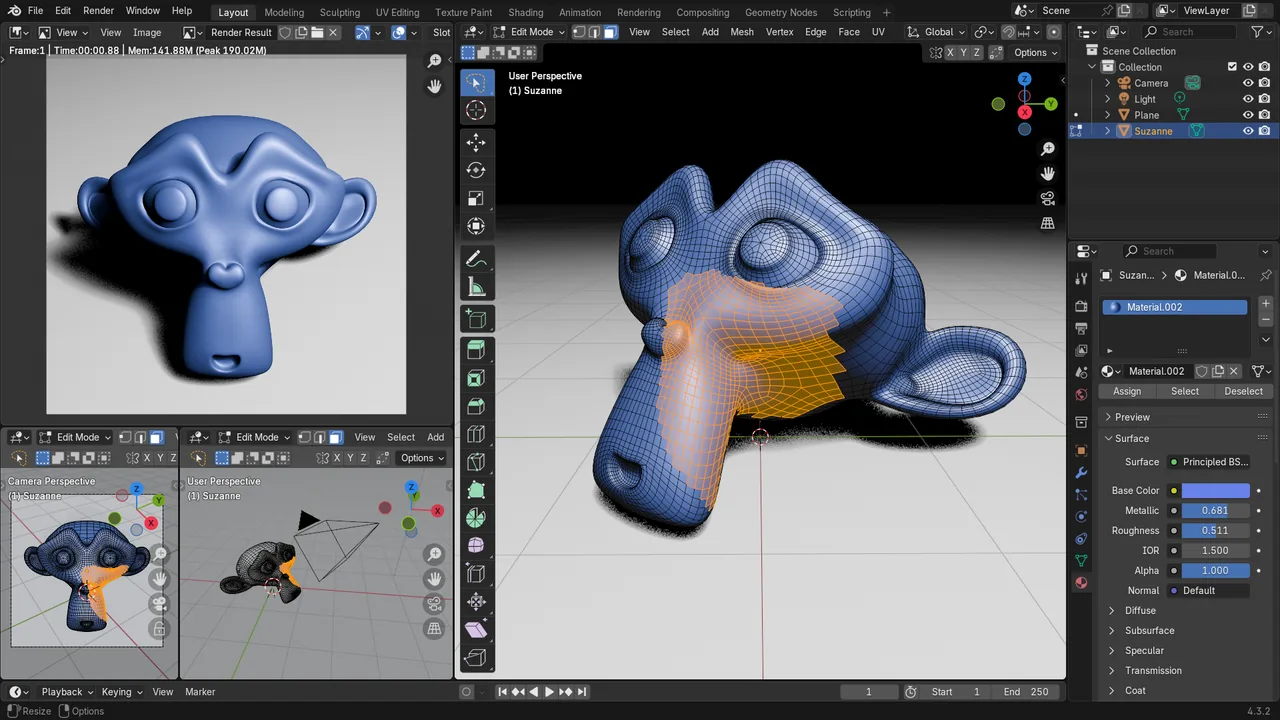

Blender covers 3D modeling, sculpting, animation, rendering, compositing and video editing in one program. It also has a Python scripting interface.
Blender’s license page says its source is licensed GNU GPL version 2 or later by default, and that some modules use more permissive licenses, for example the Cycles renderer under Apache 2.0.
Quick start
Checked against the project’s own documentation on November 9, 2026. We have not run these installs ourselves. Commands are copied from the project’s pages, or from Flathub and Homebrew where the section says so.
Linux
Blender’s Linux install page says to download the Linux build from blender.org, decompress it where you want it (for example ~/software), and start the blender executable. This way you can keep several versions side by side. Some distributions also package Blender, and the same page notes that.
Windows and macOS
Download the installer for your system from blender.org/download.
Homebrew has a cask for it. That is Homebrew’s packaging, not the project’s own:
brew install --cask blenderNixOS
nixpkgs packages Blender as blender (source: pkgs/by-name/bl/blender/package.nix):
environment.systemPackages = [ pkgs.blender ];Rebuild with sudo nixos-rebuild switch, then launch Blender from the application menu.
First steps
- Start Blender. The splash screen’s New File option starts a project from a template. To skip it, click outside the splash or press Esc. The Blender icon in the top bar reopens it.
- New projects open in Object Mode, where the manual says every object can be moved, rotated and scaled. These are the three basic transforms.
- Use Render > Render Image (F12) in the top bar to render the current frame.
- Save with Ctrl-S. The manual’s default keymap lists it as “Save file”.
Everything above is taken from Blender’s splash screen, top bar, default keymap and transform pages. Blender’s manual has the full beginner section.
Linux · 3D creation suite for modeling, animation, rendering, video editing and compositing. Paste into your AI assistant. It may only be able to guide you. Review changes before running anything.
Researched, not run by the Index. Checked 2026-11-12. No AI account or connection is needed here.
Read or copy the prompt manually
Windows and macOS · 3D creation suite for modeling, animation, rendering, video editing and compositing. Paste into your AI assistant. It may only be able to guide you. Review changes before running anything.
Researched, not run by the Index. Checked 2026-11-12. No AI account or connection is needed here.
Read or copy the prompt manually
NixOS · 3D creation suite for modeling, animation, rendering, video editing and compositing. Paste into your AI assistant. It may only be able to guide you. Review changes before running anything.
Researched, not run by the Index. Checked 2026-11-12. No AI account or connection is needed here.
Read or copy the prompt manually
Tags: Creative