Servers & monitoring
Beszel
A lightweight hub and agent for server metrics, containers and resource alerts.
Release notes / v0.21.1
Released 2026-10-22. Snapshot from the included release data, not a live check.
## What's Changed For developers using the agent as a Go package, `Agent.Start` now requires a `context.Context`. For authors of integrations, existing memory fields other than memory percentage are deprecated in favor of new fields which provide raw byte values. The deprecated fields are still populated, but will be removed from the API in a future version. ```go type Stats struct { // Deprecated fields (populated on hubs <= 0.21.1; will be removed in a future version) Mem float64 `json:"m" cbor:"2,keyasint"` // Deprecated: GB, use MemBytes. Memory GB fields are kept for older hubs and integrations. MaxMem float64 `json:"mm,omitzero" cbor:"-"` // Deprecated: GB, use MaxMemBytes. MemUsed float64 `json:"mu" cbor:"3,keyasint"` // Deprec…
Read the full release notes on GitHub ↗Available on these platforms
The browser connects to a Beszel hub. Monitored hosts run a separate agent. A Web label is not a claim that the hub or agent runs on a phone.
Compatibility details and official sources
- Web - Browser interface
Official availability checked 2026-11-12. Availability is not feature parity. The recorded release and license refer to the linked source project; separate clients can differ. No install or compatibility test was run.
Before you install
Lightweight monitoring: one hub, small agents.
- What does it run on?
- A web hub (Docker or a binary) plus a small agent on each system you want to watch. The hub alone collects no host metrics.
- Where is my data?
- CPU, memory, disk, network and container stats with history live on your hub. Nothing leaves your machines for a hosted service.
- What will I maintain?
- The hub and one agent per machine, kept updated together. It gives charts and alerts without replacing a full metrics stack such as VictoriaMetrics plus Grafana.
Advice and funding routes source-checked November 12, 2026. Researched, not an install or restore test. Installation source ↗ · Report a correction
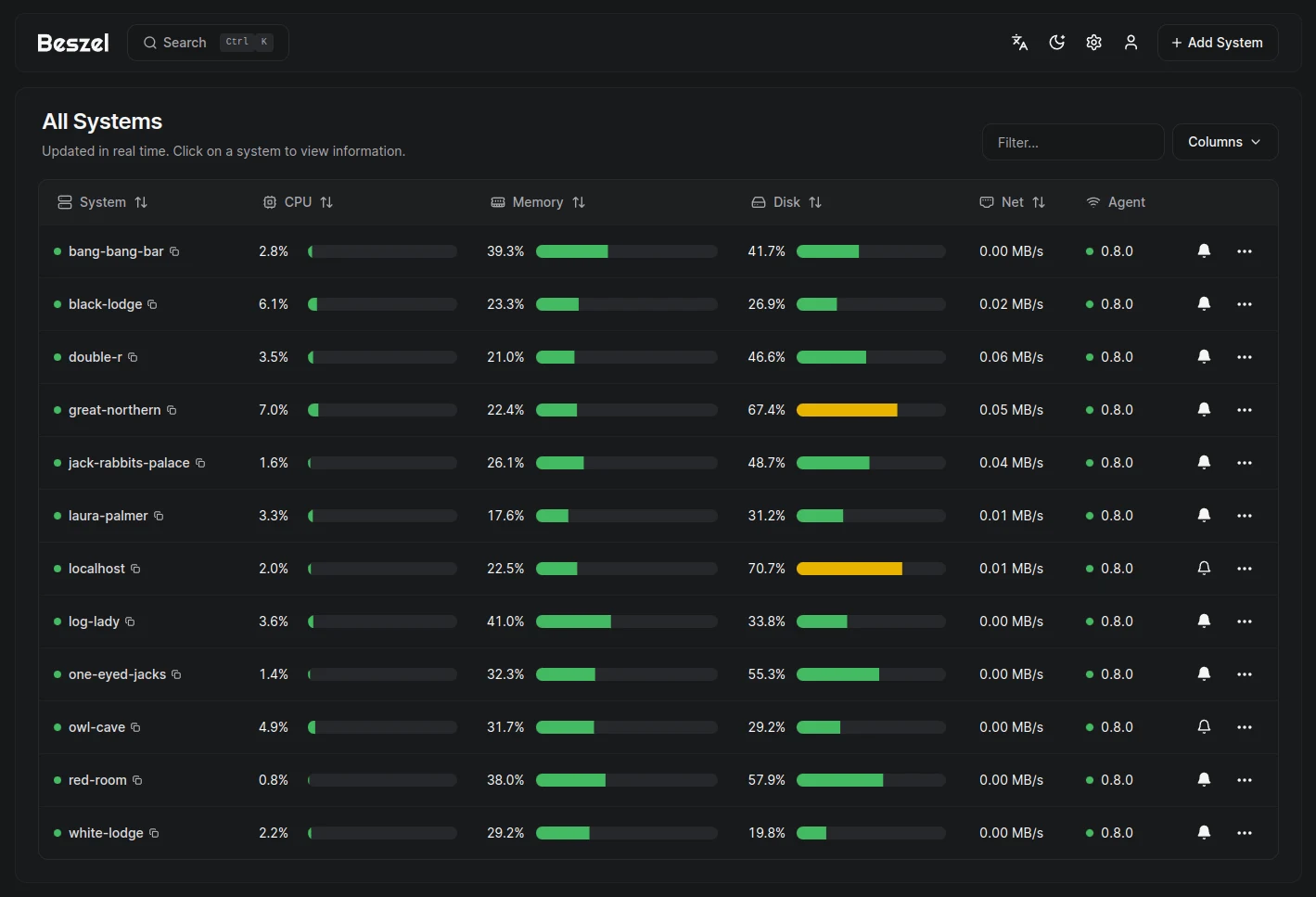

Beszel tracks server CPU, memory, disks, networks and Docker containers through a web hub and a small agent on each monitored system. It includes historical charts and configurable alerts without aiming to replace a full metrics stack.
The hub alone does not collect host metrics. Each system needs an agent and a working connection to the hub. Treat agent keys, enrollment tokens and access to the Docker socket as security-sensitive.
Quick start
Checked against the project’s docs on November 9, 2026. We have not run these setups ourselves.
Docker is an upstream-supported route. The NixOS hub and agent modules are maintained in nixpkgs and may package a different version.
Docker hub and agent enrollment
Requires Docker and the Compose plugin. Save this hub starter as
compose.yaml in a new directory:
services:
  beszel:
    image: henrygd/beszel:latest
    ports:
      - "127.0.0.1:8090:8090"
    volumes:
      - ./beszel_data:/beszel_data
    restart: unless-stopped
Run docker compose up -d, open http://localhost:8090 on the host, and create
the first admin account. This starts the hub only. Back up beszel_data.
Next, use Add System in the hub and copy its generated agent configuration for the machine you want to monitor. The official getting-started guide covers the local socket and remote-agent paths. Keep the supplied key and token private. Review its mounts and networking before starting the agent, especially Docker socket access.
A remote agent cannot reach localhost on your hub’s machine. Arrange a
reachable private-network or HTTPS hub URL and follow the documented
connection settings before enrolling it. Do not open the admin UI publicly
just to make the example connect. Use the hub-generated configuration rather
than copying placeholder keys from a tutorial.
NixOS
nixpkgs ships separate hub and agent modules. On the hub machine:
services.beszel.hub.enable = true;Run sudo nixos-rebuild switch, open http://localhost:8090 on the host and
create the first admin account. The hub listens on localhost by default
(services.beszel.hub.host) and stores its data in /var/lib/beszel-hub;
back that directory up.
On each machine to monitor:
services.beszel.agent = {
  enable = true;
  environmentFile = "/etc/beszel-agent.env";
};
Use Add System in the hub and put its generated HUB_URL, TOKEN and
KEY values in that root-owned file with mode 600. Do not set them in
services.beszel.agent.environment: values there are world-readable in the
Nix store. services.beszel.agent.openFirewall = true; opens the agent’s
listen port (default 45876) when your setup has the hub connect to agents.
Keep the hub’s admin UI off the public internet; use a reachable
private-network or HTTPS hub URL for remote agents.
Why it’s listed
A useful middle ground when you want to see how a few servers are doing without starting with a large monitoring stack. Keep Uptime Kuma alongside it if you also need external service-availability checks.
Documentation
- Getting started and agent setup
- Hub installation
- NixOS hub module source
- NixOS agent module source
- Project source
Docker hub and agent enrollment · A lightweight hub and agent for server metrics, containers and resource alerts. Paste into your AI assistant. It may only be able to guide you. Review changes before running anything.
Researched, not run by the Index. Checked 2026-11-12. No AI account or connection is needed here.
Read or copy the prompt manually
NixOS · A lightweight hub and agent for server metrics, containers and resource alerts. Paste into your AI assistant. It may only be able to guide you. Review changes before running anything.
Researched, not run by the Index. Checked 2026-11-12. No AI account or connection is needed here.
Read or copy the prompt manually
Tags: Monitoring